

Summary
Shift scheduling is the process of assigning employees to specific work times based on business demand, staff availability, and labor rules. It follows five steps: determine how many people you need per shift, collect availability, assign shifts fairly, publish the schedule with advance notice, and manage ongoing changes like swaps and call-offs. For USA businesses with hourly teams, shift scheduling happens weekly and directly impacts labor costs, employee satisfaction, and coverage reliability.
Step-by-step
The 5-Step Shift Scheduling Process
Every business follows the same basic workflow, whether you use paper, spreadsheets, or shift scheduling software.
Determine staffing demand
Before assigning anyone, figure out how many people you need by time slot, role, location, and day. Use historical sales, foot traffic, and seasonal trends, not guesses. Build demand templates for weekday, weekend, and holiday patterns so you are not starting from scratch every week.
Collect employee availability
Know who can work before you build the week. Staff submit weekly availability and leave requests through the mobile app. Capture recurring blocks and shift preferences upfront so good scheduling software can block conflicts automatically.
Assign shifts using rules
Match people to shifts using hard rules (availability, overtime limits, rest periods, minor labor laws) and soft rules (fair weekend rotation, preferences, pairing new hires with veterans). Use manual assignment under 15 people, templates for stable teams, or auto-scheduling for 20+ staff or multiple locations.
Publish with advance notice
Publish at least two weeks ahead when possible. Oregon requires 14 days, NYC 72 hours, California retail 7 days, Chicago and Philadelphia 14 days. Use push notifications, publish the same day each week, include shift details, and allow 24–48 hours for staff to flag issues before the roster locks.
Manage ongoing changes
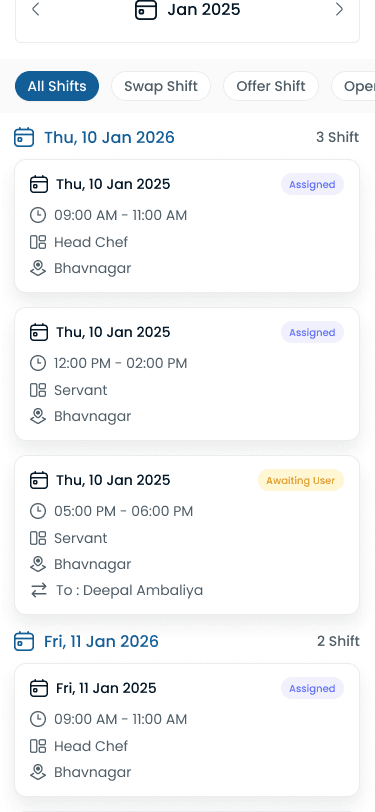
Handle shift swaps in-app, post call-offs as open shifts, alert managers on no-shows, flag overtime risk before 40 hours, and check coverage impact on mid-week time-off requests without rebuilding the whole grid.
“A schedule is a promise to your team. Publish early enough that people can plan their week around it, not react to it.”
Types
Shift Scheduling Methods
Different operations need different scheduling models. Most growing businesses combine methods using software rather than picking one pattern forever.
| Schedule type | Best for | Pros | Cons |
|---|---|---|---|
| Fixed schedules | Stable businesses with consistent demand | Predictable for staff, easy to manage, no weekly rebuild from scratch | Inflexible, does not adapt to demand swings, unfair if some shifts are better |
| Rotating schedules | 24/7 operations (manufacturing, healthcare, security) | Fair distribution of nights and weekends; everyone shares undesirable shifts | Complex to build; harder personal planning; needs careful rest management. See [DuPont and Pitman patterns](/answers/what-is-rotating-shift-schedule). |
| Demand-based scheduling | Restaurants, retail, hospitality with variable traffic | Optimal labor cost; staff levels match predicted demand each day | Less predictable for employees; needs good forecasting data and manager review |
Common mistakes
Common Shift Scheduling Mistakes
These mistakes show up on almost every manual roster. Fixing them cuts no-shows, overtime surprises, and manager time faster than adding more features.
| Practice | Why it works |
|---|---|
| Publishing too late | Staff need advance notice to plan childcare, second jobs, and personal time. Late publishing drives no-shows, resentment, and turnover. Publish two weeks ahead minimum. |
| Ignoring availability | Scheduling someone who submitted unavailability guarantees a swap request or no-show. Always check availability and approved leave before assigning. |
| Unfair distribution | The same person always getting closing shifts or weekends erodes trust fast. Track distribution and rotate fairly across undesirable shifts. |
| No backup plan for call-offs | Someone will call in sick every week. Use an open shift board, on-call list, or cross-trained staff who can cover without rebuilding the roster. |
| Overtime surprises | Not tracking hours across the week leads to unexpected overtime on payroll day. Flag employees at 35 hours while you are still building the week. |
Comparison
Spreadsheet vs Scheduling Software
Manual scheduling looks cheap until you count manager hours, missed swaps, and overtime you only catch on payroll day.
| Feature | Spreadsheet | Scheduling software |
|---|---|---|
| Build time | 3–5 hours/week | 15–30 minutes/week |
| Publishing | Email, print, or WhatsApp | Push notification to phone |
| Conflicts | Discover after publishing | Flagged before publishing |
| Shift swaps | Phone calls to manager | Self-service in app |
| Availability | Ask each person | Staff submit in app |
| Overtime tracking | Manual calculation | Real-time alerts |
| Multi-location | Separate files | One dashboard |
| History | Lost in old files | Full audit trail |
| Cost | "Free" plus 5 hours labor/week | From $4/user/month |
The break-even point is usually 10–15 employees or a second location. After that, spreadsheet maintenance and manual notifications cost more time than dedicated scheduling software.
Industries
Shift Scheduling by Industry
The five-step process stays the same, but demand patterns, compliance, and labor targets change by industry.
| Industry | Typical scheduling challenge |
|---|---|
| Restaurants | Split shifts for lunch and dinner rushes, fair rotation of tip-heavy shifts, high turnover, and labor cost targets of 25–30% of food sales. |
| Healthcare | Credential-based assignment, mandatory coverage minimums, [rotating shifts](/answers/what-is-rotating-shift-schedule) across days/nights/weekends, and on-call rotations. |
| Retail | Peak-hour staffing for lunch, after-school, and weekends; seasonal surges; part-time availability complexity; department-specific coverage. |
| Security | 24/7 coverage with zero gaps, site-specific certifications, GPS-verified [attendance](/features/attendance-tracker) at each location, and overtime control across client sites. |
| Cleaning | Multi-site crews, travel time between locations, client time windows, and mobile coordination via [staff management](/features/staff-management). |
| Manufacturing | DuPont, Pitman, or 2-2-3 rotating patterns; production line coverage with no gaps; overtime control across 24/7 operations; crew-based rotation and mandatory rest between shifts. |
If you run multiple locations, use one system for demand templates and publishing so district managers see coverage and overtime in one place.
“Auto-scheduling does not replace manager judgment. It removes the spreadsheet math so you can focus on who should work which shift.”
Expertise & sources
Why trust this guide
ReviewedThis guide walks through the shift scheduling process step by step: staffing demand, availability, assignment rules, publish discipline, and change management. It is written for managers who build weekly rosters for hourly teams, including multi-location operators in the USA.
Heyshift Team
Workforce scheduling research · USA multi-location operators
Heyshift publishes scheduling playbooks used by operators in restaurants, retail, warehouses, and clinics. We focus on practical workflows managers can run every week, not abstract HR theory.
Published & updated
Sources
3 external · 2 on Heyshift
| Source | Reference |
|---|---|
DOLU.S. Department of Labor | Work hours and the Fair Labor Standards Act |
BLSU.S. Bureau of Labor Statistics | U.S. employment situation summary |
SHRMSHRM | How to create a work schedule for employees |
| Further reading on Heyshift | |
| Heyshift answers library | What is employee scheduling software? |
| Heyshift blog | Prevent overtime before payroll |
Frequently asked questions
Related resources
| Resource | Link |
|---|---|
| What is employee scheduling software? | Open |
| What is a rotating shift schedule? | Open |
| What is workforce management software? | Open |
| Shift scheduling feature | Open |
| Attendance management feature | Open |
| Leave management feature | Open |
| Mobile app feature | Open |
| Staff management feature | Open |
| Free scheduling ROI calculator | Open |
| Overtime cost reduction guide | Open |
| Reduce employee no-shows | Open |
Start free with Heyshift
Manage employee schedules, attendance, leave requests, shift swaps, and labor costs across every location from one dashboard. Start free with Heyshift and publish your first schedule in minutes.
No credit card required