

Summary
Employee scheduling software is the system managers use to build rosters, share shifts with staff, and handle changes without spreadsheets or group texts. You set who works when, staff see updates on their phones, and the tool flags conflicts like double-bookings or overtime before you publish. For USA businesses with hourly teams across multiple locations, employee scheduling software replaces the manual back-and-forth of phone calls, WhatsApp groups, and Excel files that break down as teams grow past 10–15 people.
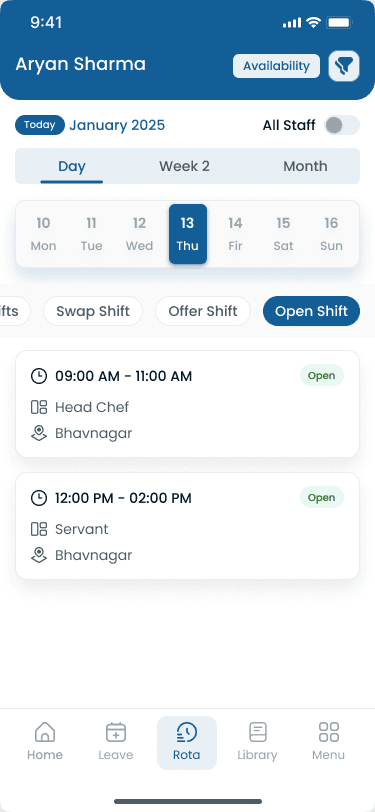
Step-by-step
How Does Employee Scheduling Software Work?
Employee scheduling software follows a simple workflow that repeats every week. The entire cycle takes 15–30 minutes per week instead of 3–5 hours with spreadsheets.
Set demand
Define how many people you need per shift, per role, per location. The system remembers your patterns.
Check availability
Staff submit availability and time-off requests through the mobile app. The system blocks unavailable slots automatically.
Build the schedule
Drag-and-drop employees into shifts, use templates for recurring patterns, or let auto-scheduling fill gaps based on rules you set.
Publish
One click publishes the schedule to everyone's phone. Staff get push notifications instantly. No more "did you see the schedule?" texts.
Handle changes
Shift swaps, call-offs, and open shifts are managed in-app. Staff can pick up open shifts without calling the manager.
“The schedule is not done when it looks right on your screen. It is done when every hourly employee knows where to be before the week starts.”
Features
Key Features of Employee Scheduling Software
These are the features that change the week for operators running hourly teams at scale.
| Feature | Why it matters |
|---|---|
| Shift scheduling | The core function. Build weekly or monthly schedules with drag-and-drop, recurring templates, auto-fill from availability, and copy-previous-week workflows. See [shift scheduling](/features/shift-scheduling). |
| Availability management | Staff set when they can and cannot work. Weekly availability windows, recurring unavailability, temporary blocks, and preferred shifts prevent conflicts before you publish. |
| Shift swaps and open shifts | When someone cannot work, they post the shift for swap. Qualified teammates grab it, managers approve (or auto-approve), and coverage updates without phone calls or group texts. |
| Time and attendance | Track who actually showed up versus who was scheduled with mobile clock-in, GPS verification, late alerts, no-show detection, and scheduled vs actual hours comparison. See [attendance tracking](/features/attendance-tracker). |
| Leave management | Staff request PTO in-app. Managers see coverage impact before approving. Approved leave auto-blocks scheduling and PTO balances stay visible. See [leave management](/features/meal-rest-break-leave-management). |
| Team communication | Schedule change announcements, shift reminders, and direct messaging between staff and managers without scattered group texts. See [staff management](/features/staff-management). |
| Multi-location dashboard | See all locations on one screen, compare staffing levels, move staff between sites, and manage every roster from one login. |
Why it matters
Benefits of Employee Scheduling Software
Scheduling software pays back in manager time, fewer no-shows, and lower labor cost when hourly teams run on variable weekly rosters.
| Pain point | What operators see |
|---|---|
| For managers | Save 4–6 hours per week with templates and one-click publishing. Prevent double-bookings and overtime violations before publish. See all locations on one dashboard. |
| For employees | Know schedules instantly via push notifications. Swap shifts in 30 seconds. Set availability and request time off without awkward conversations or lost paper forms. |
| For the business | Lower turnover with fair scheduling and advance notice. Reduce labor costs by staffing to demand. Scale locations without adding admin hours. Keep audit-ready digital schedule history. |
| No-show reduction | Push notifications, shift reminders, and easy swap tools cut no-shows by 50–60% when staff can actually see and manage their schedule. |
Fair scheduling and advance notice rank among the top things hourly workers want from employers. Scheduling software delivers both without extra manager time.
Industries
Employee Scheduling Software by Industry
Scheduling rules and labor targets vary by industry. These are the teams that adopt employee scheduling software most often.
| Industry | Typical scheduling challenge |
|---|---|
| Restaurants | Tip-heavy schedules, split shifts for lunch and dinner rushes, high turnover, and labor cost as a percentage of food sales. Rotate closing shifts fairly and manage seasonal holiday staffing. |
| Healthcare | Credential-based scheduling, minimum coverage every shift, and [rotating schedules](/answers/what-is-rotating-shift-schedule) with mandatory rest periods and on-call rotations. |
| Retail | Staff to peak-hour demand: more people during lunch rush and weekends, fewer during slow mornings. Coordinate part-time teams across departments and holiday blackout periods. |
| Security | Build 24/7 guard [schedules](/features/shift-scheduling) across client sites with zero coverage gaps, GPS clock-in for mobile teams, and license expiry tracking. |
| Cleaning | Mobile crews across job sites, territory-based scheduling, time per site for client billing, and equipment coordination across locations. |
| Manufacturing | Rotating shifts, production schedules, and crew coverage across facilities. DuPont or Pitman patterns, real-time overtime alerts before payroll, and coordination across production lines and warehouse floors. |
Multi-location operators publish from one system so district managers see coverage, swaps, and overtime across every site without rebuilding spreadsheets per location.
Product comparison
Spreadsheet vs Heyshift
Spreadsheets look free until you count manager hours, missed swaps, and overtime you only catch on payroll day.
| Feature | Spreadsheet | Heyshift |
|---|---|---|
| Scheduling | Manual, hours of copy-paste | Automated, 15 min/week |
| Staff access | Email or print | Mobile app, instant push |
| Shift swaps | Phone calls and texts | One-tap in app |
| Availability | Ask each person manually | Staff submit in app |
| Conflicts | Discover after publishing | Flagged before publishing |
| Multi-location | Separate files per site | One dashboard, all sites |
| Overtime | Calculate after payroll | Real-time alerts at 35 hours |
| Communication | Group texts, WhatsApp | Built-in messaging |
| Cost | "Free" but 5+ hours/week | $4/user/month, saves 4+ hours |
Most businesses outgrow spreadsheets once they hit 10–15 employees or open a second location. Heyshift at $4/user/month typically saves 4+ manager hours per week, more than the subscription cost.
“Spreadsheets do not send push notifications. That single gap is why group texts survive long after teams outgrow Excel.”
Fit check
Who Needs Employee Scheduling Software?
You need it if
You have 10+ hourly employees with variable schedules
You manage multiple locations or departments
You spend 2+ hours per week building schedules manually
Staff frequently miss shifts because they did not see the schedule
Shift swaps require phone calls and manager involvement
You have had overtime surprises on payroll day
You use spreadsheets, WhatsApp, or paper to manage schedules
You probably do not need it if
You have fewer than 5 employees
Everyone works the same fixed hours every week
You have one location with one shift pattern
Buyer's guide
How to Choose Employee Scheduling Software
Demo decks list dozens of features. These five checks separate tools your team will keep using from shelfware.
| # | Question | What to verify |
|---|---|---|
| 1 | Mobile-first test | Open the app on your phone. Can you build a schedule, publish it, and swap a shift in under 2 minutes? If not, your team will not use it. |
| 2 | Multi-location support | With 2+ locations, confirm one account manages all sites. Some tools charge per location, that adds up fast. |
| 3 | Staff adoption | The tool is only useful if staff check it. Look for push notifications, a simple interface, shift swap capability, and availability submission. |
| 4 | Integration needs | Does it connect to your payroll (Gusto, ADP, QuickBooks)? Does it track [attendance](/features/attendance-tracker) or just schedules? Do you need [leave management](/features/meal-rest-break-leave-management) built in? |
| 5 | Pricing transparency | Watch for hidden costs: per-location fees, per-feature modules, setup charges. Heyshift includes unlimited locations and staff at $4/user/month. |
Expertise & sources
Why trust this guide
ReviewedThis guide explains employee scheduling software from a practical operator perspective: what it does, how it works, and who needs it. It is written for managers running hourly teams across multiple USA locations who need to stop wasting time on manual scheduling.
Heyshift Team
Workforce scheduling research · USA multi-location operators
Heyshift publishes scheduling playbooks used by operators in restaurants, retail, warehouses, and clinics. We focus on practical workflows managers can run every week, not abstract HR theory.
Published & updated
Sources
2 external · 3 on Heyshift
| Source | Reference |
|---|---|
BLSU.S. Bureau of Labor Statistics | U.S. employment situation summary |
SHRMSHRM | How to create a work schedule for employees |
| Further reading on Heyshift | |
| Heyshift answers library | What is workforce management software? |
| Heyshift blog | Reduce employee no-shows and call-offs |
| Heyshift blog | Prevent overtime before payroll |
Frequently asked questions
Related resources
| Resource | Link |
|---|---|
| How does shift scheduling work? | Open |
| What is a rotating shift schedule? | Open |
| What is workforce management software? | Open |
| Shift scheduling feature | Open |
| Attendance management feature | Open |
| Leave management feature | Open |
| Mobile app feature | Open |
| Staff management feature | Open |
| Free scheduling ROI calculator | Open |
| Reduce employee no-shows | Open |
Start free with Heyshift
Manage employee schedules, attendance, leave requests, shift swaps, and labor costs across every location from one dashboard. Start free with Heyshift and publish your first schedule in minutes.
No credit card required