

Summary
Shift swapping is when two employees agree to trade their scheduled shifts with each other: Employee A works Employee B's shift, and Employee B works Employee A's shift. Most workplaces require manager approval before the swap is finalized to ensure no overtime violations, qualification gaps, or coverage issues arise. It is one of the most common ways hourly teams handle schedule conflicts without calling off or leaving shifts uncovered. Teams on shift scheduling and the mobile app handle swaps with approvals, eligibility checks, and an updated published roster everyone can see.
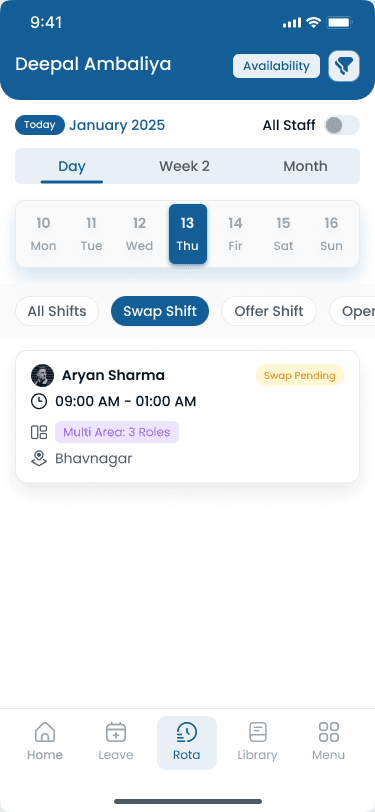
Step-by-step
How Does a Shift Swap Work?
Example — restaurant team: Sarah is scheduled Tuesday 7 AM–3 PM but has a doctor's appointment. Mike is scheduled Wednesday 7 AM–3 PM but wants Tuesday off. They agree to trade; the manager checks overtime, qualifications, and rest periods before the published roster updates.
Step 1: Request
Sarah asks Mike if he can take her Tuesday shift. In software, she taps Swap Shift in the mobile app and selects her shift.
Step 2: Agreement
Mike agrees. He will work Tuesday; Sarah will work his Wednesday. Both parties must confirm before the manager sees the request.
Step 3: Submit
Sarah submits the swap request through the app, form, or message to the manager. Verbal-only requests should not finalize the schedule.
Step 4: Review
The manager checks whether either person would hit overtime, whether both are qualified for the other's role, and whether rest-period rules still pass.
Step 5: Approve
The manager approves. The schedule updates on web and mobile so payroll and attendance see the same shift owners.
Step 6: Notify
Both employees get confirmation with their updated schedule. The rest of the team sees the change on the published roster, not just in a side text thread.
“Tuesday and Wednesday stay covered. No call-off, no scrambling for coverage, and no surprise overtime when the swap is approved before the shift starts.”
Examples
Shift Swap Types and Compliance
Swaps are not the only way crews move shifts. Pick the right pattern for planned flexibility vs emergency coverage.
Shift swap vs shift cover vs open shift
| Type | How it works | Who benefits | Manager involvement |
|---|---|---|---|
| Shift swap | Two employees trade shifts with each other | Both employees | Approval required |
| Shift cover | One employee picks up another's shift (no trade back) | Employee giving up shift | Approval required |
| Open shift | Manager posts an unfilled shift for anyone to claim | Team (extra hours available) | Posts and approves |
| Shift drop | Employee releases a shift back to the manager | Employee dropping | Manager must find replacement |
Shift swapping and labor law considerations
| Issue | What to watch for |
|---|---|
| Overtime | A swap that pushes either employee over 40 hours/week triggers overtime at 1.5× rate (FLSA) |
| Rest periods | Some states require minimum hours between shifts (8–11 hours). A swap cannot violate this. |
| Minor labor laws | Employees under 18 have restricted hours. Swaps must stay within those limits. |
| Predictive scheduling | San Francisco, New York City, Oregon, and similar rules may treat swaps as schedule changes requiring notice. |
| Equal opportunity | Swap approvals must be consistent. Selective denial can create discrimination claims. |
| Record keeping | Document approved swaps. Wage disputes need proof of who actually worked which shift. |
Comparison
Managing Shift Swaps — Manual vs Software
Text-and-email swaps work for tiny teams until overtime, qualifications, and audit trails outpace what one manager can track from memory.
| Factor | Manual (text/email/paper) | App-based process |
|---|---|---|
| Request submission | Text or email to coworker | In-app Swap Shift with eligible coworkers listed |
| Coworker agreement | Separate text thread | Coworker accepts in app |
| Manager review | Manager checks schedule manually | Notification with conflict flags |
| Overtime check | Mental math or missed | Automatic before approval |
| Qualification check | Manager memory | Role and certification rules applied |
| Schedule update | Manual edit, easy to forget | Updates automatically for everyone |
| Audit trail | None | Full request and approval history |
| Team visibility | Only two people may know | Published roster shows new assignments |
Software pays back when swaps happen weekly across 10+ hourly employees. Heyshift handles swap requests, eligibility checks, and manager approvals on the same roster as desktop scheduling from $4/user/month.
Best practices
Common Problems Shift Swapping Solves
Formal swap workflows reduce call-offs and manager fire drills without giving up control over overtime and coverage.
| Practice | Why it works |
|---|---|
| Last-minute call-offs | Employees swap instead of calling in sick or no-showing when they know a qualified coworker will take the shift. |
| Schedule inflexibility | Staff adjust schedules without waiting for the next roster cycle or a manager rebuild from scratch. |
| Manager overload | Employees solve their own conflicts instead of escalating every personal appointment to the supervisor. |
| Coverage gaps | Shifts stay filled because a two-way swap keeps both days covered when both employees confirm. |
| Employee dissatisfaction | Flexibility reduces frustration and improves retention compared with rigid rosters and surprise write-ups for schedule conflicts. |
| Overtime surprises | A formal swap process checks weekly hours before approval instead of discovering OT on payroll. See labor cost management. |
| Communication breakdowns | No more verbal agreements that get forgotten. Approved swaps live on the published schedule everyone references. |
Features
Shift Swap Best Practices for Managers
Good swap policy only works if managers make swapping easier than calling off.
| Feature | Why it matters |
|---|---|
| Make it easy | If swapping is hard, employees call off instead. One-tap requests beat phone trees and group texts. |
| Set clear rules | Written policy prevents arguments and inconsistent approvals across supervisors. |
| Require both parties to confirm | Never approve a swap based on one person's word. Both must accept before review. |
| Check overtime automatically | Do not rely on mental math. Use scheduling software or a weekly hours spreadsheet. |
| Keep a swap log | Track who swaps frequently. Repeat patterns may mean someone needs a permanent schedule change, not another trade. |
| Do not punish swapping | A approved swap beats a no-show. Encourage trades that keep coverage intact. |
| Set reasonable limits | Unlimited swaps can create chaos. Two to four per month per person is typical. |
| Review swap patterns | If the same person always swaps the same shift, adjust their base roster instead of approving the same trade every week. |
| Communicate changes | The whole team should see the updated roster, not just the two people who traded. |
Industries
Where Shift Swapping Is Most Common
Swap frequency and notice rules vary by industry, credential requirements, and how often schedules change week to week.
| Industry | Typical scheduling challenge |
|---|---|
| Restaurants | Young workforce, school schedules, social conflicts. Typical policy: 24-hour notice, same role only. See [restaurant scheduling](/restaurant-scheduling-software). |
| Retail | Part-time staff and variable availability. Typical policy: 48-hour notice, same department. |
| Healthcare | Long shifts and credential requirements. Typical policy: 72-hour notice, same certification level. |
| Hospitality | Seasonal staff and event-based scheduling. Typical policy: 24-hour notice, manager approval on every swap. |
| Warehouses | Rotating shifts and physical demands. Typical policy: 48-hour notice, same shift type and equipment training. |
| Security | 24/7 coverage and guard licensing. Typical policy: 48-hour notice, same license level and post qualification. |
Buyer's guide
How to Create a Shift Swap Policy
Every business that allows shift swapping should document who can swap, when swaps are allowed, and why a manager can deny a request.
| # | Question | What to verify |
|---|---|---|
| 1 | Who can swap | Same role or position only unless cross-trained. Same location only unless multi-site swaps are explicitly allowed. Both employees must meet the other's shift requirements (certifications, age rules, lead status). |
| 2 | When swaps are allowed | Set minimum notice (for example 24 hours before the shift). Define blackout dates (holidays, inventory, special events). Optional cap on swaps per employee per month (often 2–4). |
| 3 | Approval process | Both employees must agree in writing through the app, email, or form. Manager must approve before the swap is official. No verbal-only agreements that never hit the roster. |
| 4 | Reasons a swap can be denied | Would cause overtime for either employee. One employee lacks required certification or training. Would violate minimum rest period between shifts. Would leave a shift understaffed or without a qualified lead. Exceeds swap limit for the period. |
| 5 | Accountability after approval | Both employees are responsible for their new shifts. A no-show after an approved swap is treated like any other no-show. If one employee backs out after approval, the original schedule stands unless the manager finds another cover. |
Expertise & sources
Why trust this guide
ReviewedThis guide explains shift swapping for managers who handle schedule changes, trade requests, and coverage adjustments for hourly teams. It covers policies, compliance considerations, and practical workflows. Written for USA operators managing hourly teams across multiple locations.
Heyshift Team
Workforce scheduling research · USA multi-location operators
Heyshift publishes scheduling playbooks used by operators in restaurants, retail, warehouses, and clinics. We focus on practical workflows managers can run every week, not abstract HR theory.
Published & updated
Sources
3 external · 2 on Heyshift
| Source | Reference |
|---|---|
DOLU.S. Department of Labor | Fair Labor Standards Act (overtime rules) |
BLSOregon Bureau of Labor and Industries | Oregon Predictive Scheduling Law (ORS 653.455) |
SFCity and County of San Francisco | San Francisco Predictable Scheduling Ordinance |
| Further reading on Heyshift | |
| Heyshift answers library | What is employee scheduling software? |
| Heyshift answers library | How does shift scheduling work? |
Frequently asked questions
Run shift swaps on the published roster
Let employees propose swaps and pick up open shifts on mobile while managers approve with overtime and eligibility checks built in. Start free with Heyshift and publish your first roster in minutes.
No credit card required
Related resources
| Resource | Link |
|---|---|
| What is employee scheduling software? | Open |
| How does shift scheduling work? | Open |
| What is a rotating shift schedule? | Open |
| What is a split shift? | Open |
| What is time and attendance software? | Open |
| What is workforce management software? | Open |
| What is labor cost management? | Open |
| Shift scheduling feature | Open |
| Mobile app feature | Open |
| Overtime risk calculator | Open |