

Summary
A split shift is a work schedule where an employee's workday is divided into two or more separate working periods with a long unpaid break in between, typically 2 or more hours. Instead of working one continuous block (like 9 AM to 5 PM), the employee works two shorter blocks separated by a gap (like 11 AM to 2 PM, then 5 PM to 9 PM).
Step-by-step
How to Manage Split Shifts
Managing split shifts manually is complex because you track two time blocks per employee per day. Here is what you need to handle before you publish the roster.
Assign both blocks
Each employee needs two start/end times on the same day. Both blocks must appear on the published schedule, not just the first block.
Calculate total hours
Add both paid blocks together. Do not count spread of hours (first clock-in to last clock-out) as hours worked for payroll unless your state rules say otherwise.
Track split shift premiums
If you operate in California or New York, calculate extra pay automatically. Flag days that trigger premium requirements before payroll closes.
Monitor spread of hours
Track time from first clock-in to last clock-out for compliance (especially NY spread-of-hours rules when the day exceeds 10 hours).
Handle changes
If one block changes, check whether the other still works for the employee and whether premiums or overtime thresholds shift.
Publish clearly
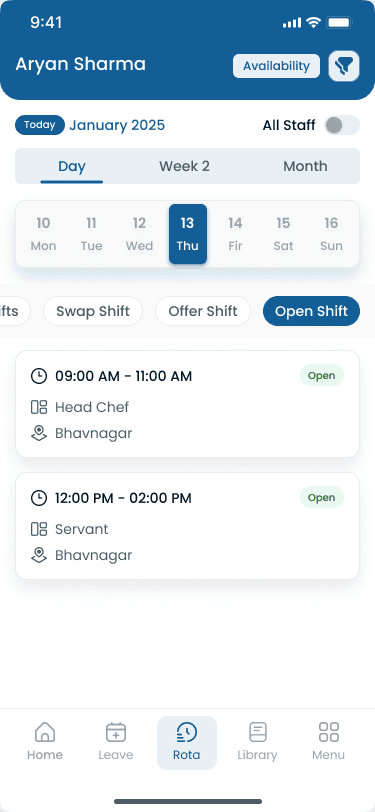
Staff need to see both blocks clearly on their schedule and mobile app so they know exactly when to show up for each segment.
Examples
What Does a Split Shift Look Like?
Split shifts split one calendar day into paid work blocks with a long unpaid gap in the middle. Total hours worked is the sum of paid blocks. Spread of hours runs from first clock-in to last clock-out (often longer than hours paid).
Restaurant server — typical split shift
| Block | Time | Duration | Status |
|---|---|---|---|
| Shift 1 | 11:00 AM – 2:00 PM | 3 hours | Paid (lunch rush) |
| Break | 2:00 PM – 5:00 PM | 3 hours | Unpaid |
| Shift 2 | 5:00 PM – 9:00 PM | 4 hours | Paid (dinner rush) |
| Total | 11:00 AM – 9:00 PM | 7 hours paid | 10-hour spread |
School bus driver — split shift
| Block | Time | Duration | Status |
|---|---|---|---|
| Shift 1 | 6:30 AM – 8:30 AM | 2 hours | Paid (morning routes) |
| Break | 8:30 AM – 2:30 PM | 6 hours | Unpaid |
| Shift 2 | 2:30 PM – 4:30 PM | 2 hours | Paid (afternoon routes) |
| Total | 6:30 AM – 4:30 PM | 4 hours paid | 10-hour spread |
Comparison
Pros and Cons of Split Shifts
Split shifts help employers match labor to peak demand but create real tradeoffs for hourly staff. Balance coverage needs with retention when assigning two-block days.
| Factor | Pros (for employers) | Cons (for employees) |
|---|---|---|
| Peak coverage | Staff only present during peak demand, reducing idle labor cost | Long unpaid gap makes the day feel longer than hours worked |
| Rush staffing | Better coverage during rush periods without overstaffing slow periods | Commute costs double (two trips or waiting around) |
| Labor hours | Can reduce total labor hours while maintaining service quality | Harder to take a second job or handle personal responsibilities |
| Flexibility | Flexible for businesses with two distinct busy periods | Can lead to fatigue and lower job satisfaction over time |
Pair fair rotation and optional premiums with clear two-block schedules so staff know what they are signing up for before they accept split days.
Best practices
Best Practices for Split Shifts
When split shifts are necessary, these practices reduce turnover and scheduling friction on two-block days.
| Practice | Why it works |
|---|---|
| Offer voluntarily when possible | Do not force split shifts unless operationally required. Voluntary assignment improves retention on hard-to-fill blocks. |
| Pay premiums where you can | Pay split shift premiums even in states that do not require it. Extra pay signals respect for the inconvenience and reduces call-offs. |
| Keep gaps short | Keep the unpaid gap under 4 hours when possible. Longer gaps increase commute burden and make the schedule harder to accept. |
| Allow on-site breaks | Let employees stay on-site during the unpaid break if they prefer, especially when parking or transit makes leaving impractical. |
| Rotate fairly | Rotate split shifts across the team. Do not assign two-block days to the same people every week. |
Features
Split Shift vs Other Schedule Types
Split shifts are one scheduling model among several. Compare structure and break patterns when choosing how to staff peak periods. See rotating shift schedules for 24/7 crew rotation patterns.
| Feature | Why it matters |
|---|---|
| Split shift | **Structure:** 2+ blocks in one day. **Break:** 2+ hours unpaid gap. **Best for:** Restaurants, transit, schools. |
| Rotating shift | **Structure:** Cycle through day/evening/night. **Break:** Standard breaks. **Best for:** Manufacturing, healthcare, security. |
| Fixed shift | **Structure:** Same hours every day. **Break:** Standard breaks. **Best for:** Office, retail, most businesses. |
| Swing shift | **Structure:** Afternoon to late evening. **Break:** Standard breaks. **Best for:** Factories, call centers. |
| On-call | **Structure:** Available when needed. **Break:** No set schedule. **Best for:** Healthcare, IT, emergency services. |
Why it matters
Split Shift Laws in the USA
Split shifts are legal in all US states. However, some states require additional pay (split shift premiums) to compensate employees for the inconvenience of a broken workday.
| Pain point | What operators see |
|---|---|
| California | 1 extra hour at minimum wage for any split shift. Premium equals the difference between minimum wage and actual hourly rate for that extra hour (CA DIR). |
| New York | Spread-of-hours premium: 1 extra hour at minimum wage if the workday exceeds 10 hours from first clock-in to last clock-out (NY DOL). |
| Oregon | Predictive scheduling rules require 14-day advance notice; split shifts count toward scheduling compliance requirements. |
Most US states (Texas, Florida, Illinois, and others) have no specific split shift premium requirements. Employers must still comply with federal minimum wage ($7.25/hr) and state minimum wage laws, overtime rules (40+ hours/week at 1.5x pay), meal and rest break requirements (varies by state), and record-keeping for all hours worked.
Industries
Who Uses Split Shifts?
Split shifts fit operators with two distinct peak periods in one day. On Heyshift, the industries that use split blocks most often align with shift scheduling, attendance tracking, leave management, and multi-location roster control:
| Industry | Typical scheduling challenge |
|---|---|
| Restaurants | Lunch rush (11 AM–2 PM) and dinner rush (5 PM–9 PM). Servers and kitchen staff often work split blocks to match covers without paying for slow mid-afternoon hours. See [restaurant scheduling software](/restaurant-scheduling-software) for peak-based roster patterns. |
| Retail | Opening rush (10 AM–12 PM) and after-work rush (5 PM–8 PM). Part-time and peak-hour staff often work split blocks on busy shopping days across store locations. |
| Healthcare | Morning rounds (7 AM–11 AM) and evening care (5 PM–9 PM). Some clinics and home-health teams split coverage when patient demand dips mid-day. |
| Hospitality | Check-in peak (3 PM–6 PM) and check-out peak (7 AM–10 AM). Front desk and housekeeping crews may split around midday lulls at limited-service hotels and resorts. |
| Cleaning | Morning and evening client windows at offices or retail sites. Crews may split when accounts need opening prep and after-hours service without full-day pay. |
| Security | Event or site coverage with distinct arrival and evening peaks. Guards may work two blocks when a single continuous shift would include long idle hours. |
Split shifts also appear in public transportation and school bus routes (see the examples above). Manufacturing (less common): occasionally used for maintenance crews, shutdown work, or production changeovers, not as a primary pattern for daily production lines where rotating shifts are more typical.
Balanced view
When Split Shifts Are a Poor Fit
Split shifts are usually not ideal when:
Employees travel long distances to the job site
Staffing demand remains fairly consistent all day
Retention is already a challenge on your team
Employee satisfaction is a higher priority than labor optimization
In these situations, fixed shifts or rotating shifts are often easier to manage.
Automation
Scheduling Split Shifts with Software
Scheduling software handles split shifts by letting managers assign multiple time blocks to the same employee on the same day.
| Input | Used for |
|---|---|
| Multi-block assignment | two start/end times per employee per day on one roster row |
| Hours calculation | total paid hours from both blocks, separate from spread of hours |
| Premium flags | automatic alerts for CA split shift and NY spread-of-hours rules |
| Mobile visibility | both blocks shown clearly so staff know when to clock in |
| Change tracking | update one block without losing coverage on the other |
The system calculates total hours, flags premium requirements, and shows both blocks on the mobile app so staff always know when to show up. Pair with attendance tracking to verify clock-ins match each block.
Expertise & sources
Why trust this guide
ReviewedThis guide explains split shift scheduling for managers who assign two-block workdays in restaurants, hospitality, and transportation. It covers legal requirements, premium calculations, and practical management workflows. Written for USA operators managing hourly teams across multiple locations.
Heyshift Team
Workforce scheduling research · USA multi-location operators
Heyshift publishes scheduling playbooks used by operators in restaurants, retail, warehouses, and clinics. We focus on practical workflows managers can run every week, not abstract HR theory.
Published & updated
Sources
3 external · 2 on Heyshift
| Source | Reference |
|---|---|
DIRCA DIR | California split shift premium requirements |
DOLNY DOL | New York wages and hours guidance |
DOLU.S. Department of Labor | Fair Labor Standards Act |
| Further reading on Heyshift | |
| Heyshift answers library | What is employee scheduling software? |
| Heyshift answers library | How does shift scheduling work? |
Frequently Asked Questions
Start free with Heyshift
Manage employee schedules, attendance, leave requests, shift swaps, and labor costs across every location from one dashboard. Start free with Heyshift and publish your first schedule in minutes.
No credit card required