

Summary
Time and attendance software is a digital system that records when employees start work, end work, take breaks, and request time off. It replaces paper timesheets and manual punch cards with automated tracking through mobile apps, web dashboards, or kiosk devices. The system generates payroll-ready reports showing exact hours worked, overtime, late arrivals, and absences for each employee. It pairs with employee scheduling software so managers compare scheduled shifts to actual clock-ins across locations.
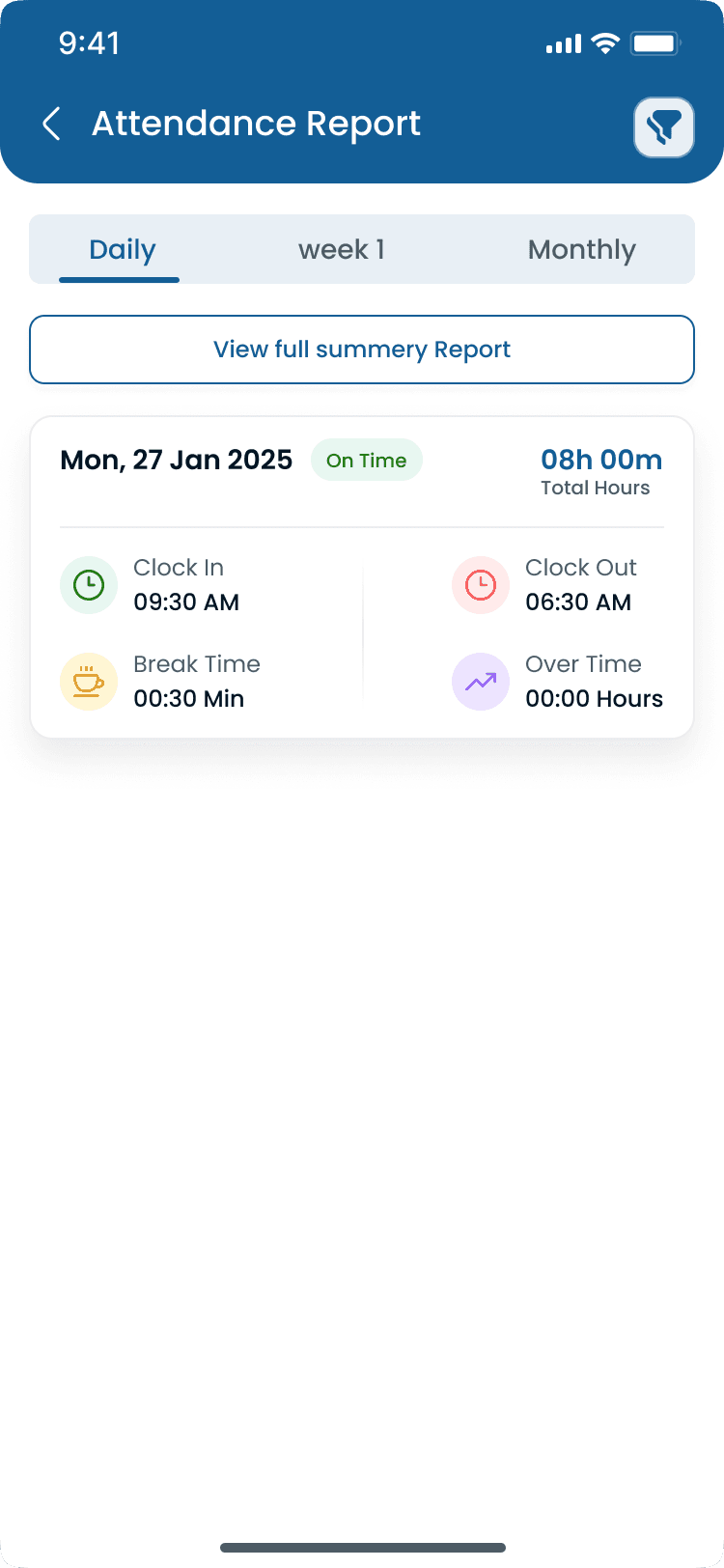
Step-by-step
How Does Time and Attendance Software Work?
Here is the typical workflow from clock-in to payroll for hourly teams using attendance tracking alongside published schedules.
Step 1: Employee clocks in
The employee opens their phone, taps Clock In on the app, and the system records exact time (to the minute), GPS location (verifies they are at the work site), and device used (helps prevent buddy punching).
Step 2: System tracks the shift
While the employee works, the software monitors break start/end times (meal and rest breaks), overtime thresholds approaching (alerts the manager before they hit), and schedule vs actual comparison (early, late, or on time vs the published shift schedule).
Step 3: Employee clocks out
At shift end, the employee clocks out. The system calculates total hours worked, break time deducted, overtime hours (if any), and split shift premiums where state rules apply.
Step 4: Manager reviews
The manager sees a real-time dashboard showing who clocked in today (and who did not), late arrivals flagged, overtime alerts, and attendance corrections needed across every location.
Step 5: Payroll export
At the end of the pay period, the system generates timesheet reports per employee, total regular hours plus overtime hours, deductions for no-shows or unapproved absences, and export to payroll (CSV, API, or direct integration).
Examples
Time Tracking vs Attendance Software vs Time and Attendance
These terms overlap but target different workflows. Most hourly operators need time and attendance, not project timers alone.
Feature comparison
| Feature | Time tracking | Attendance software | Time and attendance |
|---|---|---|---|
| Primary use | Track hours on tasks/projects | Track who showed up to work | Both hours worked and attendance patterns |
| Best for | Freelancers, agencies, consultants | Hourly teams, shift workers | Any business with hourly employees |
| Clock-in method | Manual timer start/stop | App, kiosk, or biometric | App, kiosk, GPS, or biometric |
| GPS verification | Rarely | Sometimes | Yes (standard) |
| Overtime tracking | Basic | Yes | Yes (with alerts) |
| Leave management | No | Sometimes | Yes |
| Payroll integration | Basic | Yes | Yes (full) |
| Schedule comparison | No | Yes | Yes |
Best practices
Common Problems Time and Attendance Software Solves
Paper timesheets and honor-system tracking break down quickly once hourly teams scale past a single location.
| Practice | Why it works |
|---|---|
| Buddy punching | One employee clocks in for another who is not actually at work. GPS and device verification on the attendance tracker block this pattern. |
| Time theft | Employees clocking in early, clocking out late, or extending breaks without authorization. Automated clock events create an audit trail managers can review. |
| Missed breaks | Failing to track meal and rest breaks leads to compliance violations in California, New York, and other states with strict break rules. |
| Overtime overruns | Overtime only discovered after payroll is processed. Real-time alerts flag hours before the 40-hour threshold (or state-specific rules on rotating shifts). |
| Payroll disputes | Employees disagree with hours recorded on manual timesheets. Digital records with timestamps and location data reduce back-and-forth. |
| Multi-location tracking | No visibility into who is working at which site. One dashboard shows attendance across all locations for multi-site operators. |
| Manual timesheets | Hours spent re-entering handwritten times into payroll systems with frequent errors. One-click export replaces duplicate data entry. |
Features
Key Features to Look For
Must-have capabilities for hourly teams, plus nice-to-have options for larger or higher-security operations.
| Feature | Why it matters |
|---|---|
| Must-have: GPS-verified clock-in/out | Employees can only clock in when physically at the work location. Prevents buddy punching and remote clock-ins from home. |
| Must-have: Real-time attendance dashboard | See who is clocked in, who is late, and who is absent right now, not after the fact at payroll. |
| Must-have: Automated overtime calculations | System flags when an employee approaches 40 hours per week (or state-specific thresholds) before overtime hits. |
| Must-have: Late arrival and no-show alerts | Instant notification when someone does not show up or arrives late against the published schedule. |
| Must-have: Break tracking | Meal breaks and rest breaks logged separately. Required for compliance in California, New York, and other states. See [leave and break management](/features/meal-rest-break-leave-management). |
| Must-have: Payroll export | One-click export of timesheets to your payroll system. No manual re-entry. |
| Must-have: Mobile app | Employees clock in from their phones. No expensive hardware required for most teams. See the [mobile app](/features/mobile-app). |
| Nice-to-have: Geofencing | Auto clock-in or clock-out when an employee enters or leaves a defined work area. |
| Nice-to-have: Biometric verification | Fingerprint or facial recognition for high-security environments. |
| Nice-to-have: Kiosk mode | Shared tablet at the workplace for teams without personal phones. |
| Nice-to-have: AI anomaly detection | Flags unusual patterns such as consistent early departures or last-second clock-ins. |
| Nice-to-have: Photo verification | Selfie at clock-in to confirm identity on shared devices. |
| Nice-to-have: Offline mode | Works without internet and syncs when connection returns. |
Why it matters
Benefits of Time and Attendance Software
Accurate attendance data feeds scheduling, payroll, and labor cost control across every location.
| Pain point | What operators see |
|---|---|
| Payroll accuracy | Reduces payroll errors by eliminating manual data entry and disputed hours. |
| Real-time visibility | Improves attendance visibility across all locations in one dashboard. |
| Fraud prevention | Helps prevent buddy punching with GPS and device verification. |
| Admin time saved | Simplifies payroll preparation from hours of work to minutes with export. |
| Compliance | Creates audit-ready attendance records for FLSA and state break rules. |
| Overtime control | Flags overtime before it happens, not after payroll runs. |
| Scheduling feedback | Provides actual-hours data for better scheduling and coverage decisions. |
Pair attendance with shift scheduling so scheduled hours and clocked hours stay linked from publish through payroll.
Industries
Who Needs Time and Attendance Software?
Any hourly industry with clock-in requirements benefits. These sectors see the highest return from GPS verification and schedule-to-actual comparison.
| Industry | Typical scheduling challenge |
|---|---|
| Restaurants | Tip-heavy schedules, [split shifts](/answers/what-is-a-split-shift), high turnover. Key challenges: buddy punching and early clock-ins before rushes. |
| Retail | Part-time mix, seasonal staff, multiple locations. Key challenges: inconsistent attendance and overtime creep on busy weeks. |
| Healthcare | Credential-based shifts, compliance requirements. Key challenges: coverage gaps and overtime violations on long shifts. |
| Warehouses | 24/7 operations, [rotating shifts](/answers/what-is-rotating-shift-schedule), large teams. Key challenges: time theft and break compliance. |
| Construction | Multiple job sites, mobile crews. Key challenges: GPS verification and proving attendance at each site. |
| Cleaning | Dispersed teams, client sites, no fixed office. Key challenges: proving attendance at client locations. |
| Security | 24/7 coverage, guard rotations. Key challenges: ensuring guards are on-site at each post. |
| Manufacturing | Rotating shifts, overtime control. Key challenges: shift handoff accuracy and hours worked vs scheduled blocks. |
Product comparison
Paper Timesheets vs Time and Attendance Software
Paper looks free until you count manager hours, payroll errors, and time theft across hourly teams.
| Feature | Spreadsheet | Heyshift |
|---|---|---|
| Accuracy | Employees estimate times | Exact to-the-minute recording |
| Buddy punching | Easy to fake | GPS and device verification prevents it |
| Overtime tracking | Manual calculation, error-prone | Automatic alerts before overtime hits |
| Payroll prep time | 2–4 hours per pay period | Minutes with one-click export |
| Late arrival detection | End-of-day review | Real-time instant alerts |
| Multi-location | Separate sheets per location | One dashboard for all locations |
| Compliance | Manual record-keeping | Automated audit trail |
| Break tracking | Honor system | Verified start/end times |
Most operators switch once they hit multiple shifts per week, more than one location, or their first payroll dispute over handwritten hours.
Fit check
Who Should Use Time and Attendance Software?
Time and attendance software fits any operator with hourly workers who must clock in, track breaks, and export hours to payroll. It is a core layer of workforce management software alongside scheduling and leave.
You need it if
Businesses with hourly employees
Multi-location teams
Restaurants
Retail stores
Warehouses
Healthcare clinics
Cleaning companies
Security companies
Construction crews
You probably do not need it if
Salaries-only teams with no clock-in requirement
Fully remote knowledge workers on flexible hours with no shift roster
Very small teams (under 5) on identical fixed hours every week
Buyer's guide
How to Set Up Time and Attendance Software
Typical setup time is 30–60 minutes for a team of 10–50 employees when locations and rules are defined upfront.
| # | Question | What to verify |
|---|---|---|
| 1 | Choose your clock-in method | Mobile app (most common), kiosk tablet, or both depending on whether staff carry phones on the job. |
| 2 | Set up locations | Add each work site with GPS coordinates for geofencing and multi-location dashboards. |
| 3 | Configure rules | Overtime thresholds, grace periods for late arrivals, and break requirements for your state. |
| 4 | Add employees | Import from a spreadsheet or add manually. Link each worker to their home location and role. |
| 5 | Set schedules | Link attendance to scheduled shifts so the system knows who should be where. Publish from [scheduling software](/answers/what-is-employee-scheduling-software). |
| 6 | Train staff | Show employees how to clock in and out. Most teams need about two minutes per person on the mobile app. |
| 7 | Run parallel | Keep paper timesheets for 1–2 weeks alongside the software to verify accuracy before payroll export. |
| 8 | Go live | Switch fully to digital attendance and export to payroll. Use the [attendance leakage calculator](/tools/attendance-leakage-calculator) to baseline time theft before and after. |
Pricing
How Much Does Time and Attendance Software Cost?
| Team size | Monthly range | Notes |
|---|---|---|
| Basic cloud | $2–$5/user/month | Small teams, simple clock-in/out |
| Mid-range cloud | $5–$10/user/month | Multi-location, GPS, payroll integration |
| Enterprise | $10–$20/user/month | Large teams, biometrics, custom integrations |
| Hardware + software | $500–$2,000 setup + monthly | Biometric kiosks, high-security environments |
Expertise & sources
Why trust this guide
ReviewedThis guide explains time and attendance software for managers who track clock-ins, breaks, and payroll hours for hourly teams. It covers how the software works, what features matter, and common problems it solves. Written for USA operators managing hourly teams across multiple locations.
Heyshift Team
Workforce scheduling research · USA multi-location operators
Heyshift publishes scheduling playbooks used by operators in restaurants, retail, warehouses, and clinics. We focus on practical workflows managers can run every week, not abstract HR theory.
Published & updated
Sources
3 external · 2 on Heyshift
| Source | Reference |
|---|---|
DOLU.S. Department of Labor | Fair Labor Standards Act recordkeeping requirements |
DIRCalifornia Labor Code | California meal and rest break requirements |
DOLNew York Department of Labor | New York wages and hours guidance |
| Further reading on Heyshift | |
| Heyshift answers library | What is employee scheduling software? |
| Heyshift tools | Attendance leakage calculator |
Frequently Asked Questions
Start free with Heyshift
Manage employee schedules, attendance, leave requests, shift swaps, and labor costs across every location from one dashboard. Start free with Heyshift and publish your first schedule in minutes.
No credit card required
Related resources
| Resource | Link |
|---|---|
| What is payroll integration? | Open |
| What is employee scheduling software? | Open |
| What is workforce management software? | Open |
| How does shift scheduling work? | Open |
| What is a rotating shift schedule? | Open |
| What is a split shift? | Open |
| Time and attendance software | Open |
| Attendance tracker | Open |
| Attendance leakage calculator | Open |