

Summary
Shift bidding is a workforce scheduling process where managers publish available or open shifts and eligible employees request or claim them. The manager or system awards the shift according to predefined rules such as qualifications, certifications, seniority, availability, overtime limits, or labor budgets. It is commonly used to fill gaps created by call-offs, leave, or demand spikes without managers calling down a contact list. Teams on shift scheduling and the mobile app run bidding alongside open shift management with eligibility filters and approval rules built in.
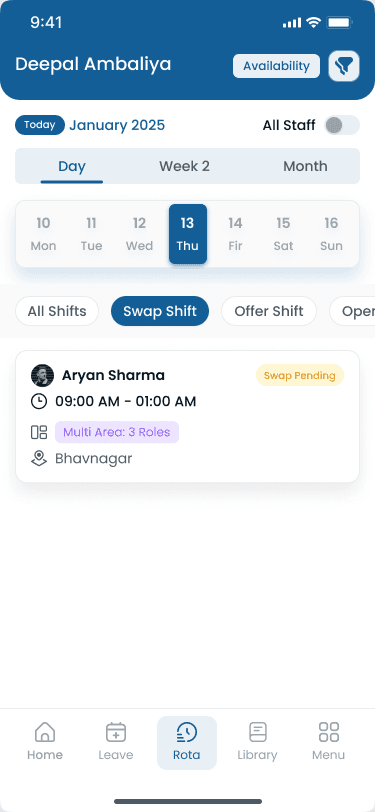
Step-by-step
How Shift Bidding Works
A typical shift bidding workflow runs inside your published scheduling process. Software handles notifications, eligibility, and roster updates when employees claim available shifts.
Step 1: A shift becomes available
Sick leave, vacation, demand spikes, or scheduling changes leave a shift unassigned. It enters the open shift pool for bidding.
Step 2: Manager publishes the shift
The manager posts the shift with role, location, time, and any certification requirements on shift scheduling.
Step 3: Eligible employees receive notifications
Qualified staff get alerts through the mobile app based on skills, location, and availability rules.
Step 4: Employees submit bids or claim the shift
Staff request the shift or tap to claim it, depending on your policy. Multiple employees may bid on the same block.
Step 5: Manager or software selects the best match
Approval follows your rules: seniority, first qualified bid, lowest hour count, or labor budget fit. Overtime management checks run before confirm.
Step 6: Schedule updates automatically
The published roster refreshes so attendance and payroll match what the team sees.
Step 7: Employees receive confirmation
The winning bidder and the rest of the team see the updated assignee. Rejected bidders know the shift is filled without follow-up texts.
“Shift bidding works when rules are published upfront. Staff should know how picks are ranked before they tap claim, not after a manager picks a favorite.”
Examples
Shift Bidding vs Shift Swapping
Shift bidding and shift swapping solve different coverage problems. Use both on the same roster, but do not treat them as the same workflow.
Shift bidding vs shift swapping
| Topic | Shift bidding | Shift swapping |
|---|---|---|
| Primary use | Fills unassigned shifts | Exchanges assigned shifts |
| Who starts it | Manager publishes shift | Employee initiates request |
| Participants | Multiple employees can bid | Usually two employees |
| Typical timing | Open shift before assign | After schedules are published |
| Approval focus | Qualifications, hours, seniority rules | OT, skills, rest between shifts |
Common reasons shifts enter bidding
These events create open shifts that managers publish for bidding rather than assigning manually.
| Trigger | What managers do |
|---|---|
| Sick leave | Publish shift to qualified available staff |
| Vacation approvals | Open bid window before leave starts |
| Seasonal demand | Add shifts and let staff claim extra hours |
| Unexpected absences | Immediate notify to eligible pool |
| New locations | Bid open roles until permanent lines are set |
| Business growth | Fill new templates before next hire starts |
Best practices
Common Shift Bidding Challenges
Bidding breaks down when rules are unclear or checks happen after the fact. Scheduling software automates most of these checks before approving bids.
| Practice | Why it works |
|---|---|
| Too many requests | Cap concurrent bids or auto-close the window when the shift is filled so managers are not sorting dozens of duplicate claims. |
| Qualification mismatches | Restrict bidding to employees with the right role, license, or certification before notify, not at approval time. |
| Overtime risk | Block or flag bids that would push an employee past 40 hours in the workweek. See overtime management. |
| Last-minute decisions | Set bid deadlines and escalation paths so open shifts are not still unresolved an hour before start time. |
| Communication delays | Mobile push notifications replace group texts so every eligible employee sees the shift at the same time. |
Features
Benefits of Shift Bidding
When bidding runs through scheduling software with clear rules, managers and employees both gain speed and predictability.
| Feature | Why it matters |
|---|---|
| Faster coverage | Parallel bids beat sequential phone calls when a shift opens on short notice. |
| Fair shift allocation | Published seniority, qualification, and hour-cap rules reduce perceived favoritism when extra shifts are scarce. |
| Better employee engagement | Staff who want more hours can compete for open shifts within policy instead of asking managers privately. |
| Improved labor cost control | Approve bids that fit [labor cost management](/answers/what-is-labor-cost-management) targets and block picks that trigger unnecessary overtime. |
| Reduced administrative work | Notify, collect bids, approve, and update the roster in one system tied to [staff management](/features/staff-management). |
Why it matters
Why Businesses Use Shift Bidding
Shift bidding gives hourly teams a structured way to fill open shifts instead of managers texting until someone says yes. When rules are clear, employees get more flexibility and operators keep labor cost and compliance under control.
| Pain point | What operators see |
|---|---|
| Fill open shifts faster | Multiple eligible employees see the same shift at once instead of sequential phone calls. |
| Reduce scheduling conflicts | System checks double-booking, location, and role before a bid is approved. |
| Improve employee flexibility | Motivated staff pick up extra hours on their terms within published rules. |
| Increase schedule transparency | Everyone sees open shifts and outcomes on the published roster, not side chats. |
| Reduce overtime | Bids from employees near 40 hours can be blocked or deprioritized automatically. |
| Lower manager workload | Notify, collect bids, and approve from one dashboard instead of manual outreach. |
| Improve employee satisfaction | Fair, consistent rules reduce favoritism when extra shifts are available. |
Shift bidding pairs naturally with open shift management for posting gaps and employee availability management for filtering who can bid.
Industries
Industries That Use Shift Bidding
Shift bidding works well wherever hourly staff, call-offs, and variable demand create open shifts on a published roster.
| Industry | Typical scheduling challenge |
|---|---|
| Restaurants | Fill server, cook, and host gaps during rushes with qualified bids from the pool. |
| Retail | Staff sales floors and cashiers during events when extra hours are available. |
| Healthcare | Bid clinical shifts with license and credential checks before approval. |
| Warehouses | Add pick-and-pack coverage when volume spikes mid-week. |
| Hospitality | Cover events, housekeeping, and front desk when occupancy jumps. |
| Manufacturing | Fill line and maintenance roles on rotating crews without default overtime. |
| Construction | Staff job sites when schedules compress or subs call off. |
| Cleaning services | Reassign crews across client sites when routes change. |
| Security | Bid guard posts across sites with certification requirements. |
| Multi-location businesses | Publish open shifts across locations with [multi-location scheduling](/answers/what-is-multi-location-scheduling) visibility. |
“Bidding fills unassigned shifts. Swapping trades shifts two employees already hold. Mix them up and you get double coverage or nobody on the roster.”
Buyer's guide
Shift Bidding Best Practices
These habits keep shift bidding fair, fast, and compliant across teams and locations.
| # | Question | What to verify |
|---|---|---|
| 1 | Publish shifts immediately | Post open shifts as soon as you know the gap. Delay gives competitors for employee attention and shrinks the approval window. |
| 2 | Restrict bidding to qualified employees | Filter by role, site, certification, and [availability](/answers/what-is-employee-availability-management) before anyone receives a notification. |
| 3 | Apply consistent approval rules | Document whether you use first qualified bid, seniority, or lowest weekly hours. Apply the same rule every time. |
| 4 | Prevent overtime automatically | Use software rules to reject bids that exceed hour caps. Model scenarios with the [overtime risk calculator](/tools/overtime-risk-calculator). |
| 5 | Keep employees informed with mobile notifications | Confirm wins and rejections in the app so staff trust the process and stop parallel coverage in chat. |
| 6 | Track every approval for auditing | Log who bid, who was approved, and which rules applied. Essential for union environments and multi-location operators. |
Expertise & sources
Why trust this guide
ReviewedThis guide was written by the Heyshift Team for managers scheduling hourly employees across restaurants, retail, healthcare, hospitality, warehouses, construction, cleaning, manufacturing, security, and other multi-location businesses in the USA. It explains shift bidding as a practical coverage workflow, not abstract HR theory.
Heyshift Team
Workforce scheduling research · USA multi-location operators
Heyshift publishes scheduling playbooks for operators who fill open shifts fairly while controlling overtime and manager workload.
Published & updated
Sources
2 external · 3 on Heyshift
| Source | Reference |
|---|---|
DOLU.S. Department of Labor | Fair Labor Standards Act (FLSA) |
SHRMSHRM | Society for Human Resource Management (SHRM) |
| Further reading on Heyshift | |
| Heyshift answers library | What is open shift management? |
| Heyshift answers library | What is shift swapping? |
| Heyshift answers library | How does shift scheduling work? |
Frequently Asked Questions
Fill open shifts faster with Heyshift
Heyshift helps businesses publish open shifts, notify eligible employees, automate approvals, reduce overtime, and keep every location fully staffed. Start your free trial to see shift bidding in action.
No credit card required
Related resources
| Resource | Link |
|---|---|
| What is open shift management? | Open |
| What is shift swapping? | Open |
| What is employee availability management? | Open |
| What is workforce planning? | Open |
| How does shift scheduling work? | Open |
| What is overtime management? | Open |
| What is multi-location scheduling? | Open |
| What is employee scheduling software? | Open |
| Shift scheduling feature | Open |
| Staff management feature | Open |
| Mobile app feature | Open |
| Attendance tracker feature | Open |
| Shift coverage gap calculator | Open |
| Labor cost percentage calculator | Open |
| Overtime risk calculator | Open |
| Open shift and swap approvals playbook | Open |