

Summary
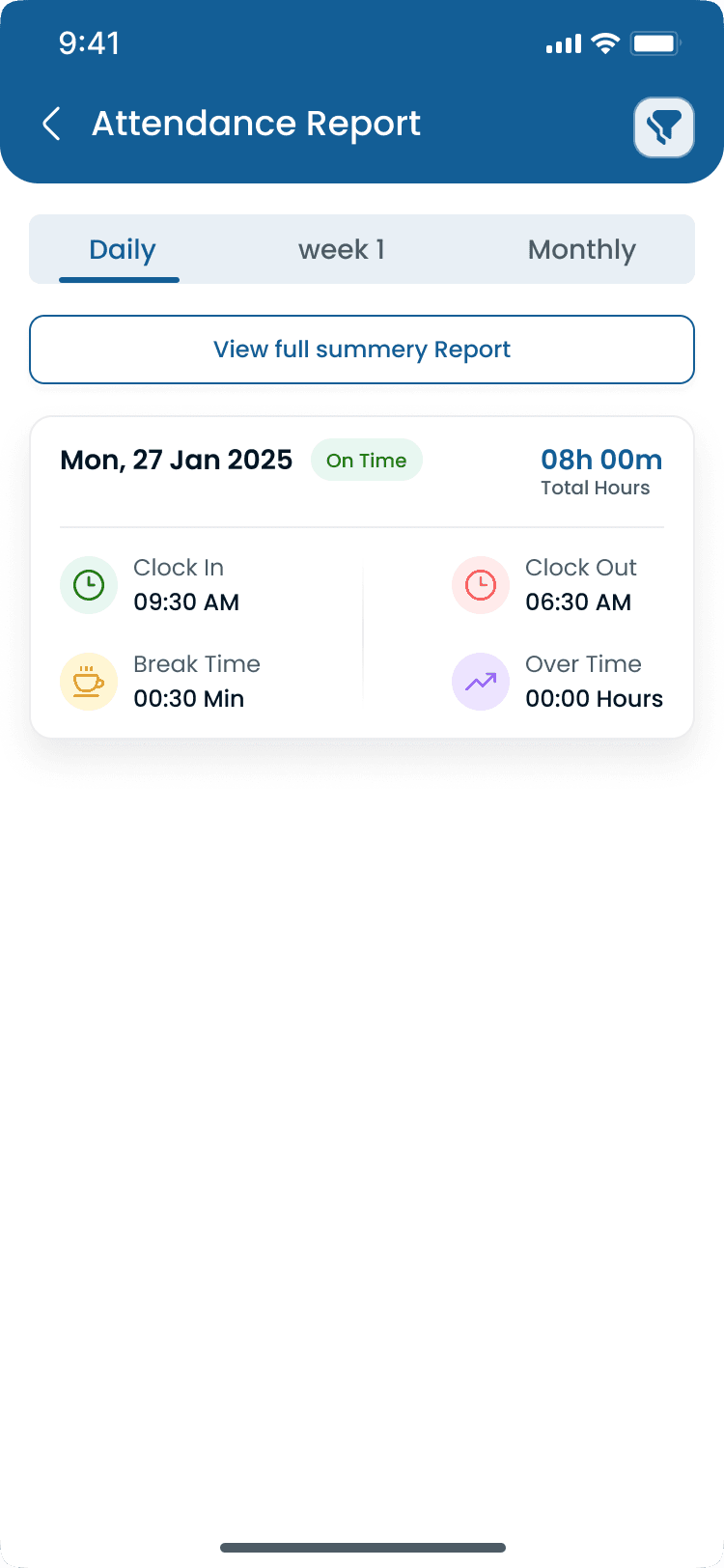
Employee timesheet management is the process of collecting, reviewing, approving, and managing employee work hours before payroll is processed. It helps businesses verify clock in and clock out records, calculate regular and overtime hours, manage attendance, reduce payroll errors, and maintain accurate labor records. Modern timesheet management software automates these tasks using digital timesheets from the attendance tracker and mobile app instead of paper forms or spreadsheets, aligned with schedules on shift scheduling.
Step-by-step
How Employee Timesheet Management Works
A standard weekly flow moves from scheduled shifts through manager approval to payroll export. Digital systems generate the timesheet; managers validate exceptions.
Step 1: Employees work scheduled shifts
Employees clock in and out using approved methods: mobile app, kiosk, web, or biometric device tied to individual accounts.
Step 2: Hours are recorded
The system records start time, finish time, breaks, overtime, and total worked hours automatically from punch data.
Step 3: Manager reviews timesheets
Supervisors verify missed punches, attendance exceptions, overtime, leave records, and schedule adherence before approval.
Step 4: Approve timesheets
Approved timesheets lock as payroll-ready with manager sign-off and optional notes on corrections.
Step 5: Export to payroll
Verified hours export to payroll software or accounting systems with an audit trail.
“A timesheet is payroll's source of truth. If managers approve bad hours, payroll pays bad hours. Review before export, not after employees are paid.”
Examples
Timesheet Fields, Methods, and Comparisons
Know what belongs on a timesheet, which capture method fits your team, and how timesheets differ from broader time tracking tools.
What appears on an employee timesheet
| Field | Purpose |
|---|---|
| Employee name | Identifies who worked the hours |
| Date and shift | Ties hours to the scheduled roster |
| Clock-in and clock-out times | Defines shift boundaries |
| Break duration | Supports compliance and net paid hours |
| Regular hours | Standard pay period totals |
| Overtime hours | OT pay calculation |
| Total payable hours | Payroll export total |
| Manager approval | Sign-off before pay run |
| Notes | Documents corrections and exceptions |
Common timesheet methods
| Method | Best for |
|---|---|
| Paper timesheets | Very small businesses with minimal hourly staff |
| Excel spreadsheet | Small teams with simple schedules |
| Web timesheets | Office and back-office employees |
| Mobile app | Hourly and mobile workers |
| Attendance software | Multi-location businesses |
| Integrated workforce platform | Growing businesses needing schedule plus approval |
Paper timesheets vs digital timesheets
| Topic | Paper | Digital |
|---|---|---|
| Calculations | Manual | Automatic |
| Storage | Easy to lose | Cloud storage |
| Payroll accuracy | Higher error risk | Calculated regular and OT hours |
| Approvals | Slow paper routing | In-app approval workflow |
| Reporting | Difficult aggregation | Real-time dashboards |
| Audits | Manual filing | Digital audit trail |
Employee timesheets vs time tracking
| Topic | Employee timesheets | Time tracking |
|---|---|---|
| Primary goal | Payroll-ready hour approval | Work hour recording |
| Workflow | Manager review and sign-off | Continuous punch capture |
| Output | Approved hours for pay run | Activity and duration data |
| Typical use | Hourly payroll preparation | Attendance plus productivity context |
Best practices
Common Timesheet Management Problems
Most timesheet issues trace back to late reviews, manual entry, or punches disconnected from the schedule. Fix the workflow before adding more spreadsheets.
| Practice | Why it works |
|---|---|
| Missing clock-ins | Open or incomplete punches require manager edits before approval. |
| Missing clock-outs | Forgotten clock-outs inflate hours until a supervisor closes the record. |
| Manual calculations | Spreadsheet OT math introduces errors digital systems calculate automatically. |
| Payroll disputes | Mismatch between schedule, punches, and approved timesheet drives hourly disagreements. |
| Buddy punching | Fraudulent punches corrupt timesheets at the source. See buddy punching prevention. |
| Overtime errors | Wrong OT rules or unapproved long shifts show up on the timesheet if not caught in review. |
| Spreadsheet mistakes | Copy-paste errors and broken formulas are common with manual timesheet files. |
| Late approvals | Approving timesheets on payroll day leaves no time to fix exceptions properly. |
Features
Benefits of Digital Timesheet Management
Moving from paper or spreadsheets to automated timesheets reduces payroll friction and gives operators labor visibility before each pay period closes.
| Feature | Why it matters |
|---|---|
| Faster payroll preparation | Pre-calculated hour totals cut manual entry before each pay run. |
| Fewer payroll errors | System math for breaks and OT beats spreadsheet formulas and handwriting. |
| Better attendance accuracy | Timesheets built from verified punches reflect actual worked time. |
| Improved labor cost visibility | Approved hours roll into labor reports and the [labor cost percentage calculator](/tools/labor-cost-percentage-calculator). |
| Easier overtime management | OT totals flag before export. Pair with the [overtime risk calculator](/tools/overtime-risk-calculator). |
| Complete audit history | Every correction, approval, and export is searchable for disputes and audits. |
| Real-time workforce reporting | District and HQ teams see pending vs approved timesheets across locations. |
| Better compliance | Documented approvals support wage-hour and internal policy reviews. |
Why it matters
Why Timesheet Management Matters
Timesheet management sits between attendance capture and payroll export. It is where managers verify hours, fix exceptions, and approve what employees actually get paid.
| Pain point | What operators see |
|---|---|
| Improve payroll accuracy | Reviewed timesheets reduce overpayments, underpayments, and post-close corrections. |
| Reduce manual calculations | Software totals regular hours, breaks, and OT instead of spreadsheet math. |
| Track attendance | Timesheets reflect [employee attendance tracking](/answers/what-is-employee-attendance-tracking) status and exceptions. |
| Monitor overtime | OT totals surface before payroll through [overtime management](/answers/what-is-overtime-management) rules. |
| Prevent payroll disputes | Approved digital records with notes resolve most hourly disagreements faster. |
| Control labor costs | Verified hours feed [labor cost management](/answers/what-is-labor-cost-management) reporting. |
| Support labor law compliance | Audit trails support break, overtime, and wage-hour documentation requests. |
| Save manager time | Daily review beats reconstructing punches on payroll night. See the [manager time savings calculator](/tools/manager-time-savings-calculator). |
Timesheet management is the approval layer inside broader time and attendance software and employee time tracking workflows. Automate capture, humanize approval, then export clean data to payroll.
Industries
Industries That Depend on Timesheet Management
Any hourly business with recurring pay runs needs a reliable timesheet approval workflow across one or many locations.
| Industry | Typical scheduling challenge |
|---|---|
| Restaurants | Multi-shift hourly teams with tips-adjacent hour accuracy and daily exception volume. |
| Retail | Store associates with weekly approvals rolled up to district payroll. |
| Healthcare | Clinicians and support staff with OT and break rules on approved timesheets. |
| Warehouses | High-volume punches converted to weekly hour totals for payroll export. |
| Hospitality | Property and event staff across departments with manager sign-off by location. |
| Manufacturing | Plant shift timesheets with OT monitoring before each pay period. |
| Construction | Job-site hours aggregated into project and payroll-ready timesheets. |
| Cleaning services | Client-site punches approved before billed and paid hours align. |
| Security | Post hours verified on timesheets before guard payroll runs. |
| Multi-location businesses | HQ approves or audits location timesheets from one workforce platform. |
“Digital timesheets should build themselves from clock events. Manual spreadsheet entry is where errors and disputes start.”
Buyer's guide
Employee Timesheet Management Best Practices
These habits keep timesheets accurate, auditable, and payroll-ready every period.
| # | Question | What to verify |
|---|---|---|
| 1 | Use digital timesheets | Generate timesheets automatically from attendance data instead of re-keying hours. |
| 2 | Review timesheets daily | Catch missed punches and OT issues when context is fresh, not on payroll deadline. |
| 3 | Approve payroll on schedule | Set a recurring approval cutoff before each pay run so exceptions are resolved in time. |
| 4 | Track overtime automatically | Let system rules calculate OT from approved punches under [overtime management](/answers/what-is-overtime-management) policies. |
| 5 | Connect timesheets with employee schedules | Compare hours to the roster on [shift scheduling](/features/shift-scheduling) and [employee scheduling software](/answers/what-is-employee-scheduling-software). |
| 6 | Require manager approval | No hour should reach payroll without supervisor sign-off and documented corrections. |
| 7 | Keep historical records | Store approved timesheets for audits, disputes, and trend analysis in [staff management](/features/staff-management). |
| 8 | Audit attendance regularly | Use the [attendance leakage calculator](/tools/attendance-leakage-calculator) to spot patterns that inflate approved hours. |
Expertise & sources
Why trust this guide
ReviewedCreated by the Heyshift Team for businesses managing hourly employees across restaurants, retail, healthcare, warehouses, hospitality, manufacturing, construction, cleaning, security, and other multi-location operations throughout the USA. It is designed to help managers streamline payroll preparation and improve workforce efficiency.
Heyshift Team
Workforce scheduling research · USA multi-location operators
Heyshift publishes scheduling and attendance playbooks for operators who need payroll-ready timesheets built from verified clock events across every location.
Published & updated
Sources
4 external · 1 on Heyshift
| Source | Reference |
|---|---|
DOLU.S. Department of Labor | Fair Labor Standards Act (FLSA) |
DOLU.S. Department of Labor | Overtime pay requirements |
SHRMSHRM | Society for Human Resource Management (SHRM) |
SBAU.S. Small Business Administration | U.S. Small Business Administration |
| Further reading on Heyshift | |
| Heyshift answers library | What is employee attendance tracking? |
Frequently Asked Questions
Simplify employee timesheet management with Heyshift
Automatically generate payroll-ready timesheets, review attendance, manage overtime, approve work hours, and reduce payroll errors from one workforce management platform. Start your free trial.
No credit card required
Related resources
| Resource | Link |
|---|---|
| What is employee attendance tracking? | Open |
| What is employee time tracking? | Open |
| What is time and attendance software? | Open |
| What is employee clock in and clock out? | Open |
| What is labor cost management? | Open |
| What is overtime management? | Open |
| What is payroll integration? | Open |
| What is employee scheduling software? | Open |
| Attendance tracker feature | Open |
| Shift scheduling feature | Open |
| Staff management feature | Open |
| Mobile app feature | Open |
| Attendance leakage calculator | Open |
| Overtime risk calculator | Open |
| Labor cost percentage calculator | Open |
| Manager time savings calculator | Open |