

Healthcare staff scheduling software with overtime management: features, benefits, and how to choose
Compare healthcare staff scheduling software with overtime management. See how hours, alerts, attendance, and coverage help managers decide before they publish.
Healthcare organizations need enough staff to keep coverage without treating every extra hour as a surprise. Overtime often starts with a scheduling decision, not with a payroll export.
A manager assigns an extra shift because a unit is short. Someone stays late after a call-off. A swap adds hours nobody added up. At a multi-site group, Clinic B does not see that Clinic A already filled the week.
By the time overtime appears in payroll, the chance to choose a different name has passed.
Healthcare staff scheduling software with overtime management helps managers see scheduled and worked hours while they build and change the week. For overtime strategy and cost control, use healthcare overtime management. For vendor lists, use best healthcare staff scheduling software.
This buying guide is about software that connects the roster to labor hours. It is not another general “how to reduce healthcare overtime” playbook.
Quick answer: what should the software do?
Managers should see how many hours each person is already scheduled, who is near a threshold, and what an extra shift would do to that total before they publish. They should compare actual hours with the published week after the fact. They should have other coverage paths: availability, time off, open shifts, and approved swaps.
Software cannot eliminate every overtime hour. Some overtime is the right coverage choice. The product test is visibility before assignment, not a promise of zero premium pay.
Who this is for: nurse managers, clinic administrators, home-care coordinators, and multi-site healthcare operators in the USA who are comparing scheduling software that includes overtime visibility, not a standalone payroll calculator.
What is healthcare staff scheduling software with overtime management?
It is workforce scheduling software that pairs the official staff week with tools that monitor scheduled and worked hours.
A basic scheduler may show who is working, which shift they have, where they report, and when the band starts and ends.
Overtime-focused workforce software goes further. Depending on the platform, managers may monitor scheduled hours, track actual hours, see people approaching a threshold, review attendance against the published shift, find available staff for open hours, manage time-off requests, review swaps, compare sites, and run labor reports.
The goal is not only to count overtime after it posts. The goal is enough visibility to make a staffing choice before unnecessary hours stack.
This is staff scheduling and workforce hours. It is not patient demand forecasting or a clinical acuity tool. Confirm pay rules, premiums, and overtime definitions with qualified HR or legal counsel. The software should show hours. It should not invent your policy.
Why healthcare scheduling and overtime management should work together
Healthcare staffing depends on coverage. A week cannot be built only around who wants to work. Managers also weigh required coverage, qualifications, department needs, shift length, availability, time off, call-offs, overtime thresholds, and more than one location.
When scheduling and overtime data live apart, those choices happen across spreadsheets, timesheets, group chats, and last week’s payroll file. That is a delayed view of labor.
A connected path looks like this:
Build the week → check coverage → review employee hours → see overtime risk → adjust who takes the gap → publish
Overtime prevention becomes part of scheduling instead of a Friday cleanup. For the broader operating playbook, stay on the healthcare overtime management page. This page stays on the software requirement.
Coverage still comes first. A connected system does not tell you to leave a night empty to protect a number. It tells you what the extra name will do to that person’s week so you can look for someone with remaining capacity, post an open shift, or accept planned overtime on purpose.
Patient demand, qualifications, and department rules still belong to the manager. Software should not pretend to score acuity. It should keep hours, availability, and the published week in one place so those human decisions have a current total.
Common causes of healthcare staff overtime
Overtime is not always an intentional extra shift. It often grows from small roster problems.
Last-minute call-offs
A nurse, caregiver, or technician calls out close to start. The fastest fix is asking someone already on the floor to stay or to take another band. That covers the hole and can create premium hours.
A system with availability and open shifts can surface other eligible people before the default is “the person already here.” See healthcare open shift management.
Poor visibility into employee hours
Managers may see several shifts and still miss the total.
| Day | Shift | Hours |
|---|---|---|
| Monday | 7:00 AM to 3:00 PM | 8 |
| Tuesday | 7:00 AM to 3:00 PM | 8 |
| Wednesday | 7:00 AM to 3:00 PM | 8 |
| Thursday | 7:00 AM to 3:00 PM | 8 |
| Friday | 7:00 AM to 3:00 PM | 8 |
| Saturday | 7:00 AM to 3:00 PM | 8 |
Saturday can look open. The week may already sit at a threshold, depending on your workweek and rules. Software should show the running total while the roster is still a draft.
A clinic manager who only sees “free on Saturday” will keep filling weekends with the same full-time names. A hospital charge nurse who only sees tonight’s holes will keep extending the person already on the floor. Both need the week-to-date number in the same view as the empty band.
Unplanned shift extensions
An eight-hour band can run long: late handoff, documentation, an emergency, a thin incoming team, early ins, or late outs. That is why buyers should compare scheduled hours and actual hours, not only the grid.
Excessive shift swapping
Swaps help flexibility. An unmanaged accept can add a day the employee did not add up. Managers should see the hour impact before they approve.
Poor time-off planning
Stacked leave creates holes. Without availability and hours in the same view, the same people keep getting the extra shifts. Time off and the builder should sit together. See healthcare staff scheduling software with time-off management.
Multi-location staffing
Someone works Clinic A all week and picks up Clinic B on Saturday. If each site has its own file, the total is invisible. Authorized leads need one workforce view of hours across facilities.
What features should healthcare scheduling software with overtime management have?
Do not stop at “does it calculate overtime?” Ask what a manager can see before they click assign.
Scheduled hours visibility
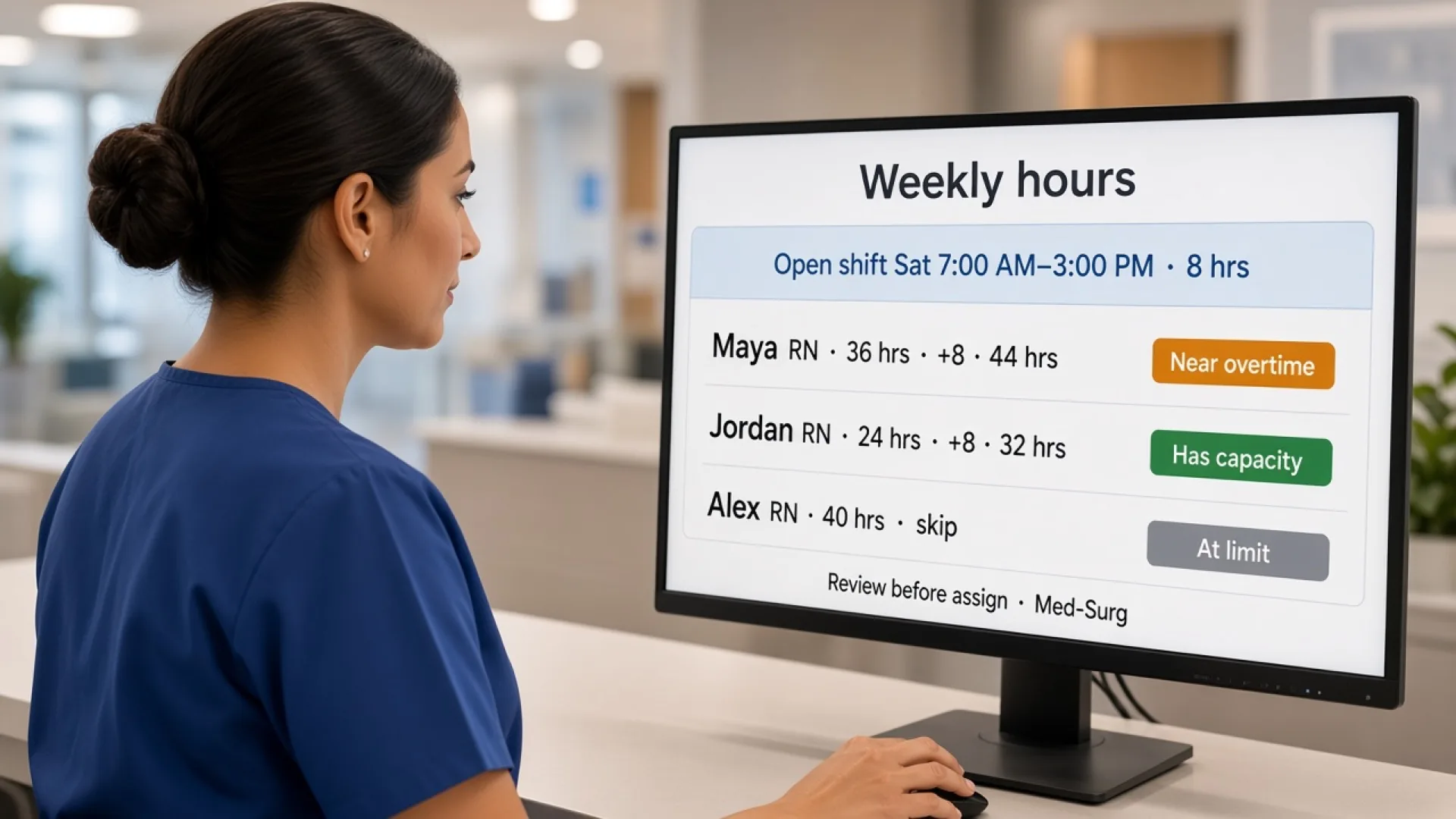
Managers should answer: How many hours is this person already assigned? How many shifts? Are they near a normal week? Who still has capacity? Who is already heavy?
If those answers require a highlighter, the builder is incomplete.
A useful people-first view sits next to the coverage grid. You can still staff by unit. You can also scan who is light and who is already heavy before you drop Saturday on the first familiar name.
Overtime alerts and thresholds
A useful system flags people near a defined limit before another shift lands on them. Rules differ by employer. Look for configurable thresholds, not a single assumed workweek. Confirm the numbers with qualified HR or legal counsel. Heyshift can surface overtime watch and hour totals beside the rota. It does not replace payroll or decide eligibility.
In a demo, change the threshold and assign the same extra shift again. If the warning does not move, the alert is decoration. If it blocks every assignment without a manager override, it will get ignored on a short night. You want a visible risk, then a human decision.
Scheduled vs actual hours
The schedule is the plan. Attendance is what happened. Comparing them shows late stays, early clock-ins, bands that always run over, units with repeating gaps, and hours nobody meant to add. See healthcare staff attendance tracking.
Employee availability management
Availability shows who can take an open band so the same names are not the only option. See healthcare employee availability management.
Time-off management
Approved leave should appear while the week is built, not after publish. A hole you can see on Monday is cheaper than a Sunday-night extension.
Open shift management
Publish the uncovered hours to eligible staff instead of extending the first person who answers the phone.
Shift swapping
Managers should approve swaps with hours and rules in view, so an informal deal does not become a surprise week.
A swap that looks fair on two names can still be a 44-hour week for the person who accepted. If approval cannot show both totals, the swap path is incomplete.
Attendance tracking
Late, early, missed, and extra hours explain why last month’s “40-hour” grid still produced premium pay.
Multi-location scheduling
Support sites, departments, assignments, cross-site work, and centralized reporting when people float.
Overtime and labor reporting
Reports should help answer why overtime happened: by person, unit, site, variance, and coverage, not only a single total.
A useful weekly review is short. Which unit ran long. Which people crossed a threshold. Which extra hours came from extensions versus extra shifts. If those three cuts take an afternoon, reporting is not helping the next publish.
How scheduling software helps prevent unnecessary overtime
The advantage is earlier visibility.
Without connected software, a manager takes the call-off, texts people, assigns whoever says yes, and later learns that person was already at the limit.
With connected software, they open the uncovered band, review eligible staff, check availability, see scheduled hours, pick someone with remaining capacity when policy allows, assign or publish, and review the updated week.
The difference is the look before the name is written in.
A worked clinic example: Friday close is empty at 2:00 PM. Nurse A is already at 36 scheduled hours. Nurse C is at 24 and available. If the product shows both totals, the manager can choose C or post an open shift. If the product only shows “who answered the phone,” A gets Friday and payroll explains it next week.
Software still cannot create staff who do not exist. If the only qualified person is already at the limit, overtime may be the coverage decision. The product should make that choice conscious.
Managing nurse overtime with scheduling software
Nursing weeks mix days, nights, full-time and part-time, skills, weekends, call-offs, and swaps. Finding a body is not enough. The extra band has to be added to a total.
| Employee | Current scheduled hours | Open shift | New total |
|---|---|---|---|
| Nurse A | 32 | 8 | 40 |
| Nurse B | 36 | 8 | 44 |
| Nurse C | 24 | 8 | 32 |
The right name depends on qualifications, availability, and your overtime policy. Software makes the arithmetic visible. It does not pick the clinically correct assignment.
Do not treat this page as another nurse scheduling guide. Keep the question on hours plus the roster.
Night staff and weekend rotations hide stacked hours because the bands look “normal.” Two 12-hour nights plus a pickup can cross a line that an 8-hour clinic week would show immediately. The software should add those bands the same way, regardless of length.
Managing caregiver overtime
Caregivers may work across clients, sites, and visits. The week may include visit times, availability, travel you track elsewhere, recurring stops, weekends, leave, extra visits, and actual hours.
If a caregiver takes another visit because someone else is out, the coordinator should see the new total, not only the filled slot. That matters for home healthcare teams with many recurring visits.
This is still staff scheduling. It is not automatically visit verification or mileage policy. Those may sit in other systems.
A useful caregiver demo adds one extra Friday visit to someone who already has a full weekday list, then shows the new week total before the coordinator confirms. If the vendor can only show the filled visit, you have a booking slot, not overtime visibility.
Managing overtime across multiple healthcare locations
An employee who usually works Clinic A and covers Clinic B can cross a threshold that neither local file shows. A centralized platform can coordinate clinics, offices, hospitals, urgent care, assisted living, home-care branches, and other sites.
The goal is not to ban every overtime hour. Some overtime is planned. The goal is to separate planned overtime from avoidable overtime created by a missing total.
A regional lead should see that two sites both offered Saturday to the same float. Local supervisors should still publish their own weeks.
If Clinic B cannot see Clinic A’s Thursday night, the float looks available. The software should carry one employee, many sites, one running total. That is the multi-location test for overtime, not whether you can create two calendars.
Use open shifts to reduce unnecessary overtime
An uncovered eight-hour clinic band does not have to land on the person who already has 36 hours. Publishing it to eligible staff can surface someone with capacity.
Managers should still review qualifications, availability, existing hours, and policy before they approve a claim. An open shift is another option, not an automatic cheaper hour.
Eligibility still matters. Broadcasting every uncovered night to the whole directory creates noise and can still land on someone near a limit. Eligible staff with remaining hours is the useful list.
Use availability and time-off data to improve overtime decisions
Overtime work starts when the week is built, not when someone crosses a line.
Employee A is available Monday through Friday and still has room. Employee B has a narrow window and is already booked inside it. If the manager sees both, the extra Thursday is less likely to become another B shift.
The same is true for leave. If three medical assistants are already off the same week, the gap is a scheduling problem now, not a Sunday-night scramble.
Availability, time off, and overtime visibility are one builder, not three admin jobs.
Scheduled hours vs actual hours
A schedule-only system can show a clean 40-hour week and still miss premium pay.
| Employee | Scheduled | Actual | Difference |
|---|---|---|---|
| Employee A | 40 hrs | 40.0 hrs | 0 |
| Employee B | 40 hrs | 42.5 hrs | +2.5 |
| Employee C | 36 hrs | 39.0 hrs | +3 |
| Employee D | 32 hrs | 32.5 hrs | +0.5 |
If B and C run long every week, the issue may be a thin incoming band or a close that never matches the plan. Attendance data is how that pattern appears. Confirm how you treat grace minutes and extra time with qualified HR or legal counsel.
Healthcare scheduling software vs spreadsheets for overtime management
Spreadsheets can work for a small, stable clinic. They get harder as nights, floats, and sites increase.
| Capability | Spreadsheet | Healthcare scheduling software |
|---|---|---|
| Employee schedules | Yes | Yes |
| Availability | Manual | Centralized |
| Time off | Manual | In the same week |
| Open shifts | Manual | Supported |
| Shift swaps | Manual | Controlled path |
| Attendance comparison | Manual | Connected |
| Overtime visibility | Hand totals | Visible in the builder |
| Multi-location | Hard to merge | Designed for it |
| Reporting | Rebuild | Built-in |
| Mobile access | Limited | Typical |
| Schedule updates | Separate messages | Published roster |
The problem is not that a sheet cannot add hours. The problem is that a person has to keep every input current. Growing healthcare teams pay for that in admin time and stale totals.
How much does healthcare overtime management software cost?
Pricing varies by headcount, sites, scheduling depth, attendance, reporting, mobile access, integrations, support, and implementation.
Do not compare only the subscription. Compare manager time, overtime created by a missing total, corrections, and coverage scramble.
Heyshift paid plans start at $4, $6, and $9 per seat after a 30-day free trial, with unlimited locations on paid plans. Other vendors will quote differently. A higher monthly fee can still be cheaper than repeating the same Saturday on the person who was already at 36 hours.
Put the subscription next to the work you already do by hand: adding hours in a sheet, calling the same three names, and explaining Friday’s premium after the fact. Software cost versus manager time plus avoidable overtime plus corrections is the comparison that matters. Do not invent a savings number. Run the trial with last month’s call-offs and see whether the extra assignments change.
A platform is not payroll. Some tools export hours into payroll. Confirm that path in the demo if you need it.
What should healthcare organizations look for when choosing software?
Use the demo as a rehearsal of a call-off Friday, not a tour of icons.
Scheduling. Recurring weeks, departments or sites, fast edits, mobile access to the published roster.
Overtime. Scheduled-hour totals, threshold or near-limit signals, scheduled vs actual, overtime reports. Ask whether limits are configurable.
Coverage. Open shifts, availability, swap approvals, a list of people who can take the band.
Time off. Requests, decisions, and approved dates in the builder.
Attendance. Actuals next to the published shift, deviations, extra hours.
Multi-location. More than one site, cross-site hours, authorized rollup.
Reporting. Overtime by unit and site, repeating gaps, labor over time.
Bring real numbers. Assign an eight-hour open shift to someone at 36 hours and someone at 24. If the product cannot show the new totals, keep looking.
Ask the same questions you would ask a vendor in writing. Can managers create recurring weeks? Can they assign by department or location and change the week quickly? Can staff open the published roster on a phone? Can they see scheduled hours and people near a threshold? Can they compare scheduled and actual hours? Can they post open shifts, read availability, and approve swaps? Can employees submit time off, and does approved leave show in the builder? Can more than one healthcare site share one hour total for a float? Can reports show which units repeat overtime?
If the demo cannot walk those questions with your real roles, you are still buying a calendar.
Why Heyshift for healthcare scheduling and overtime management
Heyshift keeps staff scheduling, availability, time off, open shifts, swaps, attendance, scheduled hours, locations, and publish in one workspace. It is not an enterprise HRIS, and it is not a patient appointment system.
The value is not a prettier grid. It is seeing the decision behind the extra name: hours already assigned, a near-overtime warning, and another person with capacity.
Use a trial the way you run a week. Publish a real unit, add an open Saturday, look at two employees’ totals, and decide. If that happens in one screen, you have overtime management in the scheduling sense. If you still open a spreadsheet to add 36 plus 8, you do not.
Do not expect Heyshift to replace a labor attorney or a payroll engine. Expect it to keep the published week, hour totals, and coverage options in one workspace so a supervisor can see risk before Saturday is assigned.
Healthcare overtime management checklist
Before you publish:
- Is every required shift covered?
- Are assignments inside stated availability?
- Is approved time off on the week?
- Is anyone near a threshold?
- Are open shifts offered to people with capacity?
- Have swaps been reviewed for hours?
- Are cross-site hours included?
- Do scheduled hours match the coverage you need?
- Are repeating gaps visible?
- Can you compare actuals after the week runs?
Check a box only when you saw the step in the product.
Who should consider healthcare scheduling software with overtime management?
Any healthcare organization that already publishes a staff week, and already discovers premium hours in payroll, should consider connecting those jobs.
Hospitals with nights, weekends, and last-minute coverage. Extra bands have to land on a visible total.
Medical clinics with thinner benches. One call-off can become a 12-hour day for the closer.
Urgent care with volume that extends a close. Actual hours may exceed the published end.
Home healthcare with extra visits after a miss. The caregiver’s week total should update.
Assisted living and nursing homes with 24/7 coverage. Recurring bands hide stacked hours.
Multi-site groups with floats. One person, two clinics, one total.
Confirm setting-specific overtime and staffing rules with qualified HR or legal counsel. The product shows hours and risk. It does not write your policy or certify that a coverage choice is lawful.
Dental and specialty practices with small teams should still look at the same test. One call-off can turn a 32-hour week into a long Friday. The software should make that visible even when the roster is short.
Final thoughts
Healthcare overtime is often treated as a payroll problem. Many of the decisions start on the roster.
When managers can see availability, time off, open shifts, attendance, scheduled hours, and coverage in one workflow, they have more to work with when a hole appears.
Healthcare staff scheduling software with overtime management moves the question from “what did we pay last week?” to “who should take Saturday, given the hours we already assigned?”
Choose a platform that connects the week to those hours. Do not treat the schedule as an isolated spreadsheet.
The buying test is simple. Open one uncovered Saturday. See two employees’ current hours. See what 8 more hours does to each total. If you need a calculator for that look, the software is not doing overtime management yet.
Frequently Asked Questions
Continue with related topics
More articles on topics related to this one.

Healthcare staff scheduling software with compliance tracking: features, benefits, and how to choose
Compare healthcare staff scheduling software with compliance tracking. See qualifications, credentials, training, and assignments in one staff workflow.
Read article
Healthcare staff scheduling software with attendance tracking: features, benefits, and how to choose
Compare healthcare staff scheduling software with attendance tracking. See how hospitals and clinics compare the published week with who actually worked.
Read article
Healthcare staff scheduling software with time-off management: features, benefits, and how to choose
Compare healthcare staff scheduling software with time-off management. See how hospitals, clinics, and care teams keep leave on the published staff week.
Read article