Skip to content

Free Restaurant Shift Schedule Template

Plan restaurant shifts more efficiently with a free, editable template. Organize opening, mid, dinner, closing, and split shifts for every department. Available in Excel, Google Sheets, and PDF for casual restaurants, fine dining, cafes, bars, hotel restaurants, and quick-service concepts.

Free download · No account required · CSV opens in Google Sheets

  • Full-service restaurants
  • Quick service restaurants (QSR)
  • Cafes and coffee shops
  • Bars and pubs
  • Hotel restaurants
  • Food trucks
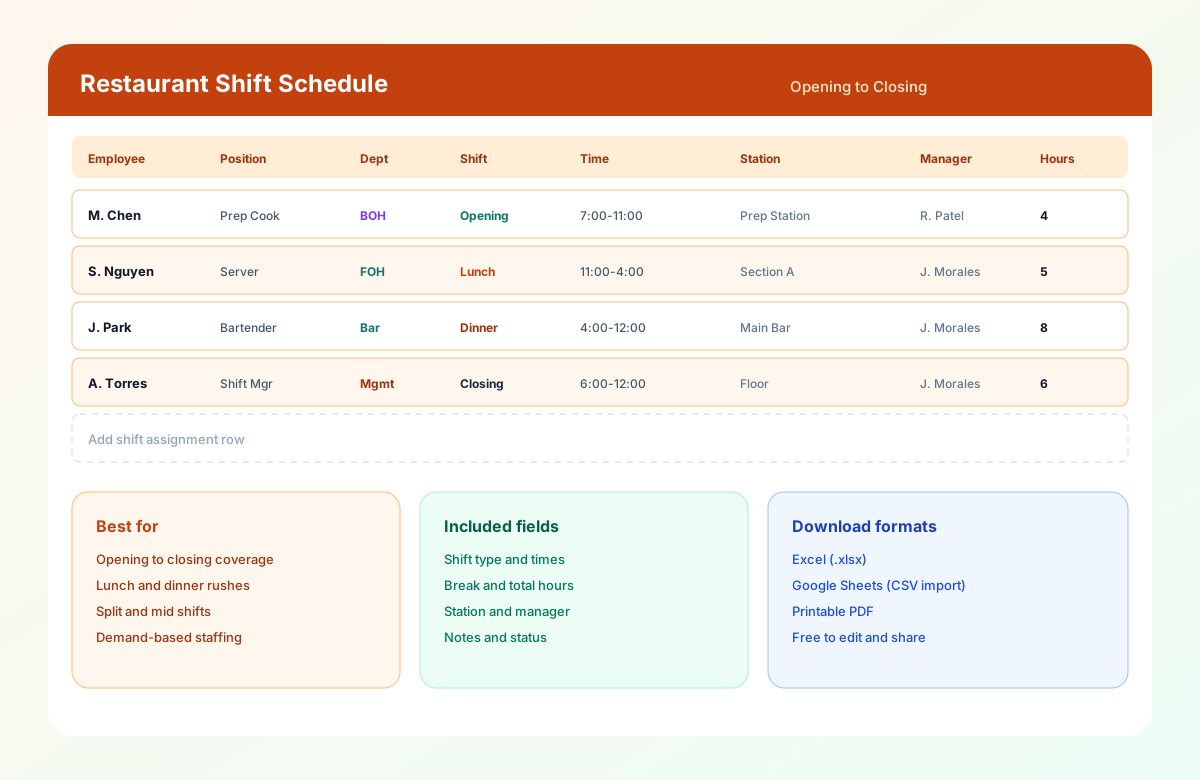
Restaurant shift schedule template in Excel showing opening, lunch, dinner, and closing shift assignments with stations, managers, and hours.

Table of contents


Quick overview

Template type Restaurant shift schedule
Best for Restaurants, cafes, bars, fast food, and food service
Schedule options Daily, weekly, and monthly
Formats Excel, Google Sheets, PDF
Shift types Opening, lunch, mid, dinner, closing, and split shifts
Editable Yes
Printable Yes
Free download Yes

This page targets shift-level planning inside the restaurant scheduling cluster. Start with the pillar restaurant employee schedule template for weekly Mon-Sun grids. Use the restaurant staff schedule template for department and station coordination. Use this shift schedule when you need service-period coverage from open to close.

For software and ops depth, see restaurant scheduling software and the restaurant staff scheduling guide.


What is a restaurant shift schedule template?

A Restaurant Shift Schedule Template is a planning tool used to organize employee shifts throughout the day based on business demand, operating hours, and employee availability.

Unlike a general employee schedule that simply assigns workdays, a shift schedule focuses on when employees work during the day. Restaurants often require different staffing levels during breakfast, lunch, dinner, weekends, holidays, and special events.

Managers must ensure every shift has the right mix of employees, including servers, hosts, bartenders, chefs, line cooks, dishwashers, and managers.

Using a structured shift schedule helps restaurants improve service quality, reduce scheduling conflicts, control labor costs, and ensure every service period is properly staffed.

Whether you are scheduling a team of 15 or managing multiple restaurant locations, a standardized shift schedule keeps operations organized and employees informed.


Why restaurant shift scheduling matters

Every shift directly affects restaurant performance.

Too few employees during a lunch rush can result in slow service, longer wait times, and frustrated guests.

Too many employees during quiet periods increase payroll costs and reduce profitability.

An effective shift schedule helps restaurants:

  • Match staffing levels to customer demand
  • Improve service speed
  • Reduce labor costs
  • Minimize overtime
  • Improve employee communication
  • Balance workloads fairly
  • Reduce scheduling conflicts
  • Support smoother shift handovers
  • Improve customer satisfaction
  • Increase operational efficiency

Well-planned shifts help both employees and customers enjoy a better experience.


Who should use this template?

This template is ideal for any restaurant or food service business that manages employees working different shifts throughout the day.

Setting Why this template helps
Full-service restaurants Coordinate breakfast, lunch, dinner, and closing across FOH and BOH
Quick service restaurants (QSR) Schedule crew efficiently during breakfast, lunch, and dinner rushes
Cafes and coffee shops Organize baristas, cashiers, and kitchen staff for morning and afternoon peaks
Bars and pubs Manage afternoon prep, evening service, and late-night closing
Hotel restaurants Align restaurant staff with room service, banquets, and catering
Food trucks Schedule around event times, festivals, and seasonal demand
Multi-location restaurant groups Standardize shift planning while keeping staffing practices consistent

Common restaurant shift types

Restaurants typically operate multiple shifts throughout the day.

Opening shift

Responsible for preparing the restaurant before guests arrive, including kitchen preparation, dining room setup, inventory checks, equipment preparation, cleaning, and cash drawer setup.

Breakfast shift

Common in cafes, hotels, and breakfast restaurants. Typical positions include baristas, servers, cooks, and cashiers.

Lunch shift

Often one of the busiest weekday periods. Additional staff may include extra servers, food runners, line cooks, and hosts.

Mid shift

Provides overlap between lunch and dinner service for handovers, preparation, cleaning, and restocking.

Dinner shift

Often the busiest period for full-service restaurants, with full serving staff, bartenders, hosts, kitchen team, and managers.

Closing shift

Responsible for shutting down operations: cleaning, inventory, cash reconciliation, equipment shutdown, and food storage.

Split shift

Some restaurants schedule employees for both lunch and dinner with a break between shifts. This increases peak coverage while reducing labor during slower periods. See what is a split shift?.


Restaurant positions you can schedule

The template supports every department within the restaurant.

Department Common roles
Front of House Hosts, servers, bussers, food runners, bartenders, cashiers
Back of House Executive chef, sous chef, line cook, prep cook, grill cook, dishwasher
Management Restaurant manager, assistant manager, shift manager, kitchen manager
Support staff Delivery drivers, cleaning staff, maintenance, inventory coordinator

Download the restaurant shift schedule template

Format Best for
Excel (.xlsx) Advanced editing, formulas, and offline scheduling
Google Sheets (CSV import) Real-time collaboration with managers
PDF Printing and posting staff schedules

Use the download buttons at the top of this page. No account required.


What's included?

The Restaurant Shift Schedule Template includes the information managers need to organize daily operations.

Field Description
Employee Name Staff member assigned to the shift
Position Server, Cook, Bartender, Host, etc.
Department FOH, BOH, Bar, Kitchen
Date Scheduled workday
Shift Type Opening, Lunch, Dinner, Closing, Split
Start Time Beginning of shift
End Time End of shift
Break Meal or rest break
Total Hours Scheduled work hours
Station Assigned work area
Manager Shift supervisor
Notes Special instructions
Status Confirmed, Pending, or Needs coverage

Header fields include Date / Week Of, Restaurant / Location, Shift Lead, and Service Focus so each posting has one owner.


Template preview

The downloadable Restaurant Shift Schedule Template includes a main Shift Planner sheet plus a How to use tab. Duplicate tabs or filter rows for daily planners, weekly views, labor hour summaries, or shift coverage checks.

Restaurant shift schedule template in Excel

The preview shows opening through closing coverage with stations, managers, shift types, and hours for a busy service day.


How to use the restaurant shift schedule template

Setup guide

How to use the restaurant shift schedule template

An effective restaurant shift schedule ensures every service period has the right number of employees while helping managers control labor costs. Follow these seven steps to match staffing with customer demand throughout the day.

  1. Review your operating hours

    Identify opening, closing, kitchen, bar, delivery, takeout, weekend, and holiday hours so you know how many shifts each day requires.

  2. Define shift types

    Divide the day into opening, breakfast, lunch, mid, dinner, closing, and split shifts based on customer traffic. Customize times to your model.

    What is a split shift?
  3. Forecast customer demand

    Use historical sales, reservations, local events, holidays, weather, promotions, and catering orders instead of copying the same headcount every day.

    Demand-based scheduling
  4. Assign employees to each shift

    Match position, experience, availability, certifications, workload, and labor budget. Build denser dinner crews and leaner opening teams as needed.

    Shift scheduling
  5. Review employee availability

    Verify approved leave, requested days off, part-time availability, school schedules, max weekly hours, and preferred shifts before finalizing.

    Employee availability form
  6. Check labor hours

    Calculate scheduled hours, review overtime, compare staffing against sales forecasts, and balance workloads across employees.

    Overtime risk calculator
  7. Publish the schedule

    Share with employees, communicate special events, confirm assignments, and update notice boards or digital tools at least one week in advance when possible.

    Mobile schedule access
Why use a template

Benefits of using a restaurant shift schedule template

  • Improve shift coverage

    Ensure every meal period has the right number of employees scheduled for opening through closing.

  • Reduce labor costs

    Schedule employees according to customer demand instead of fixed staffing levels that inflate quiet hours.

  • Improve team communication

    Employees know exactly when their shift begins, where they are assigned, and who they are working with.

  • Simplify shift changes

    Managers can quickly adjust shifts without rebuilding the entire schedule from scratch.

  • Reduce scheduling errors

    Avoid overlapping shifts, understaffing, and missed assignments during peak service periods.

  • Improve customer experience

    Proper staffing ensures faster service, shorter wait times, and smoother restaurant operations.


Template Best for
Restaurant employee schedule template Weekly Mon-Sun employee grid (cluster pillar)
Restaurant staff schedule template Daily FOH/BOH station assignments
Kitchen staff schedule template Back-of-house station coverage
Server schedule template Front-of-house dining section coverage
Bar staff schedule template Bartender and bar area coverage
Fast food employee schedule template QSR crew and drive-thru coverage
Cafe staff schedule template Barista and coffee shop coverage

This completes the restaurant scheduling template cluster.

Template Best for
Employee schedule template General hourly weekly rosters
Employee availability form template Collecting availability before publish
Rotating shift schedule template Named rotation patterns hub
8-hour shift schedule template Three-band daily coverage
10-hour shift schedule template Compressed workweeks
2-2-3 shift schedule template Panama-style 24/7 coverage
4-On 4-Off shift schedule template Extended on/off blocks

Frequently asked questions

Is this Restaurant Shift Schedule Template free?

Yes. You can download the Restaurant Shift Schedule Template free of charge in Excel, Google Sheets, and PDF formats. Customize it to match your restaurant's operating hours, staffing requirements, and shift structure.

What's the difference between a Restaurant Shift Schedule and a Restaurant Staff Schedule?

A Restaurant Shift Schedule focuses on organizing employees by specific shifts such as opening, lunch, dinner, closing, and split shifts.

A Restaurant Staff Schedule provides a broader overview of the entire workforce across departments like Front of House, Back of House, bar, kitchen, and management.

Many restaurants use both together—one to manage overall staffing and the other to organize shift-level coverage. For weekly person grids, see the restaurant employee schedule template.

Which restaurants can use this template?

This template works for full-service, casual dining, fine dining, fast food, QSR, cafes, coffee shops, bars and pubs, pizzerias, bakeries, hotel restaurants, food trucks, and catering businesses.

Can I schedule different shift types?

Yes. The template supports opening, breakfast, lunch, mid, dinner, closing, split, weekend, and holiday shifts.

Can I customize the template?

Absolutely. You can add custom columns such as station assignment, dining section, kitchen station, hourly wage, overtime hours, break times, shift notes, manager approval, and employee ID.

How far in advance should shift schedules be published?

Most restaurants publish shift schedules one to two weeks in advance. Early scheduling improves employee planning, reduces conflicts, and gives managers time to handle change requests.

How can I reduce shift scheduling conflicts?

Collect employee availability before scheduling, schedule based on sales forecasts, rotate opening and closing shifts fairly, approve shift swaps through a clear process, maintain backup employees for busy periods, and review overtime before publishing schedules.

Can I use this template for multiple restaurant locations?

Yes. You can create separate worksheets for each location or include a Location column to manage shifts across multiple restaurants.

When should I switch from spreadsheets to scheduling software?

Spreadsheets work well for small teams. However, if you are managing multiple locations, frequent shift swaps, more than 20 employees, employee availability changes, overtime tracking, or last-minute schedule changes, scheduling software can improve efficiency and reduce administrative work.

Does Heyshift support restaurant shift scheduling?

Yes. Heyshift helps restaurants build shift schedules faster, assign employees based on availability, approve shift swaps, notify employees instantly, track attendance, monitor labor costs, reduce overtime, and manage multiple restaurant locations.

Keep exploring

More templates, guides, and tools for building and running your schedule.