Table of contents
Quick overview
|
|
| Best for |
Healthcare, retail, hospitality, manufacturing |
| Template type |
Employee availability form |
| Formats |
Excel, Google Sheets, PDF |
| Editable |
Yes |
| Printable |
Yes |
| Free download |
Yes |
Featured answer: A free employee availability form template gives managers a ready-made spreadsheet to collect when staff can work, including day-level availability, preferred shifts, maximum weekly hours, weekend and holiday constraints, and scheduling notes in Excel, Google Sheets, or PDF.
This page targets employee availability form, employee availability template, work availability form, staff availability form, availability sheet template, nurse availability form, and employee schedule availability in one resource.
Learn what availability management means in practice on what is employee availability management. For software, explore people and availability.
Scheduling starts with knowing when people can work. Without that layer, managers assign shifts from guesswork, staff reject assignments, and the week gets rebuilt through texts and call-offs.
An employee availability form (also called a work availability form or staff availability sheet) collects when each employee is available to work, including preferred days, shift bands, hour limits, and recurring constraints.
Unlike a schedule template that assigns specific shifts, an availability form captures input from employees before the roster is built. HR and scheduling managers use it during onboarding, at the start of each scheduling cycle, and whenever life circumstances change.
Use it for nurses, CNAs, retail associates, servers, warehouse workers, manufacturing operators, security officers, and any hourly role where availability varies by person.
Employee availability sheet
An employee availability sheet records when each employee can work and any recurring scheduling restrictions. Managers can use an availability sheet before creating the weekly schedule to identify available employees, preferred shifts, unavailable times, and maximum working hours.
A typical employee availability sheet includes:
- Employee name
- Position or role
- Department or location
- Available days
- Available hours
- Preferred shifts
- Unavailable times
- Weekend availability
- Holiday availability
- Maximum weekly hours
- Effective date
- Scheduling notes
Use an employee availability form to collect the information. Use the availability sheet to organize it for scheduling. This download works as both: staff fill one row, then the manager reads the same grid when building the employee schedule template.
Employee availability vs. employee schedule
Employee availability shows when an employee can work. An employee schedule shows when the employee is actually assigned to work.
| Availability |
Schedule |
| Available Monday 8 AM to 4 PM |
Scheduled Monday 9 AM to 5 PM |
| Unavailable Tuesday |
Not scheduled Tuesday |
| Available Saturday |
Scheduled Saturday 10 AM to 6 PM |
Availability is an input to scheduling, not the schedule itself. Collect the form first, then assign shifts on the employee schedule template or in shift scheduling.
Who should use this template?
| Industry |
Why this template helps |
| Hospitals |
Capture nurse and CNA day/night preferences before unit publish |
| Clinics |
Align MA and front desk availability with appointment volume |
| Nursing homes |
Document CNA weekend pools and LPN night preferences |
| Retail stores |
Track part-time associate day-off patterns and hour caps |
| Restaurants |
Collect evening and weekend server availability |
| Hotels |
Plan housekeeping and front desk bands by day |
| Warehouses |
Match morning picker availability to inbound volume |
| Manufacturing plants |
Align shift rotation with employee hour limits |
| Security companies |
Document site-specific and overnight availability |
Scheduling managers, HR teams, store managers, and operations leaders are the typical buyers who start with an availability form before evaluating scheduling software.
Each row in the form supports:
| Field |
Purpose |
| Employee Name |
Staff member submitting availability |
| Department |
Unit, store, wing, or team |
| Position |
Role title (RN, Server, Associate, etc.) |
| Mon through Sun |
Available, Off, Limited, Any, or Preferred |
| Preferred Shift |
Day, evening, night, morning, or Any |
| Available Hours |
Time window such as 7 AM-3 PM or 4 PM-Close |
| Unavailable Times |
Recurring blocks (school pickup, no mornings) |
| Max Weekly Hours |
Hour cap for part-time or overtime control |
| Weekend |
Every weekend, alternate, or not available |
| Holiday |
Willing to work holidays or not |
| Notes |
Childcare, second job, transportation, medical restriction |
| Effective Date |
When this availability period starts |
Header fields include Effective Period, Location / Site, Department, and Submitted To for audit clarity.
Suggested availability values
Train staff to use consistent labels:
| Value |
Meaning |
| Available |
Can work normal shifts that day |
| Any |
Flexible on shift band that day |
| Limited |
Available with restrictions (note in Notes) |
| Off |
Not available that day |
| Preferred |
Strong preference, not a hard block |
Part-time employees often have different availability from full-time staff because of school, another job, family responsibilities, or other recurring commitments.
An availability form can capture:
- Minimum and maximum hours
- Preferred days
- Available shift windows
- Weekend availability
- Recurring unavailable periods
- Preferred number of shifts
This makes the template useful for retail, restaurants, hospitality, healthcare, and other hourly teams that mix part-time and full-time staff on one roster.
| Format |
Best for |
| Excel (.xlsx) |
Compact week grid, dropdowns for day values, and an Availability Key tab |
| Google Sheets (CSV import) |
Same compact week grid for shared employee edits |
| PDF |
Printable week grid for onboarding packets |
Use the download buttons at the top of this page. No account required. Excel includes dropdowns for Available, Off, Limited, Any, and Preferred.
Template preview
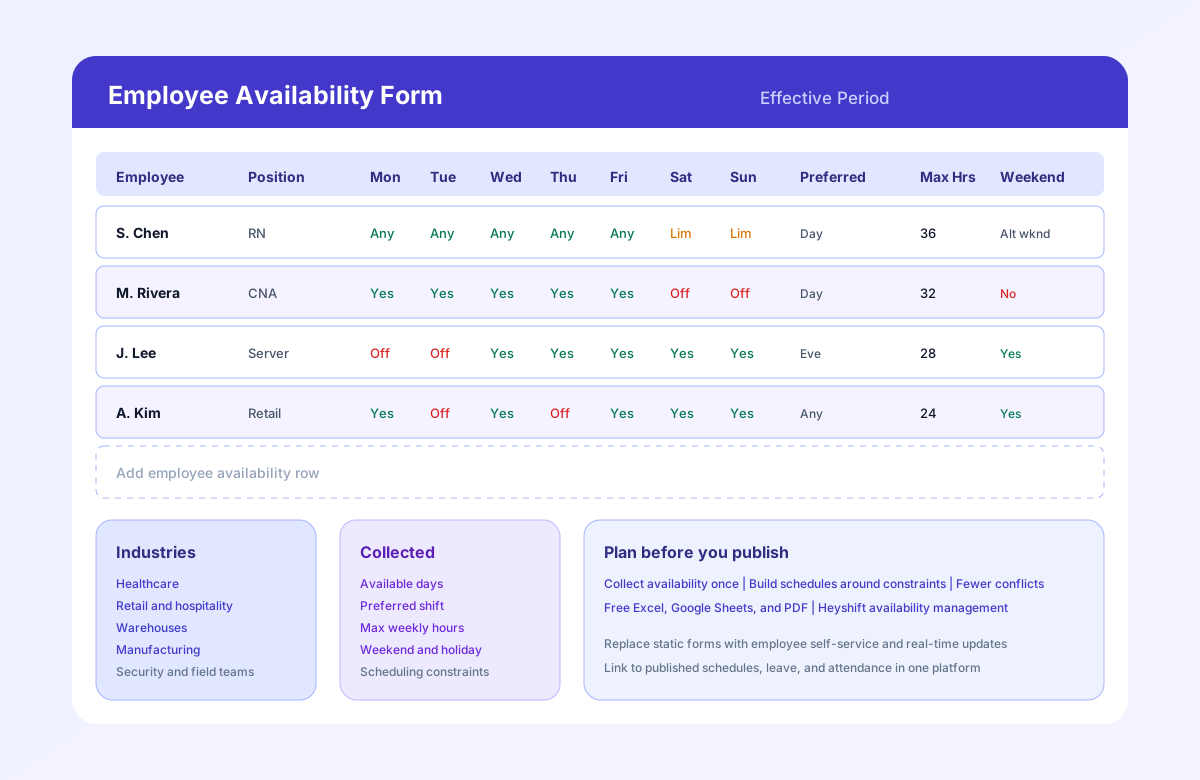
The preview image shows an availability form with employee names, positions, day-level availability (Available, Off, Limited), preferred shifts, maximum hours, and weekend preferences. Sample rows include healthcare, restaurant, retail, and warehouse examples.
| Employee |
Mon |
Tue |
Wed |
Thu |
Fri |
Weekend |
Preferred shift |
| Employee A |
Available |
Available |
Off |
Available |
Available |
Sat |
Morning |
| Employee B |
Off |
Available |
Available |
Limited |
Available |
Sun |
Evening |
| Employee C |
Available |
Off |
Available |
Available |
Limited |
None |
Night |
The actual form can include additional fields such as maximum weekly hours, unavailable times, preferred shifts, location, department, and effective date.
Why availability matters
Availability is the input layer scheduling depends on. When it is missing or outdated, every downstream step gets harder.
Fewer scheduling conflicts
Managers who publish without availability data assign shifts staff cannot work. Rejections, swap requests, and last-minute call-offs follow. Collecting availability first reduces rebuild cycles.
Better work-life balance
Hourly employees juggle school, childcare, second jobs, and transportation. A documented form respects those constraints instead of treating every schedule as negotiable after publish.
Reduced overtime
Maximum Weekly Hours visible before assignment prevents accidental 50-hour weeks for staff capped at 32 or 40 hours.
Improved employee satisfaction
Staff who feel heard on availability stay longer. Repeated schedule conflicts drive turnover in retail, hospitality, and healthcare.
More accurate staffing
When schedulers know who can work weekends and nights, coverage gaps surface during planning, not on Saturday morning.
For operational depth, read why spreadsheets fail for workforce scheduling and what is employee availability management.
Best practices
- Update availability regularly. Life changes. Require updates at least monthly and after major schedule cycles.
- Review changes before publishing schedules. Do not build the roster against last quarter's form.
- Respect recurring availability where possible. If every Tuesday is Off for school, honor it unless operational need requires a conversation first.
- Communicate exceptions clearly. Temporary changes belong in Notes with dates, not verbal-only updates.
- Keep records centralized. One shared Google Sheet or HR folder beats texts to individual managers.
- Collect before onboarding publish. New hires complete availability during orientation before their first assigned shift.
- Link availability to leave. Approved PTO overrides availability for specific dates; keep leave records beside the form.
- Plan the software transition. When forms outgrow email threads, move to people and availability in scheduling software.
How often should employees update their availability?
Employees should update their availability whenever their recurring work constraints change. Many businesses also collect or confirm availability on a regular schedule, such as monthly or before each scheduling period.
Employees should update their availability when they:
- Change school schedules
- Start or end another job
- Change childcare arrangements
- Change preferred working hours
- Need recurring days off
- Change weekend availability
- Change holiday availability
- Move to a different location or department
Keep the existing recommendation: review at least monthly and after major schedule cycles, then rebuild the week only against the current form.
How to collect employee availability