

Free Restaurant Staff Schedule Template
Organize your entire restaurant team with a free, editable staff schedule. Assign employees to specific roles and stations, coordinate FOH and BOH coverage, and ensure every shift is fully staffed. Available in Excel, Google Sheets, and PDF for neighborhood cafes, fine dining, fast-casual, sports bars, and multi-location restaurant groups.
Free download · No account required · CSV for Google Sheets
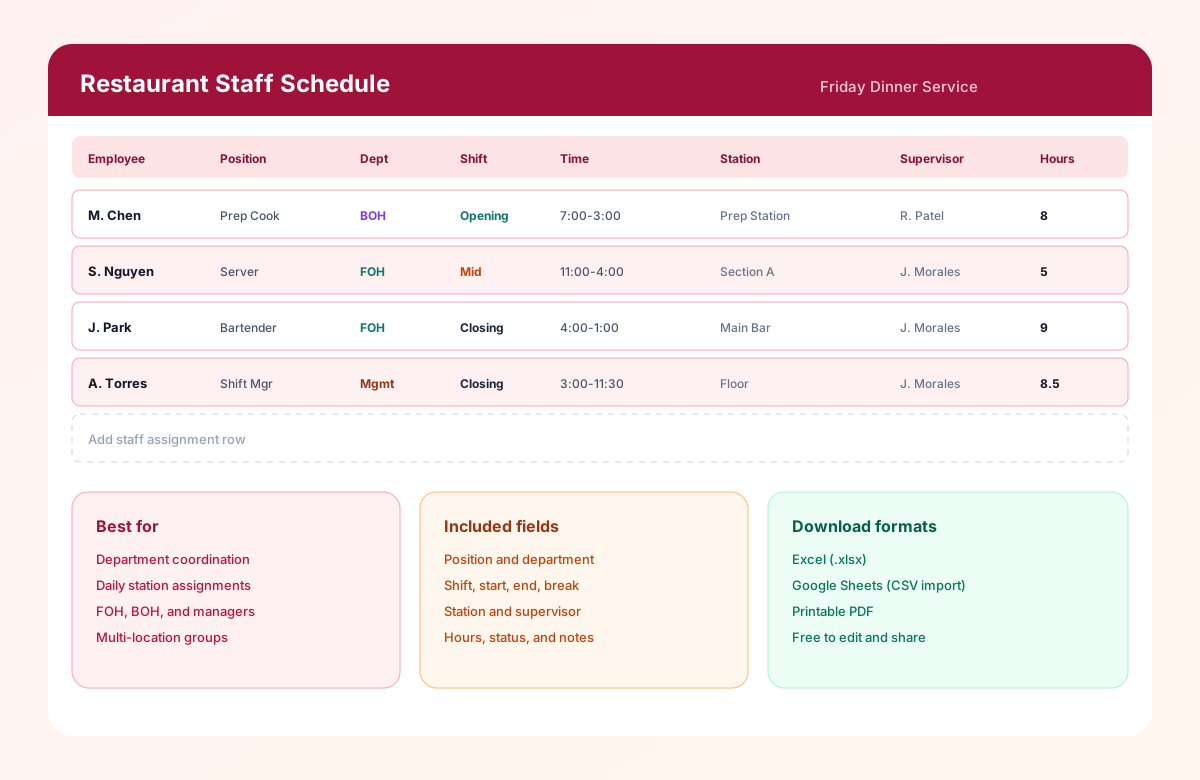
Table of contents
- Quick overview
- What is a restaurant staff schedule template?
- Why restaurant staff scheduling matters
- Who should use this template?
- Restaurant departments included
- Download the template
- What's included?
- Template preview
- How to use the template
- Daily, weekly, and monthly examples
- Common restaurant staff scheduling challenges
- Best practices
- Benefits
- Why many restaurants still use spreadsheets
- Spreadsheet vs Heyshift
- Real-world example
- Why choose Heyshift?
- Related templates
- Frequently asked questions
Quick overview
| Template type | Restaurant staff schedule |
| Best for | Restaurants, bars, cafes, fast food, and food service |
| Schedule options | Daily, weekly, and monthly |
| Formats | Excel, Google Sheets, PDF |
| Shift types | Opening, mid, closing, and split shifts |
| Editable | Yes |
| Printable | Yes |
| Free download | Yes |
Featured answer: A free restaurant staff schedule template helps managers organize day-by-day assignments for Front of House, Back of House, management, and support staff by position, station, shift band, and supervisor in Excel, Google Sheets, or PDF.
This page supports the restaurant scheduling cluster. Link first to the pillar restaurant employee schedule template for weekly Mon-Sun grids by person. Use this staff schedule when you need whole-team coordination across departments and stations.
For software and ops depth, see restaurant scheduling software and the restaurant staff scheduling guide.
What is a restaurant staff schedule template?
A Restaurant Staff Schedule Template is a workforce planning tool used to organize the schedules of everyone working in a restaurant, including front-of-house, back-of-house, management, and support staff.
Restaurants operate in a fast-paced environment where staffing requirements constantly change throughout the day. Lunch service, dinner rushes, weekends, holidays, and special events all require different staffing levels. Managers must balance employee availability, business demand, labor budgets, and customer expectations while ensuring every department has the coverage it needs.
Using a structured staff schedule template helps managers create clear schedules, reduce confusion, improve communication, and keep restaurant operations running smoothly.
Whether you manage one restaurant or multiple locations, a consistent scheduling process saves time and supports a better experience for both employees and guests.
Why restaurant staff scheduling matters
Restaurant scheduling affects much more than employee work hours. A well-planned schedule influences customer satisfaction, labor costs, team productivity, and overall business performance.
Poor scheduling can result in:
- Long customer wait times
- Slow table turnover
- Overworked employees
- Increased overtime
- Poor communication
- Last-minute staffing shortages
- Lower employee morale
- Reduced profitability
A well-organized restaurant staff schedule helps you:
- Ensure every shift is fully staffed
- Improve teamwork between departments
- Reduce scheduling conflicts
- Control labor costs
- Improve employee satisfaction
- Deliver consistent customer service
- Plan for busy periods
- Simplify workforce management
Who should use this template?
This template is designed for any business that manages restaurant employees.
| Setting | Why this template helps |
|---|---|
| Independent restaurants | Create organized schedules for small teams while reducing time spent on availability and shift assignments |
| Multi-location restaurant groups | Standardize scheduling across restaurants while keeping staffing practices consistent |
| Cafes and coffee shops | Coordinate baristas, kitchen staff, cashiers, and supervisors throughout the day |
| Fast food restaurants | Schedule crew, shift managers, cashiers, and kitchen staff based on customer demand |
| Bars and pubs | Manage bartenders, servers, security staff, and closing teams for busy evenings |
| Hotel restaurants | Coordinate restaurant employees alongside room service, banquet, and catering teams |
| Catering businesses | Plan event staff, kitchen preparation, transportation, setup, and cleanup crews |
Restaurant departments included
Unlike a basic employee schedule, this template helps organize schedules across every department in the restaurant.
Front of house (FOH)
Front-of-house employees interact directly with customers and play a key role in delivering a positive dining experience.
Typical positions include hosts, hostesses, servers, food runners, bussers, bartenders, barbacks, and cashiers.
Back of house (BOH)
Back-of-house teams are responsible for food preparation, kitchen operations, and maintaining food quality.
Common positions include executive chef, sous chef, line cook, prep cook, grill cook, fry cook, pizza chef, pastry chef, dishwasher, and kitchen porter.
Management team
Managers coordinate restaurant operations, oversee employees, and ensure service standards are maintained.
Roles include general manager, restaurant manager, assistant manager, kitchen manager, shift manager, and operations manager.
Support staff
Support teams help keep the restaurant operating efficiently behind the scenes, including cleaning staff, maintenance, inventory coordinator, receiving staff, delivery drivers, and catering assistants.
Download the restaurant staff schedule template
| Format | Best for |
|---|---|
| Excel (.xlsx) | Offline editing, formulas, and advanced customization |
| Google Sheets (CSV import) | Collaboration and cloud-based access |
| Printing, posting in staff areas, and quick reference |
Use the download buttons at the top of this page. No account required.
What's included?
The Restaurant Staff Schedule Template contains the essential fields needed to manage restaurant operations.
| Field | Description |
|---|---|
| Employee Name | Staff member assigned to the shift |
| Position | Server, Chef, Bartender, Host, etc. |
| Department | Front of House, Back of House, Management |
| Date | Scheduled workday |
| Shift | Opening, Mid, Closing, or Split |
| Start Time | Beginning of the shift |
| End Time | End of the shift |
| Break Time | Meal or rest break |
| Total Hours | Scheduled working hours |
| Station | Assigned dining section, bar, or kitchen area |
| Supervisor | Shift manager |
| Notes | Special duties or instructions |
| Status | Confirmed, Pending, or Needs coverage |
Header fields include Date / Week Of, Restaurant / Location, Floor Manager, and Service Period so each posting has one owner.
Template preview
The downloadable Restaurant Staff Schedule Template includes a main staff assignment sheet plus a How to use tab. Use filters or duplicate tabs for weekly views, daily shift planners, department copies, or labor hour summaries.
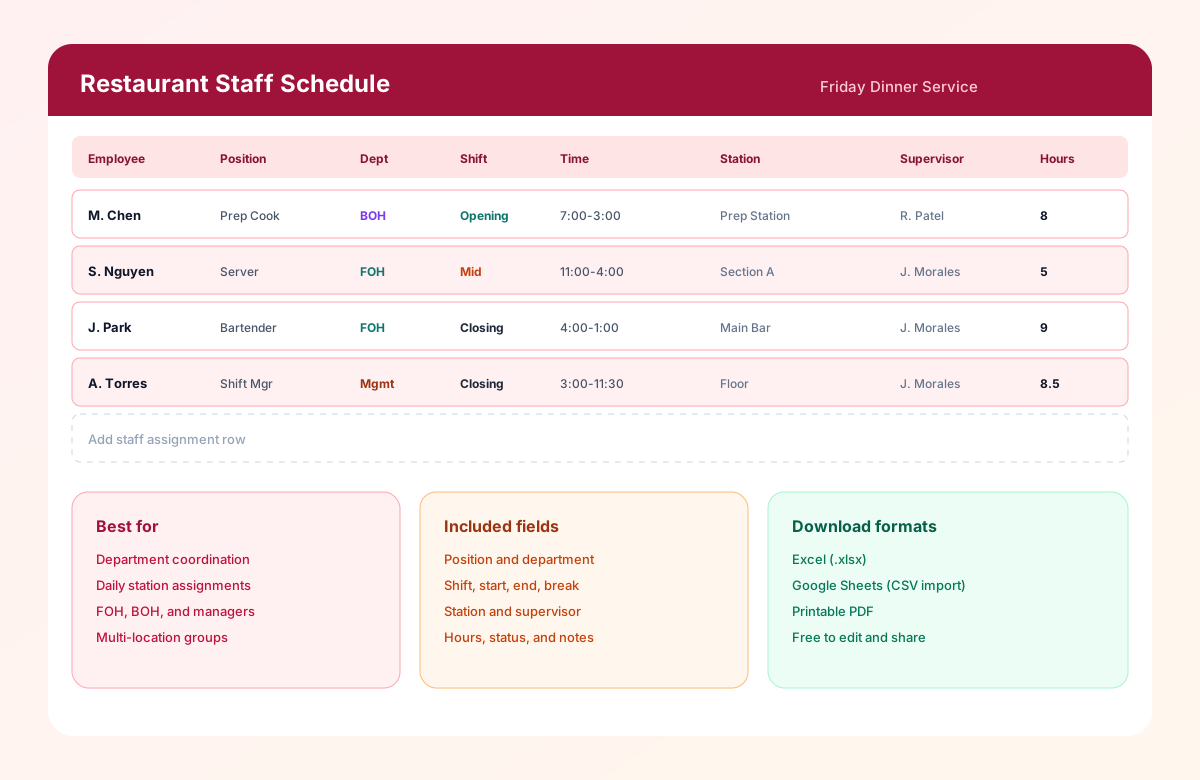
The preview shows Front of House and Back of House coverage with stations, supervisors, shift bands, and hours for a busy service day.
How to use the restaurant staff schedule template
How to use the restaurant staff schedule template
A restaurant schedule should do more than assign employees to shifts. Follow these seven steps to ensure every department has the right coverage, support smooth service during busy periods, and help control labor costs.
Create your staff list
Add every employee who may be scheduled with name, position, department, employment type, experience level, preferred hours, and weekly hour limit. An updated directory makes assigning stations much faster.
Staff managementOrganize employees by department
Group Front of House, Back of House, and Management so gaps in hosts, servers, bar, prep, line, dish, and supervisors are visible before publish.
Define your shift structure
Set opening, lunch, mid, dinner, closing, and split shift windows based on your operating hours and expected traffic. Adjust times for brunch or late nights as needed.
What is a split shift?Schedule based on business demand
Staff weekdays lighter and weekends heavier. Match servers, cooks, hosts, bartenders, runners, and bussers to expected volume instead of copying a flat roster every day.
Shift schedulingReview employee availability
Check approved leave, vacation, school schedules, preferred days, max weekly hours, and shift preferences before finalizing.
Employee availability formMonitor labor hours
Calculate scheduled hours, identify overtime, compare staffing with expected sales, and balance hours fairly across employees.
Overtime risk calculatorPublish the schedule
Share with employees, confirm assignments, notify staff of special events, and explain staffing changes at least one week in advance when possible.
Mobile schedule access
Benefits of using a restaurant staff schedule template
Improve team coordination
Everyone knows where they are scheduled, what role they are performing, which station they own, and who they are working with.
Reduce scheduling mistakes
Avoid double-booking employees, missing critical positions, or leaving departments understaffed during peak service.
Balance labor costs
Monitor scheduled hours and distribute shifts efficiently to reduce unnecessary overtime without hurting service quality.
Increase employee satisfaction
Fair scheduling practices improve morale, reduce burnout, and help retain experienced employees.
Improve customer service
Proper staffing levels ensure guests receive faster service, shorter wait times, and a better dining experience.
Simplify shift management
Managers can quickly review staffing levels across every department before publishing schedules.
Related resources
More templates, guides, and tools for building and running your schedule.
- TemplateRestaurant employee schedule template
- TemplateRestaurant shift schedule template
- TemplateKitchen staff schedule template
- TemplateServer schedule template
- TemplateBar staff schedule template
- TemplateFast food employee schedule template
- TemplateCafe staff schedule template
- TemplateEmployee schedule template
- TemplateEmployee availability form template
- TemplateRotating shift schedule template
- Template8-hour shift schedule template
- Template10-hour shift schedule template
- Template2-2-3 shift schedule template
- Template4-On 4-Off shift schedule template
- ResourceRestaurant scheduling software
- FeatureEmployee scheduling
- FeatureEmployee availability
- FeatureAttendance tracking
- FeatureLeave management
- FeatureMobile scheduling
- FeatureLabor cost monitoring
- AnswerWhat is employee scheduling software?
- AnswerWhat is employee availability management?
- AnswerWhat is shift coverage?
- AnswerWhat is workforce planning?
- AnswerWhat is overtime management?
- AnswerWhat is multi-location scheduling?
- AnswerWhat is workforce analytics?
- AnswerWhat is a split shift?
- AnswerWhat is shift swapping?
- ArticleRestaurant staff scheduling guide
- ArticleBest scheduling software for restaurants
- ResourceOvertime risk calculator
- ResourceStart 30-Day Free Trial