

Summary
Employee leave management is the process of tracking, approving, and managing time-off requests from employees, including vacation, sick days, personal leave, FMLA, bereavement, and unpaid absences. The goal is to ensure employees get their entitled time off while maintaining adequate staffing levels and shift coverage. For hourly teams, leave management is directly tied to scheduling: every approved absence creates a gap that needs to be filled. Software that combines leave management with shift scheduling shows coverage impact before a manager approves time off.
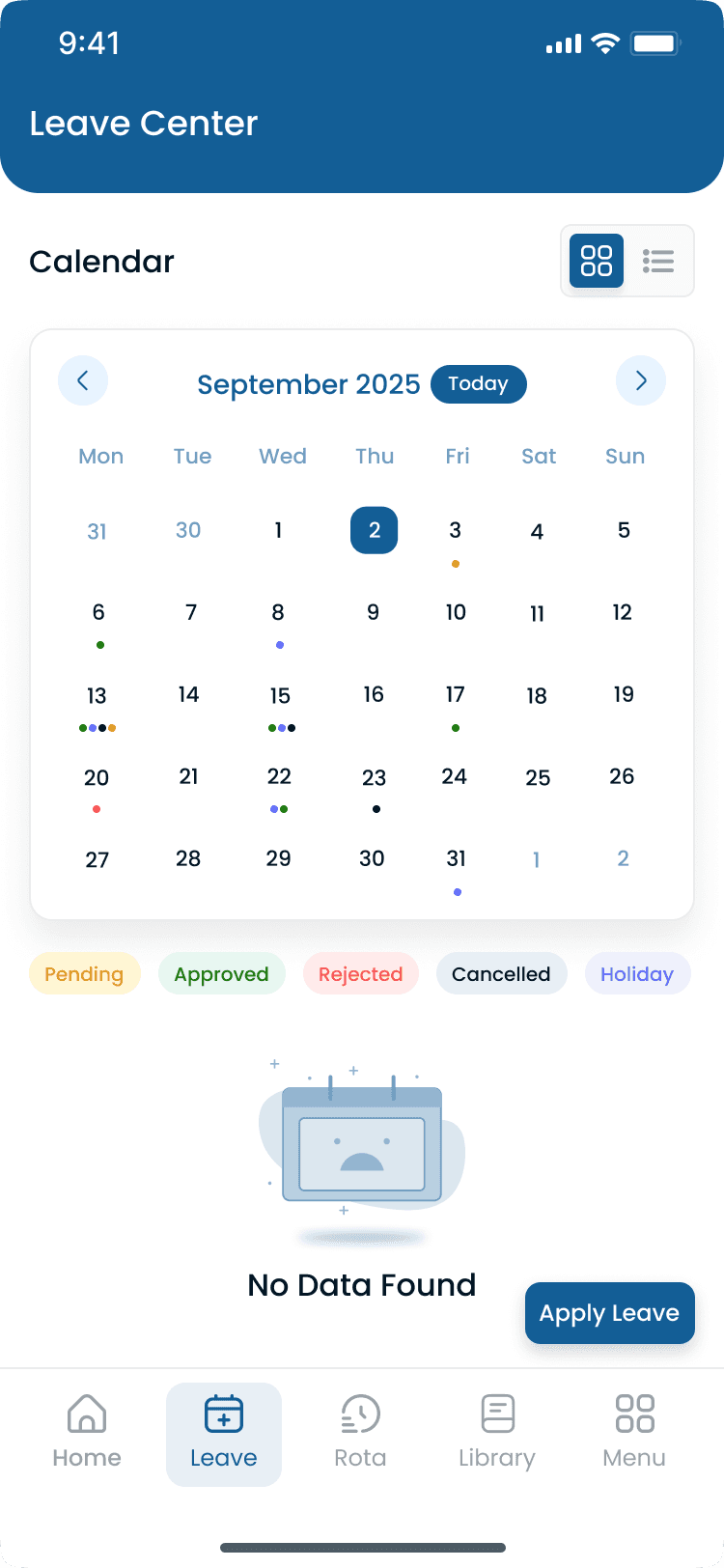
Step-by-step
How Leave Management Works
A complete leave workflow connects the request, coverage check, schedule update, and payroll export. This is how meal, rest break, and leave management fits beside attendance and scheduling in Heyshift.
Step 1: Employee submits request
The employee selects dates, leave type (vacation, sick, personal), and adds a note if needed. The request routes to their manager on web or mobile app.
Step 2: System checks conflicts
Before the manager decides, the system checks leave balance, overlapping team absences, schedule coverage impact, and blackout dates.
Step 3: Manager reviews and decides
The manager sees remaining balance, who else is off, and whether approval would short-staff the shift. Approve or deny with one tap and a documented reason.
Step 4: Schedule updates
If approved, the balance deducts, the roster shows Off on those dates, open shifts or reassignments become available, and the team sees the change on the published schedule.
Step 5: Payroll reflects leave
At pay period end, paid leave days pay at regular rate, unpaid days exclude from payroll, and balances roll forward for the next period.
“If requesting leave is harder than calling off, employees will call off. Make the formal path faster than the informal one.”
Examples
Types of Employee Leave and USA Compliance
Federal laws to know: FMLA — employers with 50+ employees must provide up to 12 weeks of unpaid, job-protected leave per year for qualifying reasons. USERRA — military service members get job-protected leave for up to 5 years cumulative service. ADA — reasonable accommodation may include additional unpaid leave for employees with disabilities. Many states require paid sick leave; Texas, Florida, Georgia, Alabama, and Mississippi do not mandate it at the state level, though employers may offer it voluntarily.
Types of employee leave in the USA
| Leave type | Paid/unpaid | Required by law? | Typical allowance |
|---|---|---|---|
| Vacation / PTO | Paid | No (federal); some states require | 10–20 days/year |
| Sick leave | Paid | No (federal); 15+ states require | 5–10 days/year |
| FMLA | Unpaid | Yes (50+ employees) | Up to 12 weeks/year |
| Bereavement | Paid | No (federal); some states require | 3–5 days |
| Jury duty | Paid or unpaid | Yes (all states require time off) | Duration of service |
| Military leave | Unpaid (job-protected) | Yes (USERRA) | Up to 5 years cumulative |
| Personal leave | Varies | No | 1–5 days/year |
| Parental leave | Varies | FMLA applies; some states add paid | 4–12 weeks |
| Voting leave | Paid (some states) | Yes (most states) | 1–3 hours |
State paid sick leave examples
| State | Requirement | Accrual rate |
|---|---|---|
| California | Mandatory paid sick leave | 1 hour per 30 hours worked (min 5 days/year) |
| New York | Mandatory paid sick leave | 1 hour per 30 hours worked (up to 56 hours/year) |
| Arizona | Mandatory paid sick leave | 1 hour per 30 hours worked |
| Washington | Mandatory paid sick leave | 1 hour per 40 hours worked |
| Colorado | Mandatory paid sick leave | 1 hour per 30 hours worked (up to 48 hours/year) |
| New Jersey | Mandatory paid sick leave | 1 hour per 30 hours worked (up to 40 hours/year) |
Common leave accrual methods
Typical accrual cap: 1.5× to 2× annual allowance (for example 30 days max when annual is 15). Once the cap is reached, accrual stops until the employee uses leave. California allows caps but not use-it-or-lose-it policies.
| Method | How it works | Example (15 days/year) |
|---|---|---|
| Per pay period | Earn X hours each pay period | 4.62 hours per bi-weekly pay period |
| Per hour worked | Earn X hours for every Y hours worked | 1 hour PTO per 26 hours worked |
| Monthly | Earn X days per month | 1.25 days per month |
| Annual front-load | Full balance available on anniversary | 15 days available on hire date |
Comparison
Leave Management — Spreadsheet vs Software
Spreadsheets work for a handful of employees until overlapping requests, accrual math, and schedule coverage outpace manual tracking.
| Feature | Spreadsheet | Leave management software |
|---|---|---|
| Balance tracking | Manual calculation, error-prone | Automatic accrual and deduction |
| Request process | Email or verbal, manager updates sheet | Employee submits in app, manager approves |
| Coverage check | Manager checks schedule separately | Automatic conflict detection |
| Compliance | Manual FMLA and state law tracking | Automated alerts and caps |
| Audit trail | Email threads easy to lose | Complete log of requests and decisions |
| Employee visibility | Must ask manager for balance | Self-service balance anytime |
| Overlapping requests | Discovered after approval | Flagged before approval |
| Payroll integration | Manual entry of leave days | Auto-export to payroll |
Combined leave and scheduling software prevents the gap between approved PTO and an understaffed shift. Heyshift ties leave requests to the published roster from $4/user/month with unlimited locations.
Best practices
Common Problems Leave Management Solves
Spreadsheet and email leave tracking breaks down once multiple managers, locations, and state rules enter the picture.
| Practice | Why it works |
|---|---|
| No visibility into leave balances | Employees do not know how many days they have left; managers cannot check quickly during a shift change request. |
| Coverage gaps | Leave approved without checking if the shift can be covered. The roster shows a hole on publish day instead of at request time. |
| Overlapping requests | Multiple employees request the same days off, leaving shifts understaffed during peak periods. |
| Compliance violations | Not tracking FMLA hours, exceeding state sick leave caps, or denying legally protected leave without documentation. |
| Inconsistent approvals | Some managers approve everything; others deny without reason, creating fairness and legal risk. |
| Manual tracking errors | Spreadsheet mistakes lead to employees getting more or fewer days than entitled. |
| No audit trail | When disputes arise, there is no documentation of who requested what and when it was approved. |
| Accrual confusion | Employees and managers disagree on how many days have been earned when accrual rules are not visible in one system. |
Features
Leave Management Best Practices
Policy on paper only works when managers run the same workflow every week.
| Feature | Why it matters |
|---|---|
| Make requesting easy | If it is hard to request leave, employees call off instead of using PTO. |
| Respond quickly | Set a maximum response time (for example 48 hours for vacation requests). |
| Be consistent | Apply the same rules to everyone. Inconsistency creates legal and morale risk. |
| Plan for peak seasons | Set blackout dates or maximum-off limits well before holiday or inventory weeks. |
| Track patterns | Frequent Monday or Friday sick days may indicate a policy or scheduling issue, not isolated illness. |
| Separate sick from vacation | Employees should not have to save sick days for actual illness when policies allow separate banks. |
| Communicate balances | Employees should always know how many days remain without asking a supervisor. |
| Document everything | Every request, approval, and denial should be recorded for compliance and disputes. |
| Review annually | Update policy based on usage patterns, turnover, and law changes in your states. |
| Connect to scheduling | Leave approvals should automatically update the work schedule and flag open coverage needs. |
Buyer's guide
How to Build a Leave Policy
Document leave types, accrual, caps, request rules, and approval authority before disputes or compliance gaps appear.
| # | Question | What to verify |
|---|---|---|
| 1 | Define leave types and allowances | Decide vacation, sick leave (check state minimums), personal days, bereavement, and legally required categories such as jury duty, voting, and military leave. |
| 2 | Set accrual rules | Choose front-loaded (all days on January 1 or hire anniversary), accrual-based (for example 1.25 days per month), or tenure-based increases after 1, 3, or 5 years of service. |
| 3 | Define carryover and caps | Can unused days roll over? Set a maximum balance cap (often 1.5× to 2× annual allowance) and any use-it-or-lose-it deadline, subject to state law. |
| 4 | Set request rules | Minimum advance notice (two weeks for vacation, same-day for sick), blackout dates for peak seasons, max employees off per shift, and documentation rules (doctor's note after three consecutive sick days). |
| 5 | Define approval authority | Who approves: direct manager, HR, or auto-approved under thresholds? Escalate if no response within X days. Document denial reasons consistently. |
| 6 | Payout on termination | Are unused vacation days paid out? Required in some states such as California. Sick days usually do not pay out. Define the calculation method in writing. |
Expertise & sources
Why trust this guide
ReviewedThis guide explains employee leave management for managers who handle time-off requests, PTO tracking, and coverage planning for hourly teams. It covers leave types, compliance requirements, accrual policies, and practical workflows. Written for USA operators managing hourly teams across multiple locations.
Heyshift Team
Workforce scheduling research · USA multi-location operators
Heyshift publishes scheduling playbooks used by operators in restaurants, retail, warehouses, and clinics. We focus on practical workflows managers can run every week, not abstract HR theory.
Published & updated
Sources
4 external · 1 on Heyshift
| Source | Reference |
|---|---|
DOLU.S. Department of Labor | Family and Medical Leave Act (FMLA) |
DIRCalifornia Division of Labor Standards Enforcement | California paid sick leave |
DOLNew York State Department of Labor | New York paid sick leave requirements |
SHRMSociety for Human Resource Management (SHRM) | PTO and leave benchmarks |
| Further reading on Heyshift | |
| Heyshift answers library | What is employee scheduling software? |
Frequently Asked Questions
Manage leave beside the live roster
Track PTO balances, approve time off with coverage checks, and update schedules across every location from one dashboard. Start free with Heyshift and connect leave to your published roster in minutes.
No credit card required
Related resources
| Resource | Link |
|---|---|
| What is employee scheduling software? | Open |
| What is workforce management software? | Open |
| What is time and attendance software? | Open |
| How does shift scheduling work? | Open |
| What is a split shift? | Open |
| What is shift swapping? | Open |
| What is labor cost management? | Open |
| Leave management feature | Open |
| Shift scheduling feature | Open |
| Attendance tracker feature | Open |