

Healthcare staff scheduling software with a mobile app: features, benefits, and how to choose
Compare healthcare staff scheduling software with a mobile app. See how hospitals, clinics, and home care teams publish shifts staff can open on a phone.
A charge nurse starts the evening band and still does not know who is covering the last med-surg slot. The spreadsheet was emailed at noon. Two people already texted that they swapped. A caregiver is sitting in a parking lot trying to remember which client comes first. The clinic front desk is asking whether the medical assistant who called off is still on the board.
Healthcare scheduling is more complicated than assigning names to a grid. Managers coordinate nurses, caregivers, medical assistants, technicians, and administrative staff across shifts, units, and sites. Those people still need the current roster, availability, time off, swaps, and open shifts when they are not at a desk.
Healthcare staff scheduling software with a mobile app puts that workforce week on a phone. It is staff scheduling, not patient appointment booking. For vendor lists, use best healthcare staff scheduling software. For the broader operating model, use the healthcare workforce management guide.
This buying guide is for teams that already know they need software staff can use from a phone. It is not another general healthcare scheduling playbook.
Quick answer: what should a healthcare scheduling app do?
Staff should open the published week on a phone: date, hours, location or unit, department, and role. They should submit availability, request time off, request a swap, and see eligible open shifts. Managers should assign coverage, approve changes, and keep one official roster.
If the app only shows a static calendar, call-offs will still live in a group text.
Who this is for: nurse managers, clinic administrators, home-care coordinators, and multi-site healthcare operators in the USA who are comparing a healthcare scheduling app, not a patient booking tool.
What is healthcare staff scheduling software with a mobile app?
It is workforce scheduling software that lets healthcare managers and employees run the staff week from a phone.
Depending on the platform, teams can manage staff schedules, employee availability, time off, shift swaps, open shifts, attendance, departments, more than one location, and schedule notifications.
The mobile layer is not a screenshot of a desktop grid. It is the same published roster the manager builds, reviewed on a device staff already carry between units, exam rooms, and client visits.
A useful healthcare staff scheduling app usually includes:
- A published staff schedule with date, hours, site, unit, and role
- Employee availability that managers can see before they assign nights or weekends
- Time-off requests submitted from a phone
- A structured swap path with manager approval
- Open shifts offered to eligible staff
- Notifications when the official week changes
- Attendance next to the scheduled band
- Support for more than one clinic, facility, or home-care branch
This is not patient appointment software. Appointment books assign patients to rooms and providers. Staff scheduling assigns employees to shifts. Heyshift targets the workforce roster.
If a vendor demo spends most of its time on online booking, recall reminders, or exam-room calendars, you are in the wrong category. Those tools can be valuable. They do not replace a published staff week.
Why healthcare teams need mobile scheduling software
Healthcare employees are not always at a computer. Mobile access is how the published roster reaches the floor.
Nurses check the week before they start, often from a locker room, a break room, or the parking garage. They need to know the band, the unit, and whether last night’s coverage change stuck.
Caregivers travel between clients. The useful screen is today’s site, start time, and whether the assignment still matches what they were told on Monday.
Clinic staff work variable hours. A medical assistant may open Tuesday, close Thursday, and float Friday. If the only copy of that week is a printed sheet at the front desk, the person who arrives early still guesses.
Hospital teams move across departments. A float nurse can be assigned to a different unit than last week. The phone should show the current unit, not last month’s habit.
People request time off from a hallway, not a desktop. If leave only lives in email, the manager building next month’s nights will miss it.
Managers fill a call-off while standing at a station. They do not have time to rebuild a spreadsheet, text eight people, and then remember which version they sent.
Some employees work at more than one site. A receptionist who covers two clinics, or a caregiver who takes weekend facility shifts, needs the location on the same card as the hours.
The buying test is simple. Can a staff member who is not at a desk see the official week, and can a manager change that week without starting a side conversation that never updates the roster?
What features should healthcare scheduling software with a mobile app have?
Do not stop at "is there an app?" Ask what staff and managers can finish on the phone. A healthcare scheduling app that only mirrors a printed grid still leaves coverage in texts.
Mobile healthcare staff schedule
Employees should see date, shift, start and end time, location or unit, department, and role. They should not have to text a supervisor to learn where they report.
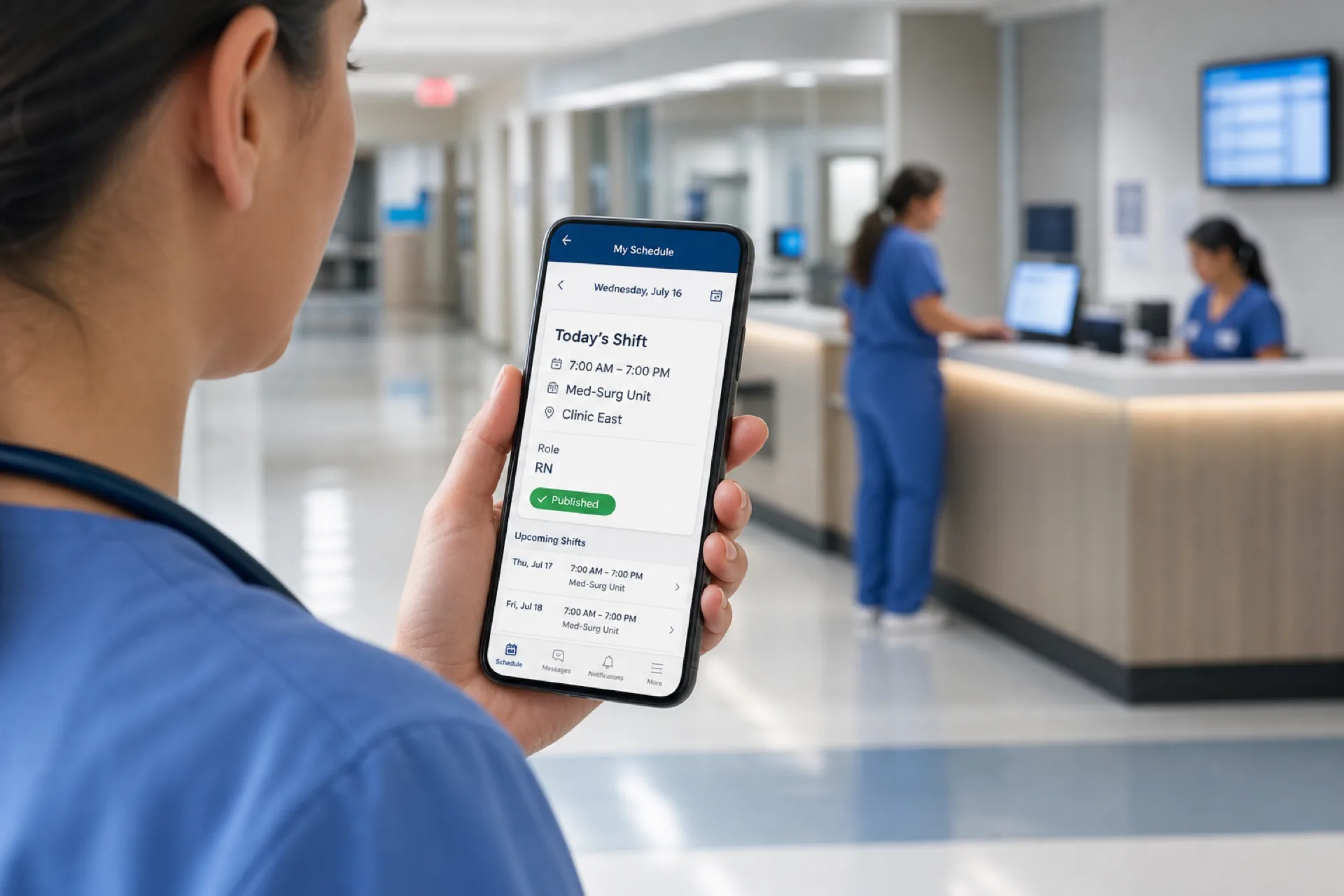
A useful card looks like this: Wednesday, 7:00 AM to 7:00 PM, Med-Surg, Clinic East, RN, Published. Missing any of those fields is how people arrive at the wrong building or the wrong band.
Staff should also see the rest of the published week, not only today. Weekend rotations, on-call notes you choose to publish, and the next night sequence matter when people are planning childcare or a second job.
Employee availability
Staff should submit and update availability so managers see it before they assign a night or weekend. Recurring limits, temporary school calendars, and a short-term change after a leave all belong in the same place.
If availability lives in a binder or a chat thread, the manager will assign someone who already said they cannot work Friday nights. For the healthcare-specific process, see healthcare employee availability management.
Time-off requests
Employees should submit leave from the phone. Managers review it. The roster should reflect the decision.
The path should be visible: submitted, approved, or declined. A request that disappears into email is how you schedule a nurse on a day that was already approved off.
Confirm paid-leave, PTO, and any setting-specific rules with qualified HR or legal counsel. The software should capture the request and the decision. It should not invent your policy.
Shift swapping
A structured path is request, eligible accept, manager approve, official week update. Confirm clinical coverage rules with qualified HR or legal counsel before you allow a swap.
The phone is where most swap conversations start. If the app cannot hold the request, two people will "agree" in a message and the official roster will still show the original names.
A swap should not create another conflict, extra hours you did not intend, an availability clash, or a location problem. The manager still owns the published week.
Open shifts
Managers can publish uncovered hours to eligible staff instead of calling down a list.
A useful open shift states the date, hours, site or unit, role, and who is allowed to claim it. A vague "can anyone take tonight?" message reaches the wrong people and still leaves the board empty.
Staff should see only the open shifts they are eligible for. A clinic medical assistant should not wade through hospital night bands they cannot work.
Shift notifications
Staff should hear when the published week changes, an open shift appears, or a request is decided.
Notifications are not decoration. They are how a 6:00 AM start reaches someone who left the building at 7:00 PM. If people still screenshot the grid and text "did this change?", the notification path is not doing the job.
Attendance
Scheduling says what should happen. Attendance says what happened. Managers should be able to compare the two. See healthcare staff attendance tracking.
A mobile attendance path can help a supervisor see that a caregiver clocked in after the published start, or that a clinic closer stayed past the planned end. That comparison belongs next to the roster. It is not a substitute for payroll, HR, or timekeeping policy.
Multiple locations
Useful for clinic groups, medical offices, care facilities, home healthcare branches, and multi-site operators.
Each shift should name the workplace. A shared first name on two clinic boards is not enough. The employee view and the manager view should share the same site label.
Department scheduling
A med-surg night is not a clinic front desk. The week should show unit or department requirements, not only a name.
Healthcare organizations often staff by role inside a department: RN, LPN, medical assistant, technician, front desk, and support. The mobile card should make the role obvious so a float assignment does not get read as "just show up."
Manager controls
Managers should control approvals, edits, and the official published roster.
Employee self-service only works when someone can still say no. Time off, swaps, and open-shift claims should not silently rewrite the week. The manager publishes. Staff follow the published week.
How mobile healthcare staff scheduling works
The complete path is the product, not a feature list.
- The manager builds the week.
- Availability and time off are checked.
- Staff are assigned to shifts.
- The week is reviewed.
- The schedule is published.
- Employees open it on a phone.
- They request swaps or time off as needed.
- The manager approves changes.
- The published roster stays current.
If a step happens in a side spreadsheet, you have two weeks again.
A worked clinic example: the administrator drafts next week on Monday. Two medical assistants have school limits already in availability. One nurse has approved Thursday off. Those constraints are visible before names are dropped onto Friday close. The week is published Tuesday. Staff open it that night. Wednesday, a front-desk call-off creates an open shift. An eligible employee claims it. The manager approves. Thursday morning, the phone shows the new name. Attendance on Friday is compared with that published close, not with a text thread from Wednesday.
A hospital unit follows the same spine with more bands. The charge nurse still publishes. Night staff still need the current assignment on a phone before they leave home.
Employee view vs manager view on a healthcare scheduling app
Employees and managers should not see the same screen.
Employees typically need:
- Today and the published week
- Site, unit, and role
- Availability updates
- Time-off requests
- Swap requests and eligible open shifts
- Notifications
- Their own attendance details, if you use them
Managers typically need:
- The builder and coverage view
- Availability and leave across the team
- Open-shift publishing
- Approvals for swaps and time off
- Multi-location or multi-department hours
- Publish and edit rights
- Attendance compared with scheduled bands
Keep the employee path short. A caregiver between visits will not complete a ten-step form to see tomorrow’s client site. Give managers the controls that protect the official roster.
If a vendor shows one login that lets every employee edit the shared grid, you do not have manager controls. You have a group spreadsheet with a nicer skin.
Mobile scheduling for nurses and clinical staff
Nurses and clinical teams often work days, nights, rotating bands, and weekends. They need availability, swaps, open shifts, and last-minute coverage without losing the official week.
A nurse scheduling app, in this buying sense, is still staff scheduling. It should show the published band and the unit. It should not pretend to assign patients, set acuity, or replace a clinical staffing committee.
Common workforce patterns the phone has to support:
- Day and night 12-hour bands
- Rotating weekends
- Float or unit changes after publish
- Last-minute call-offs before handoff
- Swap requests that still need a qualified counterpart
- Open nights that should reach eligible staff, not the entire directory
Keep the focus on workforce operations: who is assigned, where they report, and whether the shift is published. Do not treat the app as a clinical acuity or patient-assignment tool.
Confirm any nurse-to-patient, licensure, or overtime rules with qualified HR or legal counsel. The software can show hours and assignments. It cannot certify that a coverage choice meets your setting’s requirements.
Mobile scheduling for caregivers
Caregivers need the client or site, the hours, the current assignment, and any change. Home healthcare staff spend the day away from an office, so the phone is the roster.
A caregiver who learns a 10:00 AM visit moved only after arriving at the previous address loses time and trust. The mobile card should update when the official week updates.
Home healthcare also mixes employee schedules with client locations. That is still staff scheduling. It is not automatically electronic visit verification, clinical routing, or mileage policy. Those may sit in other systems. Do not buy a scheduling app by assuming it replaces them.
For product fit, see home healthcare scheduling software. For the field workflow, see caregiver scheduling best practices.
Ask the demo to show a caregiver opening tomorrow’s published visits on a phone, requesting time off from the field, and seeing an open weekend shift they are eligible to claim. If those three actions require a desktop, the mobile story is incomplete.
Mobile scheduling for clinics and medical offices
Clinics schedule nurses, medical assistants, front desk, technicians, support, and admin teams around office hours and walk-in volume.
The week often looks quieter than a hospital board and still breaks in the same places. Someone opens. Someone closes. Someone floats between rooms. A provider is out, so the medical assistant grid changes. If those edits stay in a whiteboard photo, Friday’s closer will follow yesterday’s plan.
Again: this software manages employee shifts. It does not replace a patient appointment book.
A clinic buying a healthcare employee scheduling app should still be able to:
- Publish mixed roles on one week
- Show the office or suite when the group has more than one site
- Let staff request time off without emailing the office manager
- Post an uncovered Friday afternoon to eligible people
- Keep the official roster after a same-day swap
If the product’s homepage is about patients booking online, keep looking. You can run an appointment system and a staff roster. They answer different questions.
Mobile scheduling for multi-location healthcare organizations
A group may run clinics, offices, care facilities, and home-care branches. Some people work at more than one site.
The useful view is employee, location, department, and shift. That reduces double-booking, location clashes, coverage gaps, and "which building am I at?" confusion. See multi-location healthcare workforce management.
A receptionist scheduled at Clinic A at 8:00 AM should not also appear at Clinic B at 8:00 AM unless that is an intentional, published choice. A caregiver who works facility weekends and weekday home visits needs both workplaces on one phone.
Managers need rollup without losing the local week. A regional lead should see that Thursday is thin at the west clinic without exporting five files. Local supervisors should still publish their own roster.
Mobile access matters more as sites increase. Staff will not drive to an office computer to check a second location’s Saturday board.
How mobile scheduling helps manage healthcare open shifts
A call-off can empty a unit in minutes. The manager publishes an open shift, eligible staff see it, someone responds, the manager approves, the official week updates.
That path only works if the offer reaches a phone. Calling down a list while standing at a station is slow, and the first person who would have taken the band may never see the message.
A clean mobile open-shift loop:
- The manager marks the uncovered band.
- Eligibility is limited by role, site, availability, and existing assignments.
- Eligible staff get a notification.
- Someone claims or declines.
- The manager approves.
- The published roster updates.
- Attendance later compares against the new assignment.
For the healthcare operations page, use healthcare open shift management. This article’s job is narrower: the claim has to be possible on a phone, and the official week has to change when the claim is approved.
Healthcare shift swapping from a mobile app
The path is: employee requests a swap, an eligible person accepts, the manager approves, the official schedule updates.
Most swap conversations start after publish, on a phone, between two people who already know each other’s weeks. If the app cannot hold that request, the conversation becomes a private deal. Private deals are how a unit thinks it is covered and the time clock shows someone else.
A swap should not create:
- Another scheduling conflict
- Hours you did not intend
- An availability clash
- A location problem
- A role mismatch you are not willing to accept
Confirm overtime and staffing rules with qualified HR or legal counsel. For the healthcare swap process, see healthcare shift swapping.
On mobile, the minimum is: start the request, see whether a counterpart accepted, and see the manager decision. If staff still text "we swapped, can you change the sheet?", the workflow is not finished.
Healthcare scheduling software vs spreadsheets
Spreadsheets can work for a small, stable clinic week. They get harder as units, roles, and sites increase.
A spreadsheet is not always the wrong tool. A five-person dental office with fixed hours may keep a simple grid for a long time. The break appears when nights, floats, call-offs, and a second site show up in the same week.
| Requirement | Spreadsheet | Healthcare scheduling software |
|---|---|---|
| Staff schedule | Manual | Centralized |
| Availability | Separate file | In the same week |
| Time off | Manual | Structured request |
| Shift swaps | Messages | Workflow |
| Open shifts | Calls and texts | Published offer |
| Mobile access | Limited | App-based |
| Multiple locations | Hard to merge | One workforce view |
| Schedule changes | Separate notice | Published update |
| Attendance | Separate | Connected workflow |
Software does not remove every coverage problem. It reduces the number of unofficial versions of the week.
The mobile gap is usually the deciding one. A spreadsheet emailed as a PDF is not the same as a healthcare shift scheduling app that updates when the manager publishes a change.
How much does healthcare staff scheduling software cost?
Vendors price per employee, per location, per month, by feature pack, or by workforce size. Do not compare only the subscription.
Common models you will see:
- Per employee or per seat
- Per location
- Monthly subscription
- Feature-based plans
- Workforce-size tiers
Judge mobile access, scheduling, availability, time off, open shifts, swaps, attendance, multi-location support, and manager controls. A cheap calendar that leaves call-offs in a group chat still costs supervisor time.
Also price the work you already do by hand: rebuilding the week after a call-off, answering "when do I work?", fixing a swap that never hit the official roster, and reconciling attendance against three versions of Friday.
Heyshift paid plans start at $4, $6, and $9 per seat after a 30-day free trial, with unlimited locations on paid plans. Other vendors will quote differently. Do not treat a list price as the whole cost if mobile self-service is missing.
How to choose healthcare staff scheduling software with a mobile app
Use the demo as a rehearsal of next Tuesday, not a tour of icons.
- Does it schedule healthcare staff, not only a generic calendar?
- Can employees open the published week on a phone?
- Can staff manage availability?
- Can they request time off?
- Can they request a swap?
- Can managers publish open shifts?
- Can managers approve changes?
- Can it handle more than one location?
- Can it show departments and roles?
- Does attendance sit next to the roster?
- Will hourly and clinical staff actually use it?
- Can it grow as you add units and sites?
Bring real constraints to the trial. Use a night band, a weekend rotation, a caregiver with two sites, and a same-day call-off. If those four scenes still require a side spreadsheet, keep looking.
Ask who publishes. If every employee can overwrite the shared week, you will recreate the group-chat problem inside the product.
Ask what staff can finish offline or on a poor connection only if that matters for your home-care routes. Do not invent requirements you do not have. Do require that the published assignment is readable in a parking lot.
Common buying mistakes with healthcare scheduling apps
Teams often buy the wrong category. Patient appointment software looks polished and still leaves the staff week in Excel.
Teams often buy a calendar with a login. If staff cannot submit availability or time off, the manager remains the help desk.
Teams often skip the publish step. A draft that everyone can edit is not an official roster.
Teams often ignore eligibility on open shifts. Broadcasting every uncovered night to the whole directory creates noise and still misses the people who can take the band.
Teams often treat mobile as a nice extra. For caregivers and night staff, mobile is the product.
Teams often compare only price. A lower seat cost with no swap path still produces overtime from informal coverage.
Teams often skip manager approvals. Unreviewed swaps are how a unit is double-covered in one room and empty in another.
Why Heyshift for healthcare staff scheduling
Heyshift keeps staff scheduling, mobile access, availability, time off, open shifts, swaps, attendance, locations, and publish in one workspace. It is not an enterprise HRIS, and it is not a patient appointment system.
Healthcare managers need one reliable roster. Staff need the current assignment on a phone. That is the product test.
Use a trial the same way you would run a week: publish a real unit, let staff open it on a phone, post one open shift, and approve one change. If those steps stay in one system, you have a healthcare workforce scheduling workflow. If they bounce back to texts, you do not.
Who should consider a mobile healthcare scheduling app?
Any healthcare organization where staff work away from a desk, or where the week changes after it is posted, should consider a mobile healthcare scheduling app.
Hospitals with departments, nights, and weekend coverage. The phone has to show the unit and the published band before handoff.
Medical clinics with variable office hours and mixed roles. Front desk, medical assistants, and nurses share one week even when their hours do not match.
Urgent care with extended hours and changing volume. Same-day coverage moves are common. The official roster has to move with them.
Home healthcare agencies with mobile caregivers across client sites. The assignment lives in the field. The phone is the workplace copy of the week.
Assisted living with recurring coverage bands. Recurring does not mean frozen. Call-offs still need a published update.
Nursing homes with 24/7 rotating weeks. Night staff will not check an office PC at 5:30 AM.
Behavioral health with mixed clinical and support roles. Role and site still need to appear on the same card.
Dental practices with staff scheduled around chair hours. Smaller teams still benefit when the week leaves the whiteboard.
Confirm any setting-specific staffing rules with qualified HR or legal counsel. The app supports the roster. It does not replace those rules.
Healthcare mobile scheduling software buying checklist
- Mobile employee schedule
- Availability
- Time-off requests
- Shift swaps
- Open shifts
- Notifications
- Attendance
- Multiple locations
- Department or unit view
- Manager approvals
- One published roster
- Employee self-service
Print this list for the demo. Check a box only when you saw a staff member finish the action on a phone, not when the salesperson said the feature exists.
Final thoughts
A healthcare scheduling app should carry the official staff week, not decorate a calendar.
The useful path is build, check constraints, publish, notify, manage swaps and open shifts, then compare attendance.
Healthcare managers need one reliable roster. Staff need easy access to the current assignment. Choose software that keeps both of those jobs in the same published week, on a phone the team already carries.
Frequently Asked Questions
Continue with related topics
More articles on topics related to this one.

Healthcare staff scheduling software with compliance tracking: features, benefits, and how to choose
Compare healthcare staff scheduling software with compliance tracking. See qualifications, credentials, training, and assignments in one staff workflow.
Read article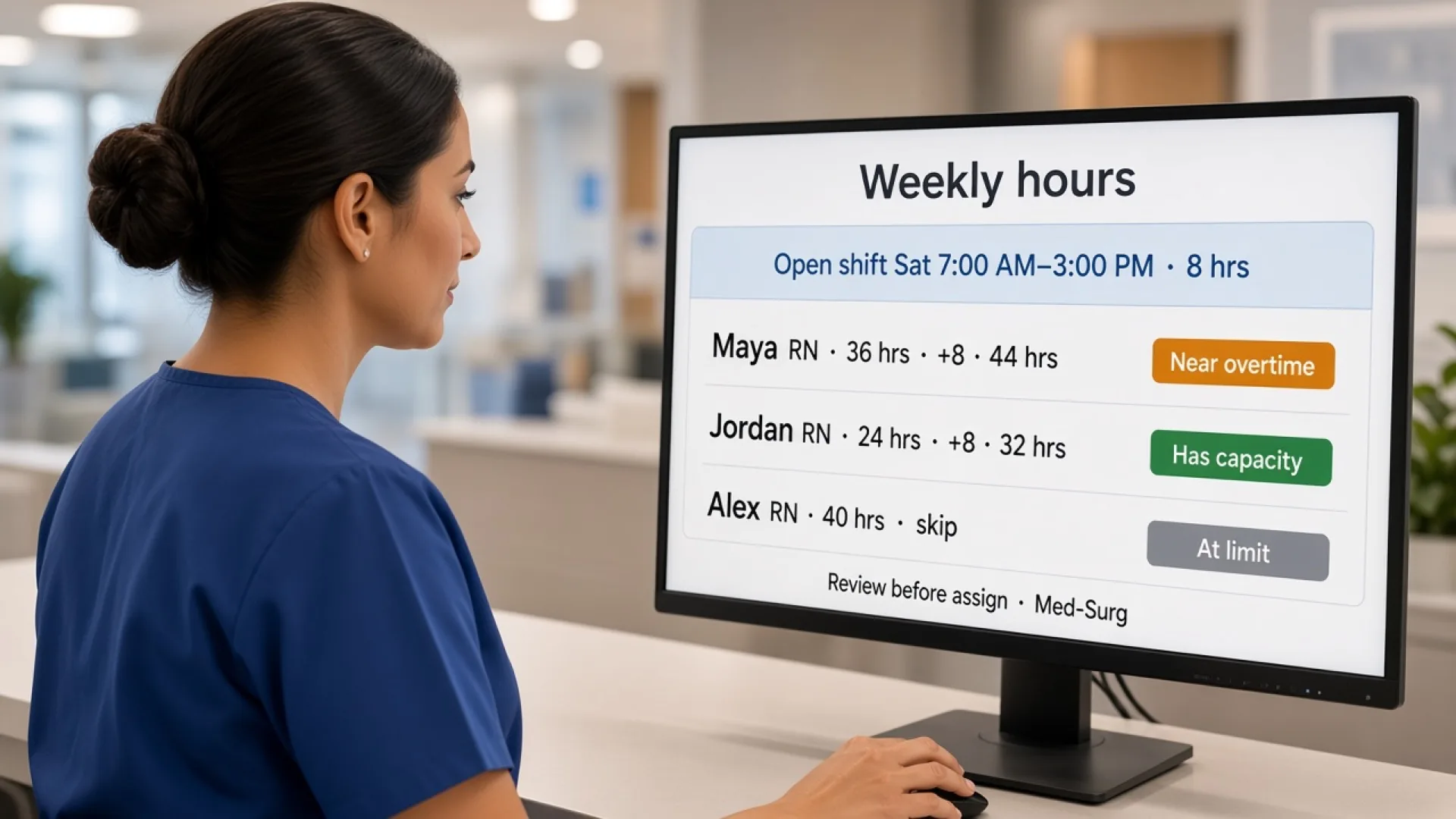
Healthcare staff scheduling software with overtime management: features, benefits, and how to choose
Compare healthcare staff scheduling software with overtime management. See how hours, alerts, attendance, and coverage help managers decide before they publish.
Read article
Healthcare staff scheduling software with attendance tracking: features, benefits, and how to choose
Compare healthcare staff scheduling software with attendance tracking. See how hospitals and clinics compare the published week with who actually worked.
Read article