

Summary
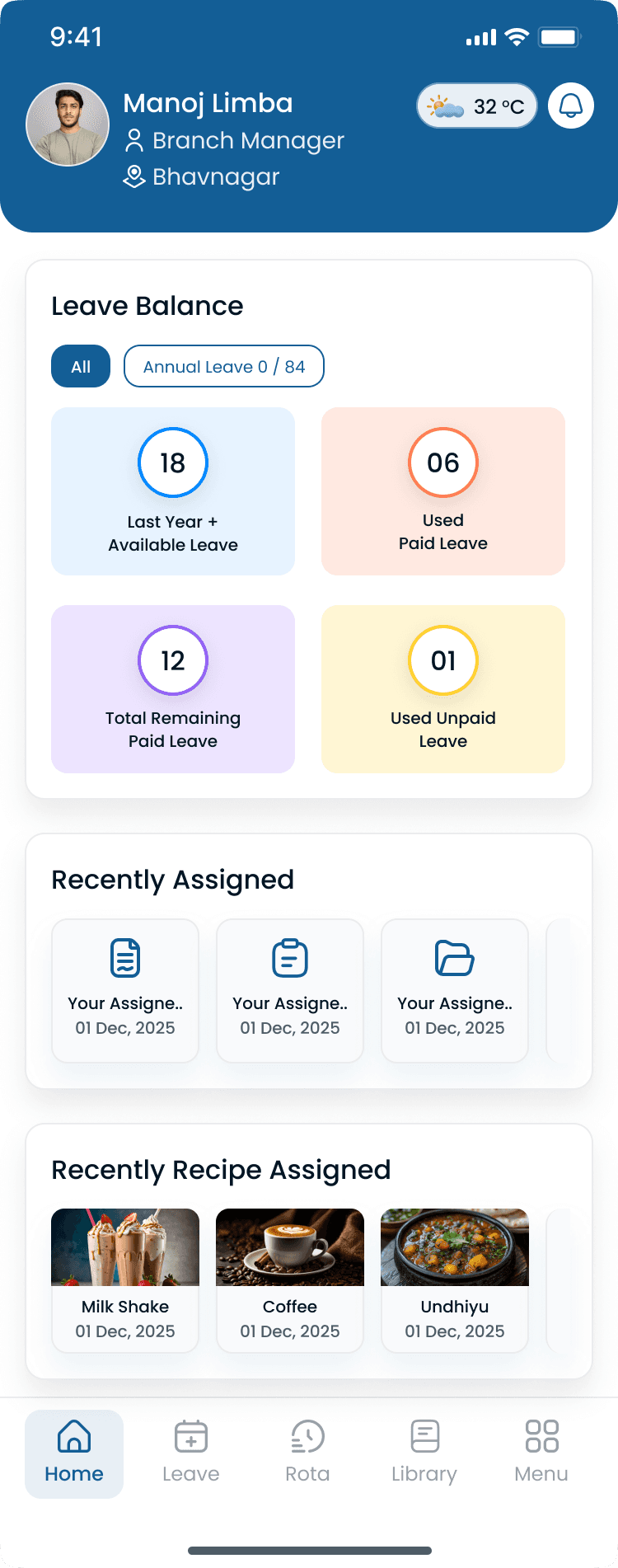
Employee Self-Service (ESS) is a secure web portal or mobile application that allows employees to manage routine workforce tasks without contacting a manager or HR. Employees can view schedules, request leave, update availability, accept open shifts, swap shifts, clock in and out, review attendance, and manage personal information through the mobile app connected to shift scheduling, the attendance tracker, and staff management. ESS is a core capability inside modern workforce management software.
Step-by-step
How Employee Self-Service Works
ESS sits between published schedules and manager approval. Employees act; managers govern exceptions and policy.
Step 1: Manager publishes schedules and policies
Rosters, leave rules, swap policies, and open-shift rules are configured in employee scheduling software.
Step 2: Employee logs in securely
Role-based access shows each employee only their schedules, hours, and requests.
Step 3: Employee completes self-service tasks
View shifts, clock in, update availability, request leave, swap shifts, or pick up open work within defined rules.
Step 4: Manager reviews exceptions
Supervisors approve leave, shift swaps, attendance corrections, and open-shift picks that require oversight.
Step 5: Data flows to payroll and analytics
Approved hours and leave feed time and attendance software and workforce analytics.
“Employee Self-Service is no longer a nice-to-have. Hourly teams expect mobile access to schedules, leave, and punches the same way they expect online banking.”
Examples
ESS vs Manual Administration
Compare common workflows before and after self-service adoption. Even small teams often save several hours per week.
Manual admin vs employee self-service
| Task | Manual approach | Employee self-service |
|---|---|---|
| View schedule | Text manager or check paper board | Open mobile app anytime |
| Request leave | Paper form or email chain | In-app request with balance view |
| Update availability | Phone call or group chat | Self-service availability form |
| Swap shifts | Manager texts multiple people | Policy-driven swap workflow |
| Clock in | Shared kiosk or honor sheet | Individual mobile or kiosk punch |
| Fix missed punch | Verbal request to supervisor | Correction request with audit trail |
Small business vs enterprise ESS
| Topic | Small business | Larger multi-site team |
|---|---|---|
| Primary benefit | Fewer manager interruptions | Consistent policy across locations |
| Typical size | Under 20 employees still gains hours weekly | District rollups and permissions |
| Must-have features | Schedule view, leave, mobile clock-in | Open shifts, analytics, compliance |
| Implementation | Often same day with cloud WFM | Phased rollout by location |
Features
What Employees Can Do with Self-Service
Capabilities depend on company policy and role permissions. Typical ESS features for hourly teams include the following.
| Feature | Why it matters |
|---|---|
| View schedules | See upcoming shifts, locations, and role assignments from web or mobile. |
| Clock in and out | Record attendance through the [mobile app](/features/mobile-app) and [attendance tracker](/features/attendance-tracker). |
| Request leave | Submit PTO and other leave requests through [leave management](/features/meal-rest-break-leave-management). |
| Check leave balances | View approved time off and remaining balances without emailing HR. |
| Update availability | Set when they can work via [people and availability](/features/people-availability). |
| Swap and pick up shifts | Initiate [shift swapping](/answers/what-is-shift-swapping) or accept [open shifts](/answers/what-is-open-shift-management) within policy rules. |
| View attendance history | Review punches and hours tied to [employee time tracking](/answers/what-is-employee-time-tracking). |
| Submit attendance corrections | Request missed punch fixes that managers approve before payroll export. |
| Update personal information | Maintain contact details and emergency info in [staff management](/features/staff-management). |
| Receive announcements | Get schedule reminders, policy updates, and company messages in the app. |
Why it matters
Why Employee Self-Service Matters
Hourly employees need fast answers about schedules, pay hours, and time off. ESS moves routine requests out of manager inboxes and into a secure app employees can use anytime.
| Pain point | What operators see |
|---|---|
| Improve communication | Published schedules, announcements, and shift changes reach staff instantly. |
| Reduce administrative work | Managers spend less time on repetitive questions and paper forms. |
| Increase schedule transparency | Employees see the same roster managers publish on [shift scheduling](/features/shift-scheduling). |
| Give employees more control | Self-service for availability, leave, and shift picks improves flexibility. |
| Improve productivity | Less back-and-forth means managers focus on operations, not data entry. |
| Reduce manual paperwork | Digital leave and availability replace printed forms and spreadsheet threads. |
| Support multi-location teams | One login works across sites with [multi-location scheduling](/answers/what-is-multi-location-scheduling). |
ESS connects to employee availability management, employee leave management, employee attendance tracking, and payroll-ready timesheet management when those modules share one platform.
Industries
Industries That Benefit from Employee Self-Service
Shift-based and hourly businesses with rotating schedules, multiple locations, or high manager-to-employee ratios see the largest ESS gains.
| Industry | Typical scheduling challenge |
|---|---|
| Restaurants | FOH and BOH staff view swaps, open shifts, and weekly rosters on mobile. |
| Retail | Store associates update availability and pick up hours across districts. |
| Healthcare | Clinicians request leave and view rotating schedules with less admin friction. |
| Hospitality | Housekeeping and front desk teams manage variable weekly hours on phone. |
| Warehouses | Shift workers clock in, view OT, and accept open picks on the floor. |
| Manufacturing | Line staff see rotating assignments and submit leave without paper forms. |
| Construction | Field crews view job-site schedules and submit availability from mobile. |
| Cleaning services | Client-site workers confirm shifts and request corrections in one app. |
| Security | Guards swap posts and view relief schedules with audit-friendly workflows. |
| Logistics | Drivers and dock staff manage variable shifts and time-off requests digitally. |
“Every text asking "what time do I work tomorrow?" is a self-service gap. Fix the portal, and manager interruptions drop fast.”
Buyer's guide
Employee Self-Service Best Practices
Roll out ESS with clear policies and manager habits so self-service reduces work instead of creating confusion.
| # | Question | What to verify |
|---|---|---|
| 1 | Start with high-volume requests | Schedule viewing, leave requests, and availability updates deliver the fastest ROI for managers and employees. |
| 2 | Define approval workflows | Document which actions auto-approve vs require manager sign-off (swaps, OT, corrections). |
| 3 | Train employees once, reinforce in onboarding | Short mobile app onboarding prevents "I didn't know I could do that" support tickets. |
| 4 | Use role-based permissions | Employees see their records; managers see their team; HR sees what policy allows. |
| 5 | Connect ESS to scheduling and attendance | Self-service only works when schedules, punches, and leave share one system of record. |
| 6 | Monitor adoption and manager time saved | Use the [manager time savings calculator](/tools/manager-time-savings-calculator) to estimate admin hours recovered. |
| 7 | Communicate policy in the app | Post swap rules, grace periods, and leave deadlines where employees act on them. |
Expertise & sources
Why trust this guide
ReviewedCreated by the Heyshift Team for business owners, operations managers, HR teams, and supervisors managing hourly employees across restaurants, retail, healthcare, hospitality, warehouses, manufacturing, construction, cleaning, security, logistics, and other shift-based industries in the USA. It is based on workforce management best practices, real operational workflows, and current employment standards.
Heyshift Team
Workforce scheduling and workforce management specialists
Heyshift helps businesses simplify employee scheduling, attendance tracking, labor cost control, and multi-location workforce operations through web and mobile self-service tools.
Published & updated
Sources
4 external · 1 on Heyshift
| Source | Reference |
|---|---|
DOLU.S. Department of Labor | Fair Labor Standards Act (FLSA) |
SHRMSHRM | Society for Human Resource Management (SHRM) |
NISTNational Institute of Standards and Technology | NIST Cybersecurity Framework |
EEOCU.S. Equal Employment Opportunity Commission | U.S. Equal Employment Opportunity Commission (EEOC) |
| Further reading on Heyshift | |
| Heyshift answers library | What is workforce management software? |
Frequently Asked Questions
Ready to give employees more control?
With Heyshift, employees view schedules instantly, clock in from the mobile app, update availability, request leave, swap shifts, accept open shifts, receive reminders, and track attendance. Managers spend less time on routine questions and more time running the business. Start your free trial.
No credit card required
Related resources
| Resource | Link |
|---|---|
| What is employee scheduling software? | Open |
| What is workforce management software? | Open |
| What is employee availability management? | Open |
| What is employee attendance tracking? | Open |
| What is employee time tracking? | Open |
| What is employee timesheet management? | Open |
| What is time and attendance software? | Open |
| What is employee leave management? | Open |
| What is open shift management? | Open |
| What is shift swapping? | Open |
| What is multi-location scheduling? | Open |
| What is workforce planning? | Open |
| Mobile app feature | Open |
| Shift scheduling feature | Open |
| Attendance tracker feature | Open |
| Meal, rest break, and leave management feature | Open |
| Staff management feature | Open |
| People and availability feature | Open |
| Attendance leakage calculator | Open |
| Scheduling ROI calculator | Open |
| Labor cost percentage calculator | Open |
| Manager time savings calculator | Open |
| Overtime risk calculator | Open |