

Free Hospital Staff Roster Template
Create organized weekly and monthly hospital staff rosters using our free Excel, Google Sheets, and PDF templates. Plan shifts for nurses, physicians, technicians, administrative staff, housekeeping, laboratory teams, and support departments while improving coverage and reducing scheduling conflicts.
Free download · No account required · CSV for Google Sheets
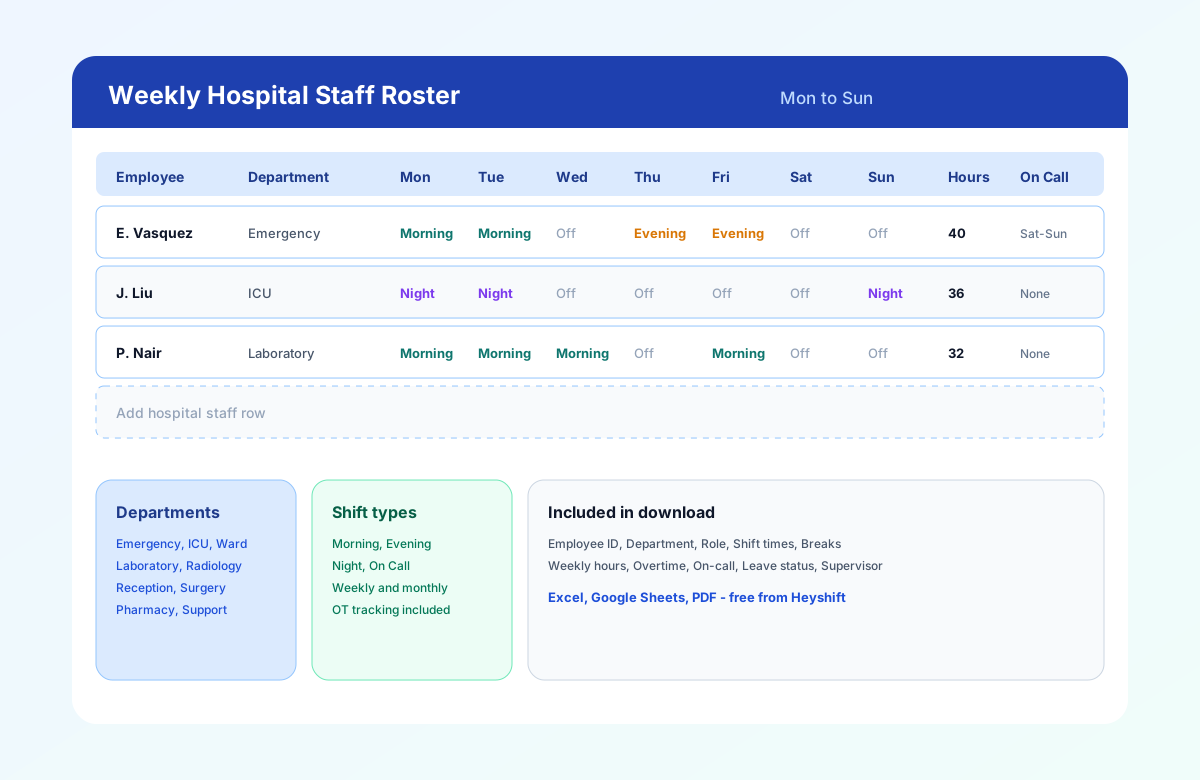
Table of contents
- Quick overview
- What is a hospital staff roster template?
- What is a hospital duty roster?
- Who should use this template?
- Departments included
- Hospital roster by department
- Download the template
- What's included?
- Template preview
- Key features
- Why hospital staff rosters are different
- How to plan hospital staffing coverage
- Hospital on-call roster
- Best practices for hospital rosters
- Common mistakes
- How to use the template
- Benefits of a structured hospital roster
- Spreadsheet vs scheduling software
- Why upgrade to Heyshift?
- Related templates
- Frequently asked questions
Quick overview
| Best for | Hospitals and medical centers |
| Schedule type | Weekly and monthly |
| Formats | Excel, Google Sheets, PDF |
| Editable | Yes |
| Printable | Yes |
| Free download | Yes |
| Shift types | Morning, evening, night, on-call |
| Multiple departments | Yes |
Featured answer: A free hospital staff roster template gives administrators and staffing coordinators a ready-made weekly grid for nurses, physicians, technicians, and support staff with departments, shift times, breaks, hours, overtime, on-call notes, and supervisor fields in Excel, Google Sheets, or PDF.
This page targets hospital roster template, hospital staff schedule template, hospital employee roster, hospital duty roster template, hospital shift roster, hospital staffing schedule, and hospital workforce schedule in one resource.
For broader healthcare settings, see the healthcare employee schedule template. For nursing-unit depth, see the nurse schedule template. For software, explore healthcare staff scheduling software.
What is a hospital staff roster template?
Hospital staffing is one of the most complex scheduling challenges in healthcare. A hospital operates around the clock, requiring the right mix of clinical and non-clinical employees on every shift to maintain patient care, operational efficiency, and regulatory compliance.
A hospital staff roster template provides a structured format for assigning employees to shifts across departments while helping managers track coverage, working hours, and staffing requirements.
Unlike a basic employee schedule, a hospital roster template coordinates multiple departments, different shift patterns, and varying staffing levels within a single planning document.
Use it to schedule nurses, physicians, technicians, pharmacists, laboratory staff, reception teams, housekeeping, security personnel, and administrative employees.
What is a hospital duty roster?
A hospital duty roster is a schedule that assigns employees to specific shifts, departments, and responsibilities for a defined period. It can include nurses, physicians, technicians, administrative staff, housekeeping, laboratory teams, and other hospital employees.
A hospital duty roster typically records:
- Employee name and role
- Department
- Date and shift
- Start and end time
- On-call assignment
- Leave or absence
- Weekly hours
- Overtime
- Supervisor or manager
The download on this page is the reusable hospital duty roster template for that official week. Use the healthcare employee schedule template when the same week includes clinic or outpatient settings outside the hospital campus.
Who should use this template?
| Setting | Why this template helps |
|---|---|
| Hospitals | Coordinate clinical and support coverage across the campus |
| Community hospitals | Standardize weekly rosters for smaller multi-department teams |
| Specialty hospitals | Plan credentialed staff by service line |
| Medical centers | Align outpatient and inpatient support schedules |
| Surgical centers | Schedule OR, recovery, and perioperative support |
| Children's hospitals | Balance pediatric units and specialized roles |
| Rehabilitation hospitals | Align therapy support with nursing coverage |
| Teaching hospitals | Document rotations and supervisor ownership |
| Veterans hospitals | Publish consistent rosters across departments |
| Private healthcare facilities | Replace ad hoc spreadsheets with one official grid |
Hospital administrators, HR, staffing coordinators, and operations managers are the typical buyers who start with a roster template before evaluating scheduling software.
Departments included
This hospital shift roster supports scheduling across:
Clinical departments
- Emergency Department (ED)
- Intensive Care Unit (ICU)
- Medical Ward
- Surgical Ward
- Pediatrics
- Maternity
- Oncology
- Cardiology
Diagnostic services
- Laboratory
- Radiology
- Imaging
- Pathology
Support services
- Pharmacy
- Reception
- Admissions
- Billing
- Housekeeping
- Maintenance
- Security
- Food services
Rename columns and departments to match your facility's org chart.
Hospital roster by department
A hospital staff roster may be organized by clinical, diagnostic, and support departments.
Clinical: ED, ICU, medical/surgical wards, pediatrics, maternity, oncology, cardiology.
Diagnostic: Laboratory, radiology, imaging, pathology.
Support: Pharmacy, admissions, reception, billing, housekeeping, maintenance, security, food services.
Keep nursing-unit depth on the nurse schedule template. Use this page when one hospital week includes clinical and support departments on the same roster.
Download the hospital staff roster template
| Format | Best for |
|---|---|
| Excel (.xlsx) | Offline editing, formulas, and local save on coordinator PCs |
| Google Sheets (CSV import) | Shared editing with nurse managers and department leads |
| Printing for notice boards, nursing stations, and department offices |
Use the download buttons at the top of this page. Each file includes Heyshift branding, sample hospital rows, and blank rows for additional staff.
Google Sheets tip: Open Google Sheets, choose File > Import, upload the CSV, and share with department heads before you publish the official roster.
What's included?
| Column | Purpose |
|---|---|
| Employee Name | Identifies scheduled staff |
| Employee ID | Matches payroll, badge, or HRIS records |
| Role | RN, MD, Lab Tech, Rad Tech, Pharmacy, Reception, etc. |
| Department | ED, ICU, Ward, Lab, Radiology, Pharmacy, etc. |
| Mon-Sun | One shift label per day, such as 7 AM-7 PM, 3 PM-11 PM, or Off |
| Weekly Hours | Excel calculates this after you enter a name |
| Overtime Hours | Hours above 40 for coordinator review |
| On-Call Assignment | Documents backup or weekend on-call rotation |
| Leave Status | Flags PTO, training, or inactive rows |
| Supervisor | Names accountable manager for the row |
| Notes | Certifications, skill mix, or coverage flags |
Excel also includes a Shift Times tab for start, end, and break times when you need punch-level detail.
Sample rows cover emergency, ICU, laboratory, radiology, and reception. Replace them with your roster or use blank rows at the bottom.
Template preview
| Employee | Department | Mon | Tue | Wed | Thu | Fri | Sat | Sun |
|---|---|---|---|---|---|---|---|---|
| E. Vasquez | Emergency | Morning | Morning | Off | Evening | Evening | Off | Off |
| J. Liu | ICU | Night | Night | Off | Off | Off | Off | Night |
| P. Nair | Laboratory | Morning | Morning | Morning | Off | Morning | Off | Off |
Department, role, shift, and on-call on one row:
| Employee | Role | Department | Shift | On Call |
|---|---|---|---|---|
| A. Patel | RN | ICU | 7 AM-7 PM | No |
| R. Khan | Physician | Emergency | 3 PM-11 PM | Yes |
| J. Lee | Lab Tech | Laboratory | 7 AM-3 PM | No |
| M. Smith | Housekeeping | Support | 3 PM-11 PM | No |
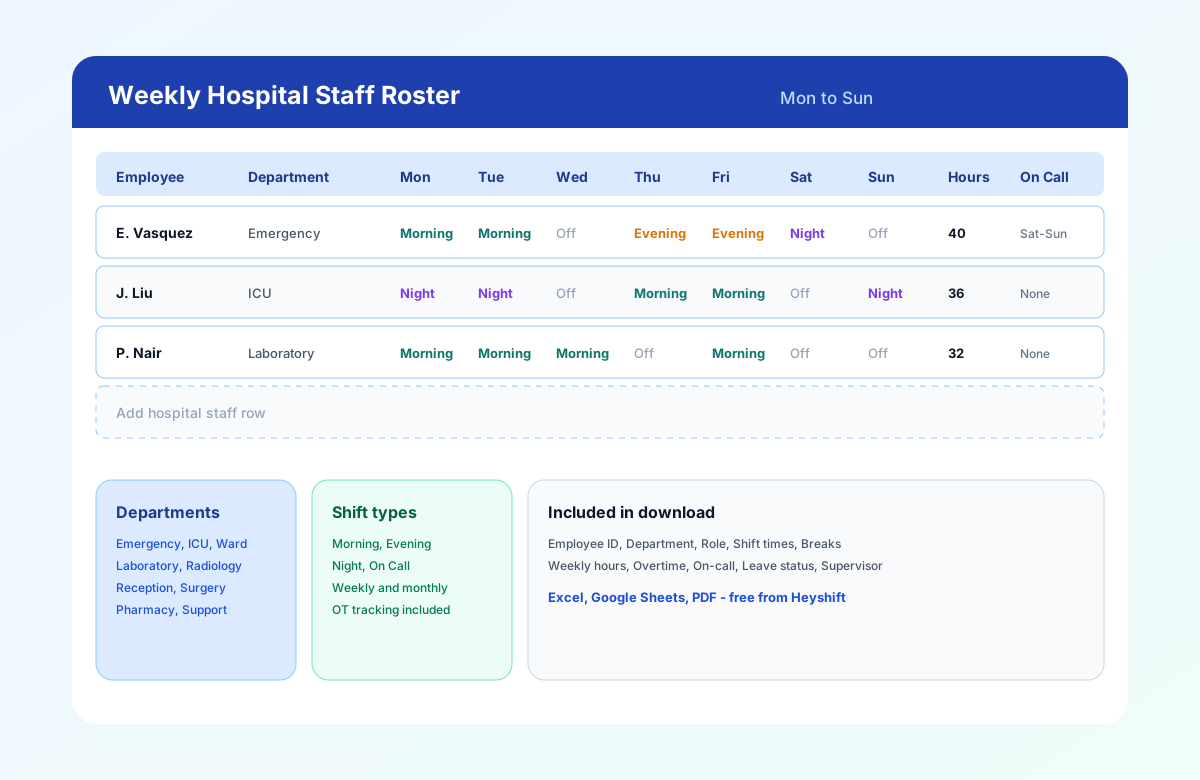
Hospital staff roster template with department, daily shift assignments, weekly hours, and on-call notes.
How to use the hospital staff roster template
Follow these five steps to publish a hospital roster your staffing coordinators, nurse managers, and department leads can trust.
Set the week and campus
Fill Week Of, Hospital/Campus, and Staffing Coordinator in the header. Align dates with payroll if you use weekly hour totals for overtime review.
Add staff by department
Enter employees with ID, role, and department. Group rows by ED, ICU, lab, radiology, and support services so coverage gaps are visible at a glance.
Staff managementAssign shifts and on-call
Fill start and end times by day, or use Morning, Evening, Night, and On Call labels. Document breaks and on-call backup in the dedicated columns.
Review hours, leave, and skill mix
Check Weekly Hours, Overtime, and Leave Status before publish. Confirm licensed staff are scheduled for specialized departments.
Overtime risk calculatorPublish and communicate
Export PDF for notice boards, share a read-only Google Sheet link, or email Excel to department heads. Publish at least one week ahead when possible.
Mobile roster access
Benefits of a structured hospital roster
Multi-department visibility
Emergency, ICU, lab, radiology, pharmacy, and support staff share one official roster instead of disconnected spreadsheets.
Buyer-ready planning format
Staffing coordinators and HR can standardize how rosters are built before evaluating scheduling software.
On-call and leave clarity
Dedicated columns for on-call assignment and leave status reduce confusion during weekends and holidays.
Overtime control
Track scheduled hours before payroll. Spot OT trends while there is still time to rebalance across departments.
Printable for floor teams
PDF layout works for nursing stations and department offices where not everyone has app access during a shift.
Related resources
More templates, guides, and tools for building and running your schedule.
- ResourceHealthcare staff scheduling software
- TemplateHealthcare employee schedule template
- TemplateEmployee availability form template
- TemplateHome healthcare schedule template
- TemplateCaregiver schedule template
- TemplateNurse schedule template
- TemplateNursing home staff schedule template
- TemplateHealthcare attendance sheet template
- TemplateHealthcare staffing matrix template
- Template12-hour nurse schedule template
- Template8-hour shift schedule template
- Template10-hour shift schedule template
- Template2-2-3 shift schedule template (Panama)
- Template4-On 4-Off shift schedule template
- TemplateClinic staff schedule template
- TemplateMedical office schedule template
- ResourceNurse scheduling software
- FeatureShift scheduling
- FeatureAttendance tracker
- FeatureStaff management
- FeatureMobile app
- AnswerWorkforce planning
- AnswerOvertime management
- AnswerSchedule conflict management
- AnswerWhat is employee scheduling software?
- ArticleBest healthcare scheduling software
- ResourceStart 30-Day Free Trial