Table of contents
Quick overview
|
|
| Best for |
Hospitals, clinics, nursing homes |
| Template type |
Attendance register |
| Formats |
Excel, Google Sheets, PDF |
| Editable |
Yes |
| Printable |
Yes |
| Free download |
Yes |
| Tracks |
Clock-in, absences, late, OT |
Featured answer: A free healthcare attendance sheet template gives nurse managers and HR teams a ready-made register to record clock-in, clock-out, attendance status, late minutes, overtime, and supervisor notes beside scheduled shifts in Excel, Google Sheets, or PDF.
This page targets healthcare attendance sheet, hospital attendance sheet template, nurse attendance sheet, employee attendance sheet healthcare, medical staff attendance template, and healthcare attendance register in one resource.
Pair this template with the healthcare employee schedule template for planning and healthcare attendance tracking best practices for operational depth. For software, explore attendance management software.
What is a healthcare attendance sheet?
Every healthcare organization schedules staff first, then needs to know who actually showed up. A missed punch on the night shift, a caregiver who leaves early, or a nurse who works two hours beyond the published roster affects payroll, coverage, and compliance.
A healthcare attendance sheet (also called an attendance register or punch log) records when employees clock in, clock out, arrive late, miss shifts, or work overtime. It sits beside the published schedule so supervisors can compare planned hours to actual hours.
Unlike a schedule template that plans future shifts, an attendance sheet documents what happened. HR and payroll use it to reconcile hours before export. Nurse managers use it to spot patterns: repeated late arrivals on Monday mornings, overtime clustering on weekends, or no-call no-shows on the overnight band.
Use it for nurses, CNAs, physicians, medical assistants, lab techs, radiology staff, receptionists, dietary workers, housekeeping, and administrative employees across hospitals, clinics, nursing homes, and home health agencies.
Who should use it?
| Setting |
Why this template helps |
| Hospitals |
Reconcile ED, ICU, and ward punches beside published rosters |
| Outpatient clinics |
Track MA, nurse, and front desk attendance by day |
| Nursing homes |
Document CNA and caregiver clock events by wing |
| Assisted living |
Monitor residential care staff across day and evening bands |
| Home health |
Log visit start and end times beside scheduled caseloads |
| Urgent care |
Capture evening and weekend punch exceptions quickly |
| Medical offices |
Align small-team attendance with payroll cutoff |
| HR and payroll |
Standardize exception codes before hour export |
Nurse managers, HR administrators, payroll leads, and operations directors are the typical buyers who start with an attendance sheet before evaluating attendance software.
Attendance status codes
Define a short legend and train supervisors to apply codes consistently. Recommended codes for healthcare teams:
| Code |
Status |
When to use |
| P |
Present |
Clocked in and out within policy; shift completed |
| L |
Late |
Arrived after scheduled start; record Late Minutes |
| A |
Absent |
Did not report; call-off or unapproved absence |
| NC |
No Call No Show |
Absent without notification |
| ED |
Early Departure |
Left before scheduled end time |
| OT |
Overtime |
Worked beyond scheduled hours; record Overtime Hours |
| PTO |
Paid Time Off |
Approved leave; no punch expected |
| HOL |
Holiday |
Scheduled holiday; no punch expected |
| TRN |
Training |
Off-floor training or orientation |
| MOD |
Modified Duty |
Restricted duty or light assignment |
Add your facility-specific codes (FMLA, jury duty, bereavement) in the Notes column until you adopt software with built-in leave types.
Download the healthcare attendance sheet template
| Format |
Best for |
| Excel (.xlsx) |
Offline editing, formulas, and local save on HR PCs |
| Google Sheets (CSV import) |
Shared review with nurse managers and department leads |
| PDF |
Printing for nurse stations, HR files, and audit archives |
Use the download buttons at the top of this page. No account required.
What's included?
Each row in the attendance register supports:
| Column |
Purpose |
| Employee Name |
Staff member on the register |
| Department |
ED, Med-Surg, Clinic, Skilled Nursing, Laboratory, etc. |
| Role |
RN, LPN, CNA, MA, Lab Tech, Receptionist, etc. |
| Date |
Day the shift or punch event occurred |
| Scheduled Shift |
Planned start and end from the published roster |
| Clock-In |
Actual punch-in time |
| Clock-Out |
Actual punch-out time |
| Attendance Status |
Present, Late, Absent, Overtime, PTO, etc. |
| Late Minutes |
Minutes past scheduled start |
| Overtime Hours |
Hours beyond scheduled end |
| Notes |
Call-off reason, correction, supervisor comment |
| Supervisor |
Manager who reviewed or approved the row |
Header fields include Pay Period, Facility / Campus, Attendance Manager, and Review Date for payroll alignment.
Template preview
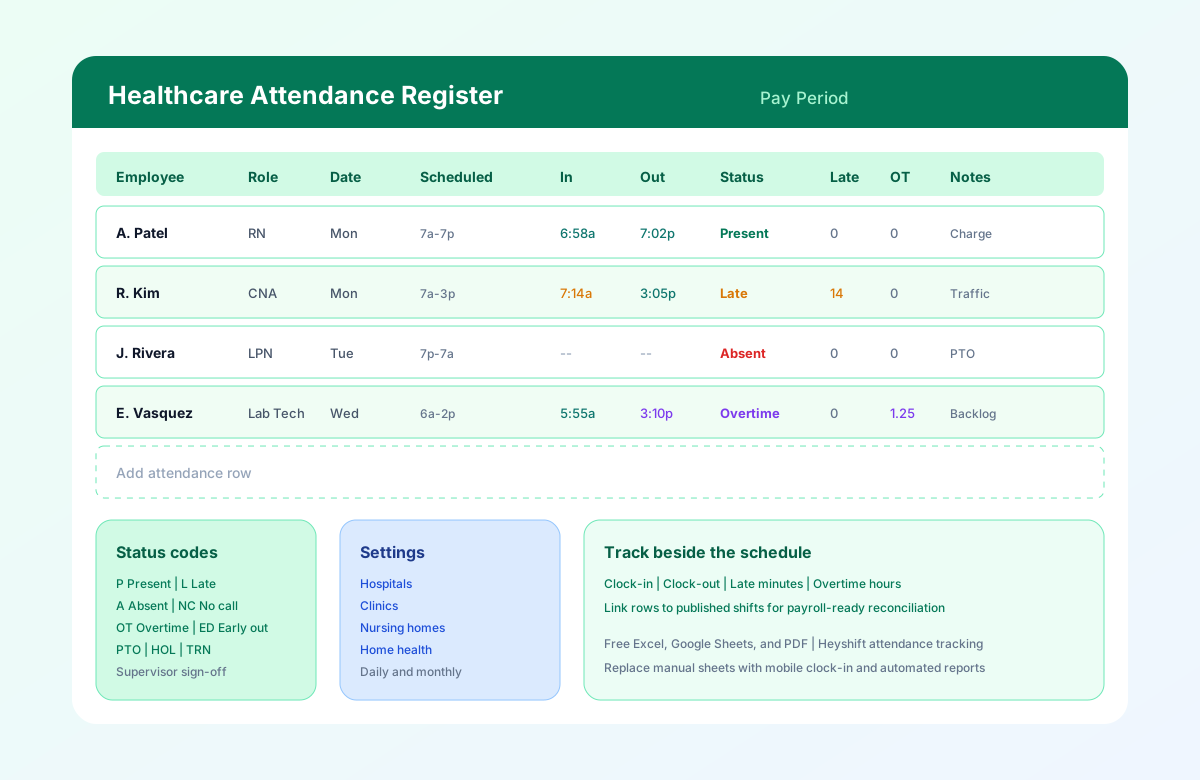
The preview image shows an attendance register with employee names, roles, dates, scheduled shifts, clock-in and clock-out times, status codes, late minutes, and overtime. Sample rows include on-time present, late arrival, approved absence, overtime, early departure, and no-call no-show examples.
Daily and monthly attendance examples
Daily attendance log
Use one row per employee per shift day. Supervisors review the register at end of shift to catch missed punches before staff leave the building.
Example: Monday med-surg day shift
| Employee |
Scheduled |
Clock-In |
Clock-Out |
Status |
| RN charge |
7:00 AM - 7:00 PM |
6:58 AM |
7:02 PM |
Present |
| CNA floor |
7:00 AM - 3:00 PM |
7:14 AM |
3:05 PM |
Late (14 min) |
| LPN backup |
3:00 PM - 11:00 PM |
-- |
-- |
Absent (PTO) |
Weekly reconciliation
At week end, sum Overtime Hours and Late Minutes by department. Compare totals to the hospital staff roster template or nurse schedule template before payroll submit.
Monthly archive
Save a PDF or read-only Google Sheet copy each pay period. Auditors and surveyors may ask for attendance records that match published schedules and payroll exports.
For deeper guidance, read healthcare attendance tracking best practices and healthcare leave management best practices.
Common attendance challenges
Healthcare attendance is harder than a standard office punch log because care never stops and shifts cross midnight.
Missed clock-in and clock-out
Nurses rushing to a code may forget to punch in. CNAs leaving after a double may forget to punch out. Without a daily review, payroll reconstructs hours from memory.
Late arrivals and coverage gaps
A late CNA on the 7 AM band delays morning care rounds. Recording Late Minutes beside Scheduled Shift shows patterns supervisors can address in scheduling.
Call-offs and no-shows
Approved absences need PTO or Absent codes. No-call no-shows need immediate documentation for replacement staffing and progressive discipline files.
Overtime without approval
Staff who stay past scheduled end for handover or patient need create unplanned OT. Tracking Overtime Hours daily prevents surprise labor cost at pay period close.
Schedule vs punch mismatch
The most expensive failure mode: payroll exports hours that do not match the schedule nursing published. One attendance register beside one official schedule reduces duplicate corrections.
Multi-site and float staff
Regional clinics and float pools need Department and Supervisor columns so each location owns its exceptions.
Paper punch cards and binder logs
Paper logs get lost, smudged, or corrected without initials. A spreadsheet is a step forward; software adds timestamps and audit trails.
Best practices
- Publish the schedule before tracking attendance. Attendance without a published shift plan creates disputes. Start from a healthcare employee schedule template or setting-specific roster.
- Review exceptions daily. Missed punches and call-offs are cheapest to fix the same day, not at payroll deadline.
- Use consistent status codes. Train charge nurses and supervisors on the same legend across departments.
- Document corrections in Notes. Who approved the change and why matters for payroll disputes and audits.
- Reconcile weekly before payroll. Sum overtime and late minutes by department; compare to schedule totals.
- Separate approved leave from unapproved absence. PTO and Absent are different payroll treatments; code them correctly.
- Archive monthly registers. Keep PDF or locked copies aligned to pay period for compliance records.
- Plan the software transition early. When manual logs break down, move to attendance management software beside your scheduling tool.
Use the overtime risk calculator while reviewing hour totals each week.
How to use the healthcare attendance sheet