

Free Caregiver Schedule Template
Managing caregiver schedules should not take hours every week. Use our free Caregiver Schedule Template to organize caregiver shifts, assign client visits, track working hours, and improve coverage for home care agencies, assisted living facilities, senior care providers, and private caregivers. Available in Excel, Google Sheets, and PDF.
Free download · No account required · CSV for Google Sheets
Includes: caregiver assignments, client visits, shift times, locations, care types, travel time, total hours, coverage status, supervisor, and notes.
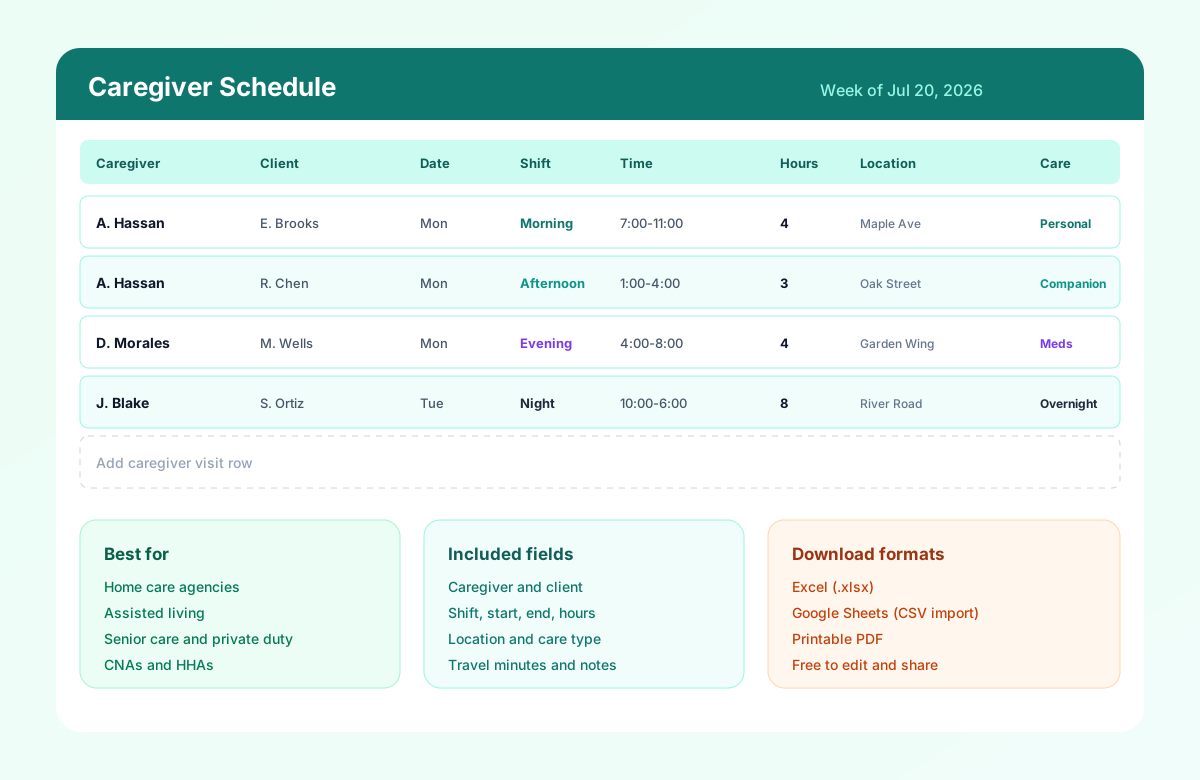
Table of contents
- Quick overview
- What is a caregiver schedule template?
- Who should use this template?
- Download the template
- What's included?
- Template preview
- Caregiver schedule example
- Key benefits
- Common scheduling challenges
- Why travel time matters in caregiver scheduling
- Best practices
- Match caregivers to client requirements
- Caregiver schedule vs standard employee schedule
- Caregiver scheduling for home healthcare agencies
- How to schedule recurring caregiver visits
- How to build your first caregiver schedule
- Benefits of a structured caregiver schedule
- Caregiver schedule template vs scheduling software
- Related templates
- Frequently asked questions
Quick overview
| Best for | Home care, assisted living, senior care, private caregivers |
| Schedule type | Weekly and monthly |
| Formats | Excel, Google Sheets, PDF |
| Editable | Yes |
| Printable | Yes |
| Free download | Yes |
| Shift types | Morning, afternoon, evening, night |
| Visit fields | Caregiver, client, location, care type, travel |
Featured answer: A free caregiver schedule template helps home care agencies, assisted living communities, and senior care providers assign caregivers to clients, define visit times, track hours, and improve coverage with an editable Excel, Google Sheets, or PDF schedule.
This template can be adapted for home care agencies, assisted living communities, senior care providers, private caregivers, and other organizations coordinating caregiver visits and shifts.
For facility-wide long-term care grids, see the nursing home staff schedule template. For nursing workforce depth, see the nurse schedule template. For broader clinical teams, start with the healthcare employee schedule template.
What is a caregiver schedule template?
A caregiver schedule template helps healthcare providers, home care agencies, and senior living facilities organize employee shifts and client visits in one place.
Instead of manually tracking assignments on paper or scattered spreadsheets, managers can use a caregiver scheduling template to assign caregivers to clients, define shift times, monitor coverage, and reduce scheduling conflicts.
Whether you are scheduling five caregivers or hundreds across multiple locations, a structured schedule helps improve communication, maintain continuity of care, and ensure every client receives the support they need.
Caregiver scheduling is different from a standard weekly employee roster. Many visits are client-specific, travel-dependent, and time-banded across morning, afternoon, evening, and overnight care. A good template makes those visit rows explicit so coordinators can see who is with which client, where they are going next, and how many hours each caregiver is carrying for the week.
Use this template for home health aides, CNAs, companions, private duty caregivers, and residential care staff who need clear visit assignments before the week starts.
Who should use this template?
This template is ideal for organizations that coordinate caregivers across multiple clients, shifts, or locations.
| Setting | Why this template helps |
|---|---|
| Home healthcare agencies | Assign field visits, travel routes, and recurring client care |
| Assisted living communities | Schedule caregivers and CNAs across residential wings |
| Senior care providers | Coordinate companionship, personal care, and overnight coverage |
| Nursing homes | Support caregiver and CNA assignments alongside clinical staff |
| Memory care facilities | Keep consistent caregiver-client pairings for dementia care |
| Hospice care providers | Plan visit windows around comfort care and family needs |
| Private caregiver services | Track one-to-one private duty shifts without ad hoc texts |
| Residential care homes | Publish a shared weekly visit and shift plan for small teams |
| Disability support services | Document support visits by client, location, and care type |
| Community care organizations | Standardize schedules across neighborhoods or service areas |
Care coordinators, schedulers, agency owners, DON teams, and operations managers are the typical buyers who start with a caregiver schedule template before evaluating scheduling software.
Download the caregiver schedule template
| Format | Best for |
|---|---|
| Excel (.xlsx) | Offline editing, local save, and office PC workflows |
| Google Sheets (CSV import) | Shared editing with coordinators and field supervisors |
| Printing for care offices, binders, and on-call folders |
Use the download buttons at the top of this page. No account required.
What's included?
The caregiver schedule template includes everything needed to manage daily and weekly assignments:
| Field | Description |
|---|---|
| Caregiver Name | Employee assigned to the visit or shift |
| Client Name | Assigned client or resident |
| Date | Scheduled workday |
| Shift | Morning, Afternoon, Evening, Night |
| Role | HHA, CNA, Caregiver, Companion, or private duty title |
| Start Time | Visit or shift start |
| End Time | Visit or shift end |
| Total Hours | Hours worked for that assignment |
| Location | Client home, facility wing, or service site |
| Care Type | Personal care, companionship, medication support, overnight, respite |
| Travel Minutes | Estimated drive time before or between visits |
| Notes | Special instructions, continuity preferences, backup flags |
| Supervisor | Coordinator or manager responsible for the row |
| Status | Confirmed, Pending, or Needs coverage |
Header fields include Week Of, Agency / Facility, Scheduler, and Service Area so teams can publish one official plan per territory or campus.
Template preview
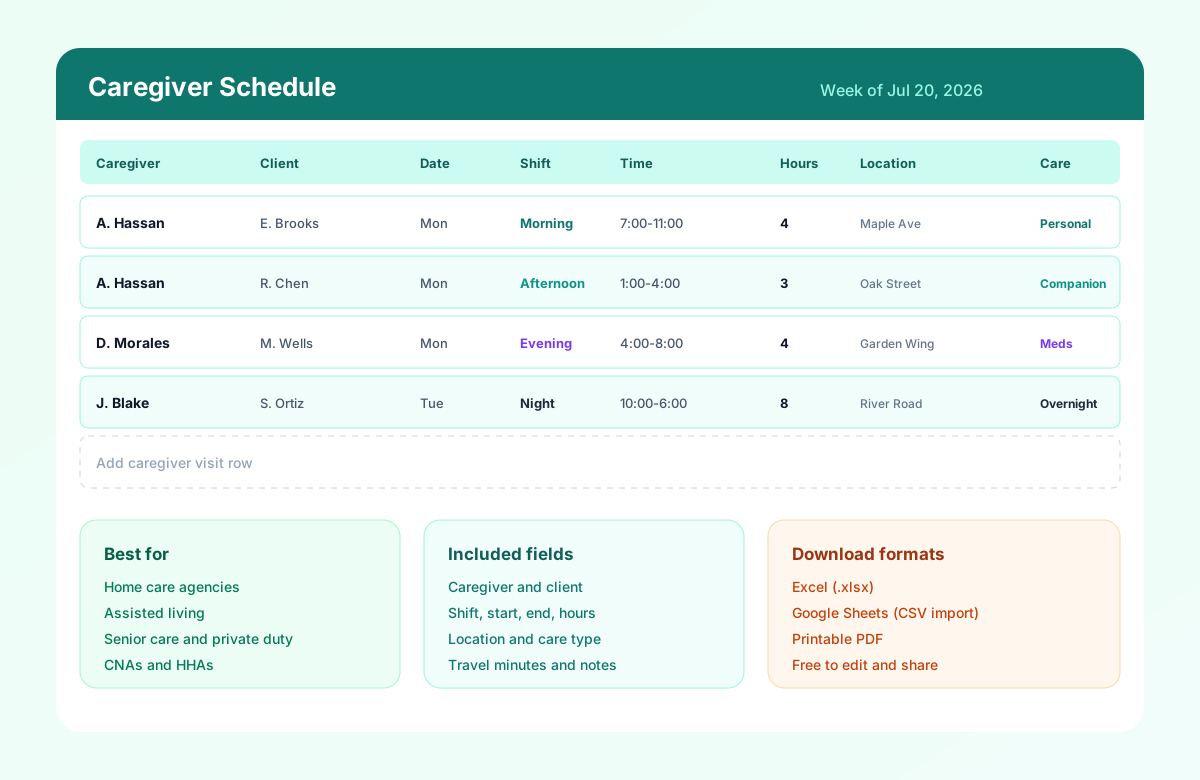
The preview shows caregiver visit rows with client names, morning and afternoon bands, start and end times, hours, locations, and care types. Sample data includes home visits, assisted living coverage, overnight care, and pending respite assignments so schedulers can see how to adapt the sheet for weekly or monthly planning.
Caregiver schedule example
| Caregiver | Client | Day | Time | Location | Care Type | Hours |
|---|---|---|---|---|---|---|
| Caregiver A | Client 1 | Mon | 8-11 AM | Client home | Personal care | 3 |
| Caregiver A | Client 2 | Mon | 1-4 PM | Client home | Companion care | 3 |
| Caregiver B | Client 3 | Mon | 9 AM-1 PM | Assisted living | Daily care | 4 |
| Caregiver C | Client 4 | Mon | 6-10 PM | Client home | Evening care | 4 |
This is an example only. Actual caregiver schedules should account for client needs, employee availability, travel time, qualifications, approved leave, and applicable agency policies.
Key benefits
Using a caregiver schedule template helps you:
- Organize caregiver assignments across clients and locations
- Reduce missed visits with clearer start times and status fields
- Improve shift visibility across morning, afternoon, evening, and night bands
- Balance workloads across staff using Total Hours and Travel Minutes
- Plan recurring client visits with consistent caregiver pairings
- Reduce overtime by reviewing hours before publish
- Improve communication between office and field teams
- Support continuity of care for families and clinical partners
- Simplify weekly schedule planning without starting from a blank sheet
Pair the template with caregiver scheduling best practices and home healthcare scheduling best practices when you formalize the process.
Common scheduling challenges
Caregiving organizations often face scheduling issues such as:
Last-minute call-offs
A morning call-off can leave multiple clients uncovered if backup caregivers are not already listed. Status and Notes columns help coordinators mark Needs coverage before the first visit starts.
Caregiver availability changes
Field staff update preferred days, school pickups, and second jobs frequently. Capture confirmed availability first, then build visits only from available caregivers. See employee availability management.
Multiple client visits per day
One caregiver may complete three short visits before lunch. Group nearby clients, log Travel Minutes, and avoid unrealistic back-to-back windows that ignore drive time.
Weekend and holiday coverage
Weekends are harder to fill. Rotate fair weekend pools and publish holiday coverage early so families are not surprised.
Overtime management
Extra evening fills and overnight blocks push caregivers past weekly limits. Review Total Hours before you confirm the week.
Emergency shift replacements
Keep a short backup list in Notes or a second pending row so call-offs do not become text-message scavenger hunts.
Continuity of care
Families and clinicians prefer familiar caregivers. Mark continuity preferences so temporary fills do not become the default for complex clients.
A structured schedule makes these challenges easier to manage before the week begins.
Why travel time matters in caregiver scheduling
A caregiver may have multiple client visits in one day. A schedule that only considers visit duration can create unrealistic back-to-back assignments.
For example:
- 9:00-11:00 Client A
- 11:00-1:00 Client B
may look possible on paper, but if Client B is 25 minutes away, the schedule leaves no realistic travel window.
Use the template's Travel Minutes field to account for movement between visits. Route nearby clients on the same day whenever possible.
Best practices
To create an effective caregiver schedule:
- Publish schedules at least one week in advance. Caregivers plan transportation, childcare, and second jobs around confirmed visits.
- Group nearby client visits to reduce travel time. Geography-first routing protects visit quality and reduces late arrivals.
- Balance workloads fairly across caregivers. Spread weekend, evening, and overnight blocks instead of defaulting to the same reliable staff.
- Match qualifications to client needs. Use Role and Care Type for medication support, transfers, memory care, and overnight fall risk.
- Build backup coverage for unexpected absences. Keep per-diem or float caregivers ready for each service area.
- Track overtime to manage labor costs. Review Total Hours before you lock the week.
- Review schedules regularly based on changing care plans. Update visit length, care type, and continuity notes when assessments change.
Match caregivers to client requirements
Not every caregiver should necessarily be assigned to every client.
Scheduling may need to consider:
- Caregiver role
- Required skills
- Client care type
- Memory-care requirements
- Medication-related responsibilities
- Mobility or transfer needs
- Overnight requirements
Use Role, Care Type, and Notes so coordinators can match qualifications to client needs before they publish the week.
Caregiver schedule vs standard employee schedule
A standard employee schedule usually focuses on who works, when they work, and where they work.
A caregiver schedule often needs additional information:
- Client
- Visit time
- Care type
- Client location
- Travel time
- Continuity preferences
- Caregiver qualifications
- Visit status
That is why this template is built around visit rows, not only shift bands.
Caregiver scheduling for home healthcare agencies
Home healthcare agencies may need to coordinate caregivers across multiple client homes rather than one facility.
A caregiver's schedule may therefore need to account for:
- Client visit windows
- Travel between visits
- Caregiver availability
- Recurring visits
- Client-caregiver continuity
- Open visits
- Weekend coverage
- Total working hours
Use this caregiver schedule for individual assignments and visits. Use the home healthcare schedule template when you also need a broader home-health team view.
How to schedule recurring caregiver visits
For recurring care:
- Identify the client and required visit frequency.
- Set preferred visit windows.
- Match caregivers based on availability and role.
- Account for travel time.
- Assign recurring visits.
- Review total weekly hours.
- Publish the schedule.
- Recheck changes before the next scheduling cycle.
Keep the same caregiver-client pairing in Notes when continuity of care matters.
How to build your first caregiver schedule
How to build your first caregiver schedule
Follow these five steps to publish a visit-ready caregiver schedule your coordinators, field supervisors, and caregivers can trust.
Set the week and service area
Fill Week Of, Agency / Facility, Scheduler, and Service Area in the header. Align dates with payroll or EVV review windows when supervisors check hours.
Add caregivers and clients
Enter each visit row with caregiver name, client name, role, and location. Group nearby clients on the same day to cut travel time between appointments.
Assign shifts and visit times
Choose Morning, Afternoon, Evening, or Night, then set start and end times. Capture care type and notes so field staff know what the visit requires.
Review hours, travel, and coverage
Check Total Hours and Travel Minutes before publish. Flag pending rows, overnight coverage gaps, and caregivers approaching overtime thresholds.
Publish and communicate
Export PDF for care coordinators, share a Google Sheet with supervisors, or email Excel to the office. Confirm caregivers see tomorrow's visits early.
Benefits of a structured caregiver schedule
Organize caregiver assignments
Keep caregiver-to-client visits, shift bands, and locations on one official grid instead of scattered texts and paper calendars.
Reduce missed visits
Clear start times, locations, and status fields make gaps visible before a client is left without coverage.
Improve shift visibility
Morning, afternoon, evening, and night bands help coordinators see coverage across the full care day.
Balance workloads fairly
Total Hours and Travel Minutes help you distribute visits evenly and avoid overloading the same caregivers every weekend.
Support continuity of care
Prefer consistent caregiver-client pairings in Notes so families and clinical teams keep familiar faces on recurring visits.
Related resources
More templates, guides, and tools for building and running your schedule.
- TemplateHome healthcare schedule template
- TemplateHealthcare employee schedule template
- TemplateNurse schedule template
- TemplateNursing home staff schedule template
- TemplateHealthcare attendance sheet template
- TemplateEmployee availability form template
- TemplateHealthcare staffing matrix template
- TemplateHospital staff roster template
- ResourceHealthcare staff scheduling software
- ResourceNursing home scheduling software
- FeatureShift scheduling
- FeatureAttendance tracking
- FeatureLeave management
- FeatureMobile app
- AnswerEmployee scheduling software
- AnswerEmployee availability management
- AnswerWorkforce planning
- AnswerShift coverage
- AnswerOvertime management
- ArticleCaregiver scheduling best practices
- ArticleHome healthcare scheduling best practices
- ArticleAssisted living scheduling best practices
- ResourceOvertime risk calculator
- ResourceStart 30-Day Free Trial