

Free Medical Office Schedule Template
Create organized weekly and monthly schedules for physicians, nurses, medical assistants, receptionists, billing teams, and office staff. Download the template in Excel, Google Sheets, or PDF, or simplify scheduling with Heyshift.
Free download · No account required · CSV for Google Sheets
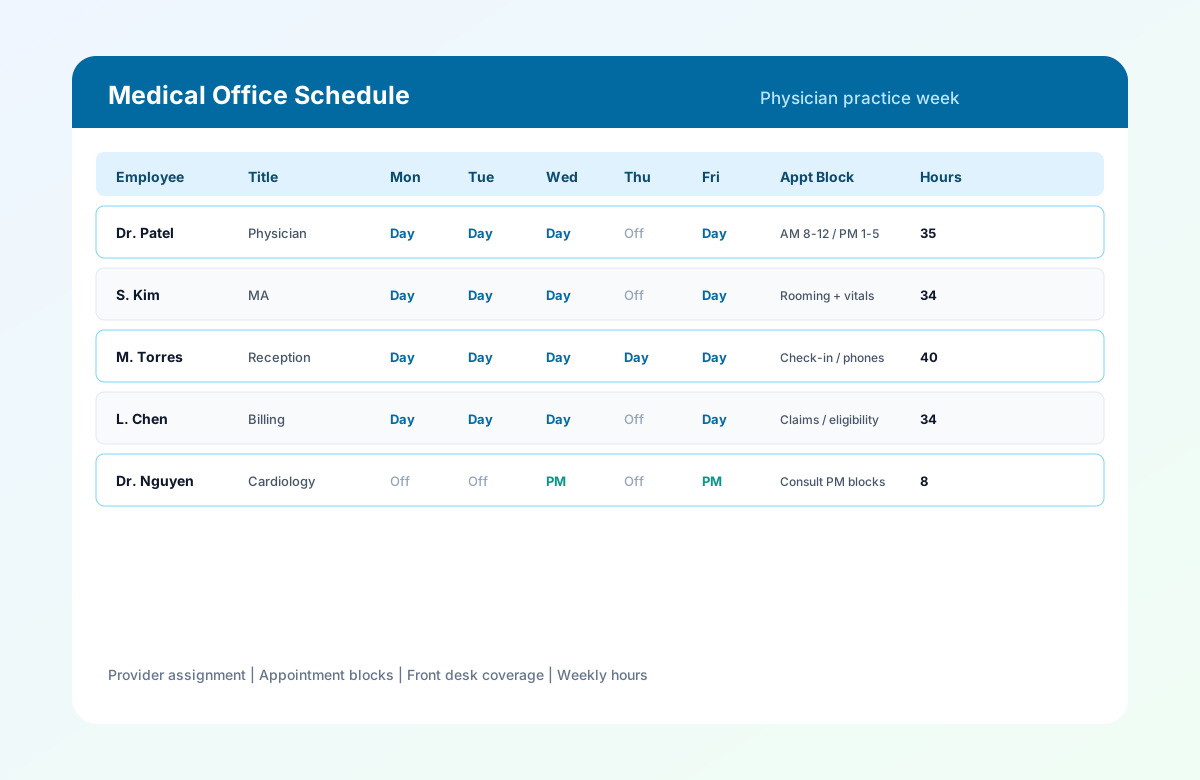
Table of contents
- Quick overview
- What is a medical office schedule template?
- Who uses it?
- Roles included
- Download the template
- What's included?
- Template preview
- Key features
- Common challenges
- Best practices
- Common mistakes
- How to use the template
- Benefits of a structured medical office roster
- Spreadsheet vs scheduling software
- Related templates
- Frequently asked questions
Quick overview
| Feature | Details |
|---|---|
| Best for | Medical offices and physician practices |
| Schedule | Weekly and monthly |
| Formats | Excel, Google Sheets, PDF |
| Editable | Yes |
| Printable | Yes |
| Cost | Free |
Featured answer: A free medical office schedule template gives practice managers a ready-made weekly grid for physicians, medical assistants, receptionists, billing staff, and office support with shift times, provider assignment, appointment blocks, weekly hours, overtime, and notes in Excel, Google Sheets, or PDF.
This page targets medical office schedule template, physician office schedule template, doctor office schedule, medical practice schedule template, and healthcare office schedule searches for small and medium private practices.
For larger outpatient clinics, see clinic staff schedule template. For 24/7 hospital teams, see hospital staff roster template.
What is a medical office schedule template?
A medical office schedule template is a planning tool used to organize employee shifts, provider availability, appointment coverage, and daily staffing in private physician practices and small healthcare businesses.
Most medical offices run on appointment-based scheduling rather than 24/7 inpatient coverage. Office managers must coordinate:
- Provider availability for physicians and NPs
- Front desk coordination for check-in, phones, and patient flow
- Administrative staffing for billing and insurance
- Clinical support for MAs, nurses, and lab staff
A structured template helps practices assign the right people to the right shifts while reducing conflicts and keeping patient appointments on track.
Who uses it?
| Practice type | Why this template helps |
|---|---|
| Family medicine | Align provider and MA coverage with daily appointment blocks |
| Internal medicine | Schedule physicians, clinical support, and front desk together |
| Pediatrics | Plan session-based coverage for clinical and reception staff |
| Cardiology / orthopedics / dermatology | Map specialist days and support staff by service line |
| Dental offices | Schedule hygienists, assistants, and front office on one grid |
| Eye clinics | Coordinate optometrists, techs, and front desk |
| Chiropractic offices | Plan provider and admin coverage by treatment blocks |
| Therapy practices | Align therapists, aides, and scheduling staff |
Roles included
Clinical
- Physicians
- Nurse Practitioners
- Registered Nurses
- Medical Assistants
- Laboratory Staff
Administrative
- Receptionists
- Office Managers
- Billing Specialists
- Insurance Coordinators
Support
- Cleaning and maintenance (as needed)
- IT or phone support (as needed)
Download the medical office schedule template
| Format | Best for |
|---|---|
| Excel (.xlsx) | Offline editing at the office manager workstation |
| Google Sheets (CSV import) | Shared editing with leads before publish |
| Printing in staff areas or sharing with part-time employees |
Use the download buttons at the top of this page. Each file includes Heyshift branding, practice sample rows, and blank rows for additional staff.
What's included?
| Column | Purpose |
|---|---|
| Employee Name | Identifies scheduled office staff |
| Job Title | Physician, MA, NP, Receptionist, Billing, etc. |
| Department | Clinical, Front Desk, Billing, etc. |
| Shift | Day, half day, or custom band |
| Start / End / Break (by day) | Paid work blocks Monday through Sunday |
| Weekly Hours | Rolling total before publish |
| Overtime Hours | Payroll review column |
| Provider Assignment | Which provider the staff member supports |
| Appointment Block | AM/PM blocks, rooming, check-in, or consult windows |
| Leave Status | PTO, training, or active assignment |
| Supervisor | Office manager or clinical lead |
| Notes | Certifications, cross-training, or coverage flags |
Template preview
| Employee | Title | Mon | Tue | Wed | Thu | Fri | Appt Block |
|---|---|---|---|---|---|---|---|
| Dr. Patel | Physician | Day | Day | Day | Off | Day | AM 8-12 / PM 1-5 |
| S. Kim | MA | Day | Day | Day | Off | Day | Rooming + vitals |
| M. Torres | Reception | Day | Day | Day | Day | Day | Check-in / phones |
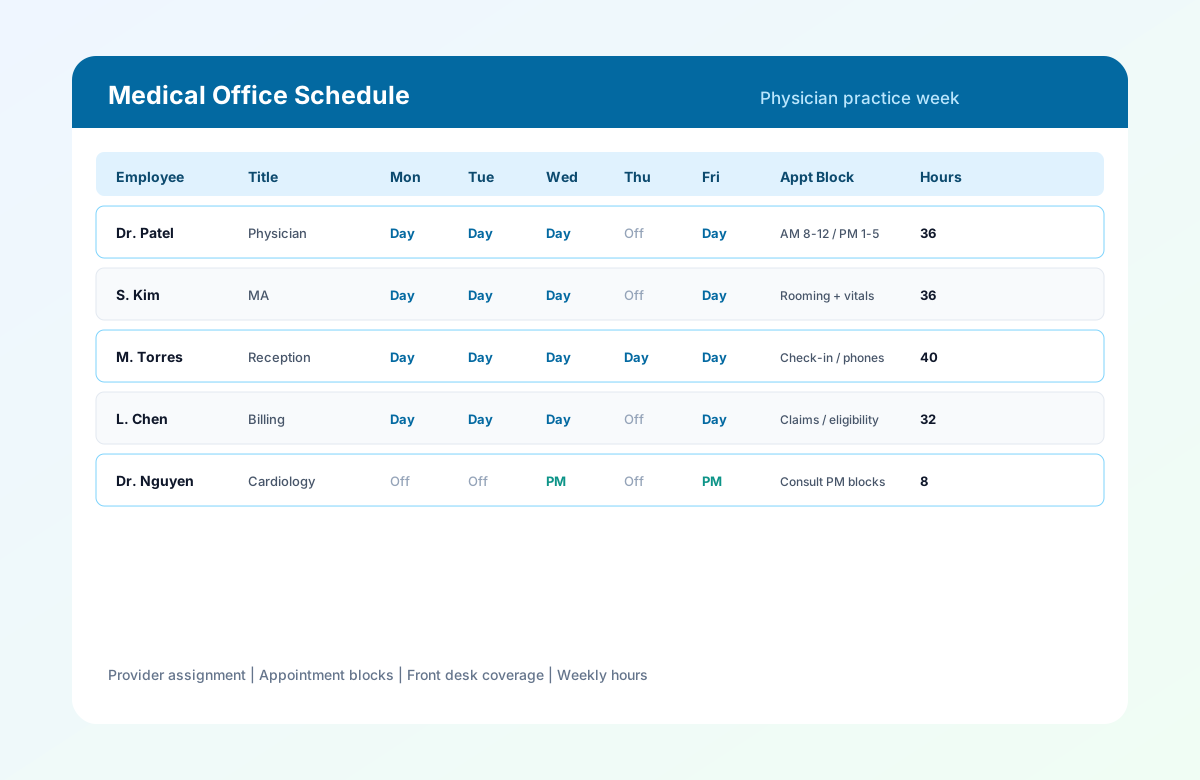
Medical office schedule template with provider assignment, appointment blocks, and weekly hours.
How to use the medical office schedule template
Follow these five steps to publish a practice week that aligns staffing with appointments, provider availability, and front-desk coverage.
Set the week and practice name
Fill Week Of, Practice / Location, and Office Manager in the header. Match dates to your payroll week if you review hours before submit.
Add staff by role
List physicians, NPs, MAs, reception, billing, and lab staff. Group rows by department so coverage gaps are easy to spot.
Staff managementAssign shifts and appointment blocks
Enter start and end times by day. Set Provider Assignment and Appointment Block so clinical lanes and check-in windows stay covered.
Review hours and overtime
Check Weekly Hours and Overtime Hours before publish. Confirm front desk and clinical coverage during peak appointment blocks.
Overtime risk calculatorPublish and share
Export PDF for the break room, share a read-only Google Sheet, or email Excel to leads. Publish at least one week ahead when possible.
Mobile schedule access
Benefits of a structured medical office roster
Appointment-aligned staffing
Match clinical and administrative coverage to booked appointment volume instead of generic shift grids.
Provider and block visibility
Provider Assignment and Appointment Block columns keep physician availability and patient flow on one official sheet.
Practice-sized layout
Built for small and medium physician offices, dental practices, and specialty suites without hospital roster complexity.
Front desk and billing included
Schedule reception, billing, and clinical support alongside providers on one weekly grid.
Printable for staff areas
PDF export works for break rooms and front-desk areas where staff check the official week on paper.
Related resources
More templates, guides, and tools for building and running your schedule.
- ResourceHealthcare staff scheduling software
- TemplateHealthcare employee schedule template
- TemplateClinic staff schedule template
- TemplateHome healthcare schedule template
- TemplateCaregiver schedule template
- TemplateHospital staff roster template
- TemplateNurse schedule template
- Template12-hour nurse schedule template
- Template8-hour shift schedule template
- Template10-hour shift schedule template
- FeatureShift scheduling
- FeatureAttendance tracker
- FeatureStaff management
- FeatureMobile app
- AnswerWhat is employee scheduling software?
- AnswerEmployee availability management
- ResourceStart 30-Day Free Trial