Free 8-Hour Shift Schedule Template
Create employee schedules faster with our free 8-hour shift schedule template. Plan morning, afternoon, and night shifts using Excel, Google Sheets, or PDF. Perfect for healthcare, retail, manufacturing, hospitality, warehouses, call centers, security teams, and other businesses that operate multiple shifts.
Free download · No account required · CSV opens in Google Sheets
- Healthcare facilities
- Retail stores and supermarkets
- Manufacturing plants
- Hotels and hospitality
- Warehouses and logistics
- Security teams
Table of contents
- Quick overview
- What is an 8-hour shift schedule template?
- Who should use this template?
- Common 8-hour shift patterns
- How many staff do you need for 24/7 coverage?
- What's included?
- Template features
- Template preview
- Industry scheduling guides
- Setting shift times by industry
- Handoffs, breaks, and minimum staffing
- Overtime, labor cost, and compliance basics
- Monthly and multi-week planning workflow
- Benefits of an 8-hour shift schedule
- Common scheduling challenges
- Best practices
- Common mistakes
- How to build your first 8-hour shift week
- Spreadsheet vs scheduling software
- Compare shift patterns
- Related templates
- Frequently asked questions
Quick overview
| Feature | Details |
|---|---|
| Best for | Healthcare, retail, manufacturing, hospitality |
| Shift pattern | 8-hour |
| Schedule type | Weekly and monthly |
| Formats | Excel, Google Sheets, PDF |
| Editable | Yes |
| Printable | Yes |
| Cost | Free |
Featured answer: A free 8-hour shift schedule template gives managers a weekly grid for morning, afternoon, and night shifts with employee names, departments, shift types, daily start and end times, weekly hours, overtime, supervisor, leave status, and notes in Excel, Google Sheets, or PDF.
This page is designed as a complete guide to 8-hour workforce planning, not only a download link. Use the sections below to choose patterns, estimate headcount, and publish a week your team can trust.
What is an 8-hour shift schedule template?
An 8-hour shift schedule template is a workforce planning tool used to organize employee work schedules into standard eight-hour shifts. Managers use these templates to assign employees to morning, afternoon, or night shifts while balancing staffing coverage, employee availability, overtime, and labor costs.
Unlike manually creating schedules from scratch every week, an 8-hour shift template provides a structured framework that makes it easier to:
- Assign shifts consistently across departments
- Ensure adequate coverage for every operating hour
- Document breaks, hours, and overtime before payroll
- Share one official version with supervisors and staff
Organizations in healthcare, retail, manufacturing, hospitality, logistics, security, customer support, and many other industries rely on 8-hour schedules because they provide predictable working hours and simplify workforce planning.
Eight-hour planning sits between short part-time blocks and long 10- or 12-hour bands. It is the default model when a business needs three distinct crews per day rather than two long shifts.
Who should use this template?
This template is suitable for businesses of all sizes that operate one or more daily shifts.
Healthcare
Hospitals, clinics, medical offices, laboratories, and rehabilitation centers often run 8-hour bands for ancillary staff, support roles, and units that prefer three-shift coverage over 12-hour nursing lines.
- Hospitals: Environmental services, dietary, some clinical support
- Clinics: Extended-hour outpatient bands
- Medical offices: Early open and late close coverage
- Laboratories: Specimen processing across day parts
- Rehabilitation centers: Therapy and nursing support rotations
For dedicated healthcare rosters, pair this template with the healthcare employee schedule template or hospital staff roster template.
Retail
Grocery stores, supermarkets, clothing stores, electronics retailers, and shopping centers depend on morning stocking, afternoon peak coverage, and limited night closing crews.
- Morning: Receiving, stocking, opening registers
- Afternoon: Peak sales and customer traffic
- Night: Closing, cleaning, inventory counts
See retail employee scheduling software when spreadsheet planning outgrows your store count.
Manufacturing
Production facilities, assembly plants, food processing, and packaging facilities frequently run three-shift models to maximize equipment uptime.
- Shift A: 7 AM to 3 PM
- Shift B: 3 PM to 11 PM
- Shift C: 11 PM to 7 AM
Use the Shift Type column to document fixed lines or rotating crews. See manufacturing shift scheduling software for multi-line plants.
Hospitality
Hotels, resorts, event venues, restaurants, and catering businesses schedule front desk, housekeeping, kitchen, and banquet staff across morning prep, service peaks, and late close.
Restaurant teams with long single shifts may prefer the employee schedule template; hotels with 24-hour desks fit the 8-hour three-band model well.
Logistics
Warehouses, distribution centers, and fulfillment centers use 8-hour shifts to cover receiving, picking, packing, and shipping across day parts without burning out crews on 12-hour blocks.
See warehouse scheduling software for high-volume fulfillment operations.
Security
Security companies, office buildings, hospital campuses, and school campuses assign guards to fixed posts or patrol routes by band. Night coverage is often the hardest to fill; rotating templates help distribute those hours.
Customer support
Call centers, help desks, and IT support teams align agent pools with ticket volume curves. Morning shifts handle overnight backlog; afternoon shifts cover business hours; night shifts support follow-the-sun or extended SLAs.
Common 8-hour shift patterns
The template supports several scheduling approaches. Choose the pattern that matches your operating hours and fairness rules.
Fixed morning shift
Example: 7:00 AM to 3:00 PM
Best for: Clinics, offices, retail opens, administrative teams, school-adjacent hours.
Employees keep the same band every scheduled day. Managers optimize for commute consistency and training depth on one part of the day.
Fixed afternoon shift
Example: 3:00 PM to 11:00 PM
Ideal for: Retail peak hours, hospitality dinner service, manufacturing second shift, warehouse outbound waves.
Afternoon bands often carry the highest customer or production volume. Staff these rows with experienced employees when possible.
Fixed night shift
Example: 11:00 PM to 7:00 AM
Common in: Hospitals, warehouses, manufacturing third shift, security, 24-hour contact centers.
Night lines typically pay shift differentials and require clear handoff notes in the Notes column.
Rotating 8-hour shifts
Employees rotate between morning, afternoon, and night to distribute less desirable shifts fairly. Document the rotation in Shift Type (Rotating) and Rotation Week notes if your sheet includes them.
Common rotation cycles:
- Weekly: One band per calendar week
- Monthly: Four-week rotation calendar
- Panama-style variants: Adapted from longer-shift rotation math (see 2-2-3 shift schedule template for 12-hour Panama bands)
Three-shift coverage (24-hour operations)
Many businesses use:
| Band | Typical hours | Label in template |
|---|---|---|
| Shift A | 7 AM to 3 PM | Morning |
| Shift B | 3 PM to 11 PM | Afternoon |
| Shift C | 11 PM to 7 AM | Night |
This provides continuous 24-hour coverage when each band has enough headcount every day of the week.
How many staff do you need for 24/7 coverage?
Planning headcount prevents chronic understaffing and surprise overtime.
The 4.2 FTE rule
For one position that must be covered 24/7/365 with 8-hour shifts:
- There are 21 eight-hour shifts per week (3 bands x 7 days)
- One full-time employee works 5 shifts (40 hours) per week
- Minimum theoretical staff: 21 / 5 = 4.2 full-time equivalents
In practice, plan for at least five people per role when you include:
- Paid time off and sick leave
- Break coverage
- Training and onboarding overlap
- Call-out buffer
Example: warehouse packing line
If you need two packers on each band, every day:
- 2 packers x 3 bands x 7 days = 42 shift slots per week
- 42 / 5 shifts per FTE = 8.4 FTE minimum
- Round up to 9 or 10 people with leave and backup
Use the Weekly Hours column to confirm no employee exceeds your part-time or full-time limits before you publish.
What's included?
| Column | Purpose |
|---|---|
| Employee Name | Identifies scheduled staff |
| Employee ID | Payroll or HR system reference |
| Department | Team, unit, or cost center |
| Job Title | Role on the schedule |
| Shift Type | Morning, Afternoon, Night, or Rotating |
| Start / End / Break (Mon through Sun) | Eight-hour bands by day |
| Weekly Hours | Rolling total before publish |
| Overtime Hours | Payroll review column |
| Supervisor | Manager or lead of record |
| Notes | Certifications, cross-training, backup flags |
| Leave Status | PTO, training, or active assignment |
Template features
Weekly scheduling
Plan shifts from Monday through Sunday on one grid. Duplicate the sheet tab for monthly planning or copy rows into a monthly workbook.
Monthly scheduling
Create schedules for longer planning periods by copying weekly tabs or extending rows. Many operators publish two weeks visible and keep a four-week planning horizon in the same file.
Department assignment
Organize staff by team or department so supervisors can filter their rows before publish.
Shift rotation
Alternate employees between different shifts using the Shift Type column and day-level start/end times.
Overtime tracking
Monitor regular and overtime hours in dedicated columns before payroll cutoff.
Printable layout
Display schedules in staff rooms or share digital copies. The PDF download includes Heyshift branding and sample rows for reference.
Template preview
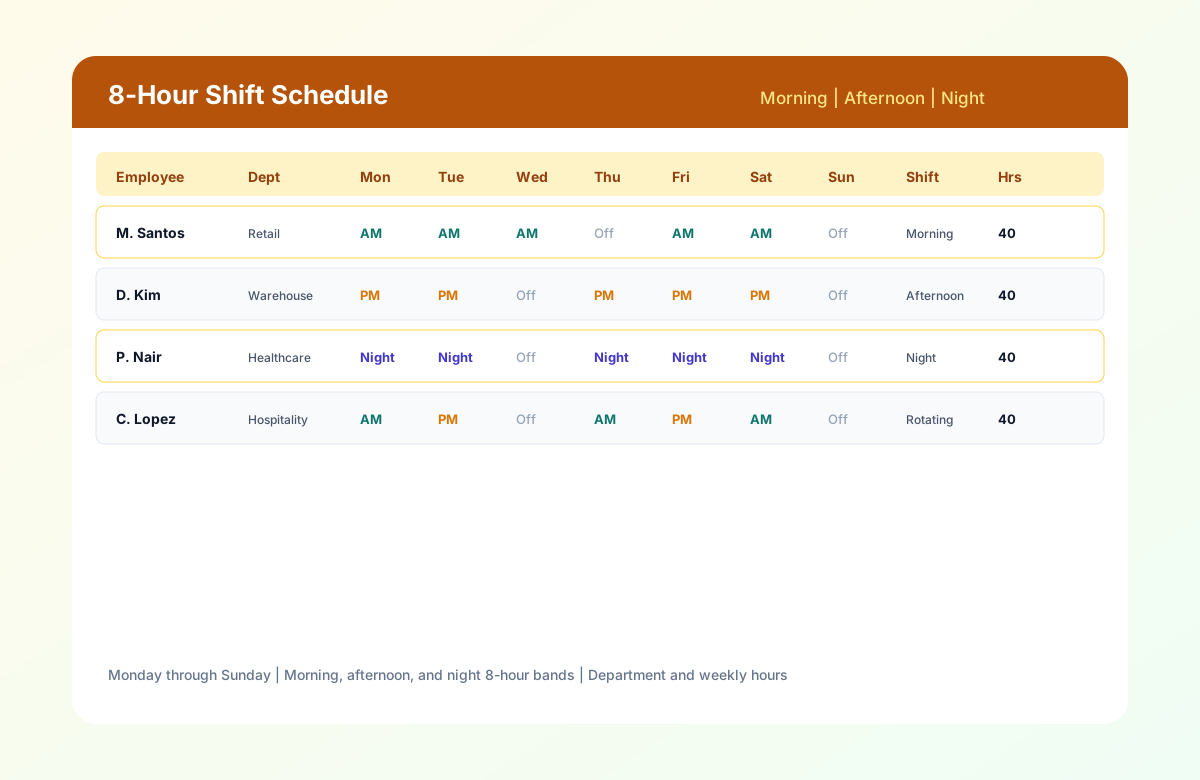
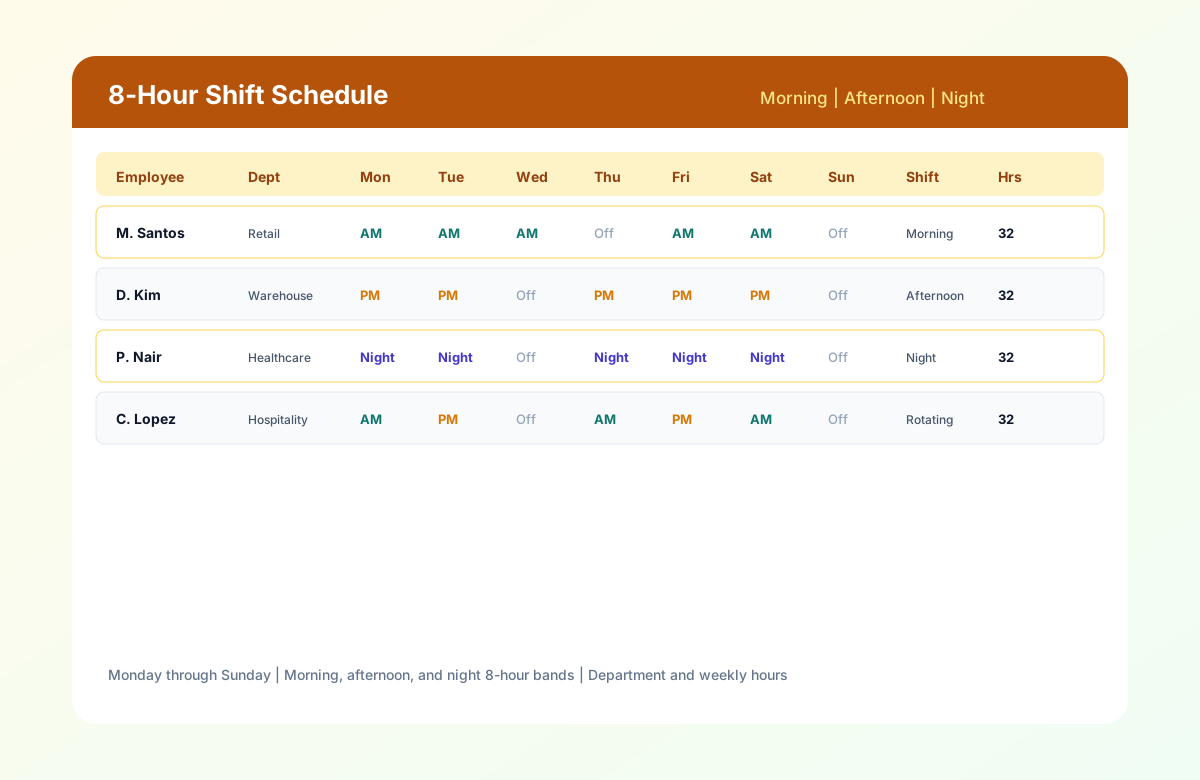
| Employee | Dept | Mon | Tue | Wed | Shift | Hours |
|---|---|---|---|---|---|---|
| M. Santos | Retail | AM | AM | AM | Morning | 32 |
| D. Kim | Warehouse | PM | PM | Off | Afternoon | 32 |
| P. Nair | Healthcare | Night | Night | Off | Night | 32 |
| C. Lopez | Hospitality | AM | PM | Off | Rotating | 32 |
8-hour shift schedule with morning, afternoon, and night bands, departments, and weekly hours.
How to build your first 8-hour shift week
Follow these five steps to publish a balanced week with morning, afternoon, and night coverage.
- 1
Set the week and location
Fill Week Of, Location / Site, and Schedule Manager in the header. Match dates to your payroll week if managers review hours before submit.
- 2
List employees by department
Add Employee Name, ID, Department, and Job Title. Group rows by team so you can spot gaps by shift band.
Staff management - 3
Assign shift bands by day
Choose Morning (7 AM to 3 PM), Afternoon (3 PM to 11 PM), or Night (11 PM to 7 AM), or enter custom start and end times. Mark Off for rest days.
- 4
Review hours and overtime
Check Weekly Hours and Overtime Hours before publish. Confirm each band has minimum staffing every day you operate.
Overtime risk calculator - 5
Publish and communicate
Export PDF for the floor, share a read-only Google Sheet, or email Excel to supervisors. Publish at least one week ahead when possible.
Mobile schedule access
Benefits of an 8-hour shift schedule
Predictable work blocks
Eight-hour shifts give employees consistent start and end times, which simplifies childcare, commuting, and second jobs compared with irregular daily hours.
Flexible three-band coverage
Morning, afternoon, and night bands scale from single-shift retail to 24/7 hospitals without changing the template structure.
Industry-neutral layout
One grid works for healthcare, retail, manufacturing, hospitality, and logistics because it focuses on shift length, not job type.
Overtime visibility
Weekly Hours and Overtime Hours columns support payroll review before you publish a heavy week.
Printable for the floor
PDF export works for break rooms, nurse stations, and warehouse boards where staff check the official week on paper.
Industry scheduling guides
Healthcare with 8-hour shifts
Not every healthcare role uses 12-hour nursing lines. Support departments often standardize on 8-hour bands:
- Environmental services: Morning deep clean, afternoon turnover, night response
- Dietary: Meal prep, service, and overnight refresh
- Patient transport and lab: Specimen windows tied to day parts
When clinical units use 12-hour patterns, use the 12-hour nurse schedule template for nursing and this 8-hour grid for ancillary teams on the same campus.
Retail with 8-hour shifts
Retail schedules live and die by customer traffic curves:
- Open: Cashiers and stockers on morning bands
- Peak: Full floor coverage on afternoon bands
- Close: Reduced headcount with cross-trained closers on night bands
Publish at least one week ahead so part-time students can confirm hours. Track Leave Status before you finalize weekend rows.
Manufacturing with 8-hour shifts
Manufacturing schedulers optimize for machine uptime and changeover windows:
- Align maintenance on low-volume bands when possible
- Keep certified operators on each band every day
- Document overtime in Notes when production runs long
Rotating crews fairly reduces attrition on night shift, which is often the hardest to fill.
Hospitality with 8-hour shifts
Hotels split front desk, housekeeping, and F&B across three bands. Restaurants inside hotels may blend 8-hour and 10-hour rows; use Job Title and Notes to flag hybrid roles.
Event venues spike afternoon and night bands on show days. Copy last week's sheet as a starting point, then adjust rows for ticketed events.
Logistics and warehouses
Fulfillment peaks often hit afternoon outbound windows. Morning bands focus on inbound and replenishment; night bands on regional sortation.
Cross-train forklift and picker roles so one call-out does not collapse a band. See warehouse scheduling software when you operate multiple buildings.
Setting shift times by industry
Eight-hour templates are flexible because start and end times are editable. Below are common bands by sector. Adjust for union contracts, state break rules, and customer hours.
Standard three-shift model (24/7)
| Band | Start | End | Paid break (example) |
|---|---|---|---|
| Morning | 7:00 AM | 3:00 PM | 30 min unpaid |
| Afternoon | 3:00 PM | 11:00 PM | 30 min unpaid |
| Night | 11:00 PM | 7:00 AM | 30 min unpaid |
Retail and grocery variants
- 6:00 AM to 2:00 PM: Early open and bakery prep
- 2:00 PM to 10:00 PM: Peak sales and close
- 10:00 PM to 6:00 AM: Stock and cleaning (limited stores)
Healthcare support variants
- 6:30 AM to 2:30 PM: Day ancillary aligned with rounding
- 2:30 PM to 10:30 PM: Evening coverage
- 10:30 PM to 6:30 AM: Overnight support
Clinical nursing units that standardize on 12-hour lines should use the 12-hour nurse schedule template instead of forcing 8-hour rows for RNs.
Call center variants
Align bands with ticket volume, not clock symmetry:
- 6:00 AM to 2:00 PM: Clear overnight backlog
- 10:00 AM to 6:00 PM: Core business overlap
- 2:00 PM to 10:00 PM: Extended SLA window
Document overlap hours in Notes when two bands both cover the same interval for training or escalation.
Handoffs, breaks, and minimum staffing
Eight-hour schedules introduce three handoffs per day. Each handoff is a failure point if coverage drops below minimum.
Handoff checklist
- Outgoing band confirms open tasks in Notes (tickets, patients, orders).
- Incoming band confirms headcount meets minimum before outgoing leaves.
- Supervisor signs the printed PDF in high-acuity settings when your policy requires it.
Break coverage
If one person on a four-person band takes lunch, you still need three on the floor. Options:
- Stagger breaks by 30 minutes
- Float a cross-trained employee from another department
- Shorten overlap windows during low volume
Record break windows in daily Break columns so payroll and compliance audits match the published schedule.
Minimum staffing matrix
Build a simple table by band and day type (weekday vs weekend). Example for a 24/7 help desk:
| Band | Weekday minimum | Weekend minimum |
|---|---|---|
| Morning | 4 agents | 3 agents |
| Afternoon | 6 agents | 4 agents |
| Night | 3 agents | 3 agents |
Compare row counts on your template against this matrix before publish.
Overtime, labor cost, and compliance basics
Eight-hour schedules make overtime visible when managers stack extra shifts on the same employee in one week.
When 8-hour weeks trigger overtime
In the United States, non-exempt hourly employees often hit overtime after 40 hours in a workweek (state rules may differ). Watch for:
- Shift pickup after a five-day week
- Double shifts when someone stays into the next band
- Holiday pay weeks that compress schedules
Use the Overtime Hours column as a pre-publish check, not only a payroll afterthought.
Labor cost planning
Rough weekly labor cost per employee:
Weekly Hours x Hourly Rate x (1 + Burden Rate)
Burden includes taxes, benefits, and shift differential. Night bands often carry 10 to 15 percent differential in healthcare and logistics. Document differential eligibility in Notes when it affects assignments.
Documentation habits
- Save a published PDF with date stamp each week
- Lock or protect the official Excel tab after publish
- Keep Leave Status current so you do not schedule PTO as active
Monthly and multi-week planning workflow
Operators who outgrow single-week tabs often use this workflow without leaving spreadsheets:
- Week 0 (planning): Copy last week's tab. Adjust for known PTO and events.
- Week -1 (draft): Share read-only Google Sheet with supervisors for gap review.
- Week -1 (finalize): Merge feedback, check overtime, publish PDF.
- Rolling horizon: Maintain four tabs (this week plus next three) in one workbook.
When four tabs become unmanageable across sites, evaluate employee scheduling software.
Security and public safety notes
Security firms and campus operations often combine fixed posts with patrol rotations:
- Fixed post: same site every scheduled day on one band
- Patrol pool: Rotating shift type with different sites in Notes
Extended patterns such as four-on-four-off are on the shift-pattern roadmap. This 8-hour template covers standard morning, afternoon, and night bands used by most security contracts.
Common scheduling challenges
Even with a template, managers often encounter:
- Employee availability conflicts when students or parents cannot work certain bands
- Last-minute absences that leave a band below minimum
- Overtime management when production or sales exceed plan
- Shift swaps handled informally without updating the official sheet
- Vacation planning that overlaps peak season
- Understaffed shifts on nights and weekends
- Peak demand periods that need flex staff not on the base roster
- Multi-location coordination when each site maintains its own file
As organizations grow, these challenges often require workforce management software rather than spreadsheets alone.
Best practices
- Publish schedules at least one week in advance (two weeks for rotating units).
- Rotate shifts fairly so night and weekend burden is shared.
- Track overtime before assigning extra hours using Weekly and Overtime columns.
- Keep employee availability updated in one shared source.
- Build backup coverage for each band, not only peak days.
- Communicate schedule changes immediately after you edit the official file.
- Review staffing needs regularly after demand or census shifts.
- Monitor labor costs against sales, census, or production targets.
Common mistakes
Avoid:
- Scheduling employees during approved leave
- Ignoring availability preferences until after publish
- Creating uneven workloads across the same band
- Excessive overtime because the roster is too thin
- Last-minute schedule changes without notifying affected staff
- Maintaining multiple spreadsheet versions (draft vs official)
- Forgetting to communicate updates to night and weekend crews
- Understaffing handoffs between afternoon and night bands
Spreadsheet vs scheduling software
| Capability | Spreadsheet template | Heyshift |
|---|---|---|
| 8-hour weekly roster | Yes | Yes |
| Manual schedule creation | Yes | AI-assisted scheduling |
| Static files | Yes | Live schedules |
| Manual updates | Yes | Real-time updates |
| Conflict detection | No | Automatic conflict alerts |
| Shift reminders | No | Automated notifications |
| Attendance tracking | No | Built-in attendance |
| Overtime monitoring | Manual columns | Automatic overtime monitoring |
| Collaboration | Limited | Web and mobile access |
| Multi-location visibility | Manual merge | Unified platform |
Spreadsheets work well for small teams, single sites, and stable patterns. Growing operators benefit from software when call-offs, swaps, and leave requests become daily work.
Compare shift patterns
Choosing the right shift length affects coverage, labor cost, and employee satisfaction. Use this table to decide whether 8-hour, 10-hour, or 12-hour planning fits your operation.
| Pattern | Shifts per day | Typical weekly hours | Best for | Heyshift template |
|---|---|---|---|---|
| 8-hour | 3 (morning, afternoon, night) | 40 (5 x 8) | Retail, manufacturing, 24/7 support, three-crew models | This page |
| 10-hour | 2 to 3 compressed bands | 40 (4 x 10) | Manufacturing, public safety, 4x10 workweeks | 10-hour shift schedule |
| 12-hour | 2 (day and night) | 36 (3 x 12) | Hospitals, LTC, ED, ICU | 12-hour nurse schedule |
| 2-2-3 (Panama) | Rotating long shifts | ~36 to 42 avg | 24/7 clinical and plant coverage | 2-2-3 shift schedule |
| 4-on-4-off | Extended blocks | Varies | Security, oil and gas, remote sites | 4-On 4-Off shift schedule |
| Rotating (generic) | Alternating bands | Varies | Fairness across undesirable hours | Rotating shift schedule |
When to choose 8-hour over 12-hour: Pick 8-hour when you need three handoffs per day, shorter continuous responsibility blocks, or mixed departments where not everyone can work 12-hour clinical shifts.
When to choose 12-hour over 8-hour: Pick 12-hour when units want fewer handoffs, longer recovery between workdays, and nursing-standard day/night lines. See the 12-hour nurse schedule template.
Related templates
| Template | Best for |
|---|---|
| Rotating shift schedule template | Hub for all shift rotation patterns |
| 4-On 4-Off shift schedule template | Eight-day rotation, long off blocks |
| 2-2-3 shift schedule template | Panama rotation, 24/7 coverage |
| 8-hour shift schedule template | Morning, afternoon, night bands |
| 10-hour shift schedule template | Four-day compressed workweeks |
| 12-hour nurse schedule template | Hospital and LTC 12-hour rotations |
| Healthcare employee schedule template | Broad healthcare settings |
| Hospital staff roster template | Full-hospital weekly rosters |
| Clinic staff schedule template | Outpatient clinics |
| Medical office schedule template | Physician practices |
| Employee schedule template | General hourly teams |
DuPont and Pitman templates are planned next in the shift pattern series. See the rotating shift schedule template hub to compare all patterns.
Getting started checklist
Before you publish your first official 8-hour week, walk through this checklist with supervisors:
- Confirm operating hours for each day (including holidays and special events).
- Define minimum headcount per band for weekday and weekend.
- Collect availability and approved leave for the planning window.
- Assign Shift Type (Morning, Afternoon, Night, or Rotating) for each employee.
- Enter start, end, and break times for every scheduled day.
- Sum Weekly Hours and flag any row over your full-time threshold.
- Review Overtime Hours before you add pickup shifts.
- Compare against the minimum matrix for each band.
- Export PDF and post in the staff area.
- Send mobile or email notice when you move from draft to official (Heyshift automates this step when you upgrade).
This checklist works for a single site with 15 employees or a multi-department location with 150. The difference at scale is how quickly availability changes and how often call-outs force edits. That is when teams typically evaluate shift scheduling software instead of emailing updated spreadsheets.
Frequently asked questions
What is an 8-hour shift schedule?
Three standard eight-hour bands per day: morning, afternoon, and night. Employees work one band per scheduled day unless they rotate.
How many employees for 24/7 coverage?
About 4.2 FTE per role minimum; plan five or more people with leave and backup.
Rotating shifts supported?
Yes. Use Shift Type and daily start/end columns.
Customize shift times?
Yes. Edit Start and End for each day.
Healthcare and retail on one template?
Yes. This is industry-neutral. Use healthcare-specific templates when you need clinical columns.
Printable?
Yes. PDF, Excel, or Google Sheets print.
Multiple managers editing?
Yes via shared Google Sheets or team drive Excel.
8-hour vs 12-hour?
8-hour = three bands; 12-hour = two longer bands. See Compare shift patterns.
When to use software?
When availability, call-offs, and multi-site coverage exceed spreadsheet capacity.
Is it free?
Yes. Download at no cost.
Does Heyshift support 8-hour patterns?
Yes. Start a 30-day free trial when you are ready.
Related resources
More templates, guides, and tools for building and running your schedule.
- TemplateRotating shift schedule template (hub)
- Template10-hour shift schedule template
- Template2-2-3 shift schedule template (Panama)
- Template4-On 4-Off shift schedule template
- Template12-hour nurse schedule template
- TemplateEmployee schedule template
- TemplateHealthcare employee schedule template
- ResourceEmployee scheduling software
- ResourceRetail scheduling software
- ResourceWarehouse scheduling software
- ResourceHealthcare scheduling software
- ResourceRestaurant scheduling software
- FeatureShift scheduling
- ResourceOvertime risk calculator
- ResourceStart 30-day free trial