

Free Rotating Shift Schedule Template
Create fair and consistent employee shift rotations with our free rotating shift schedule template. Plan day, evening, night, and rotating shifts using Excel, Google Sheets, or PDF for healthcare, manufacturing, retail, logistics, hospitality, security, and other 24/7 businesses.
Free download · No account required · CSV for Google Sheets
Includes: blank template + sample rotating schedule + rotation cycle tracking + weekly hours + overtime fields.
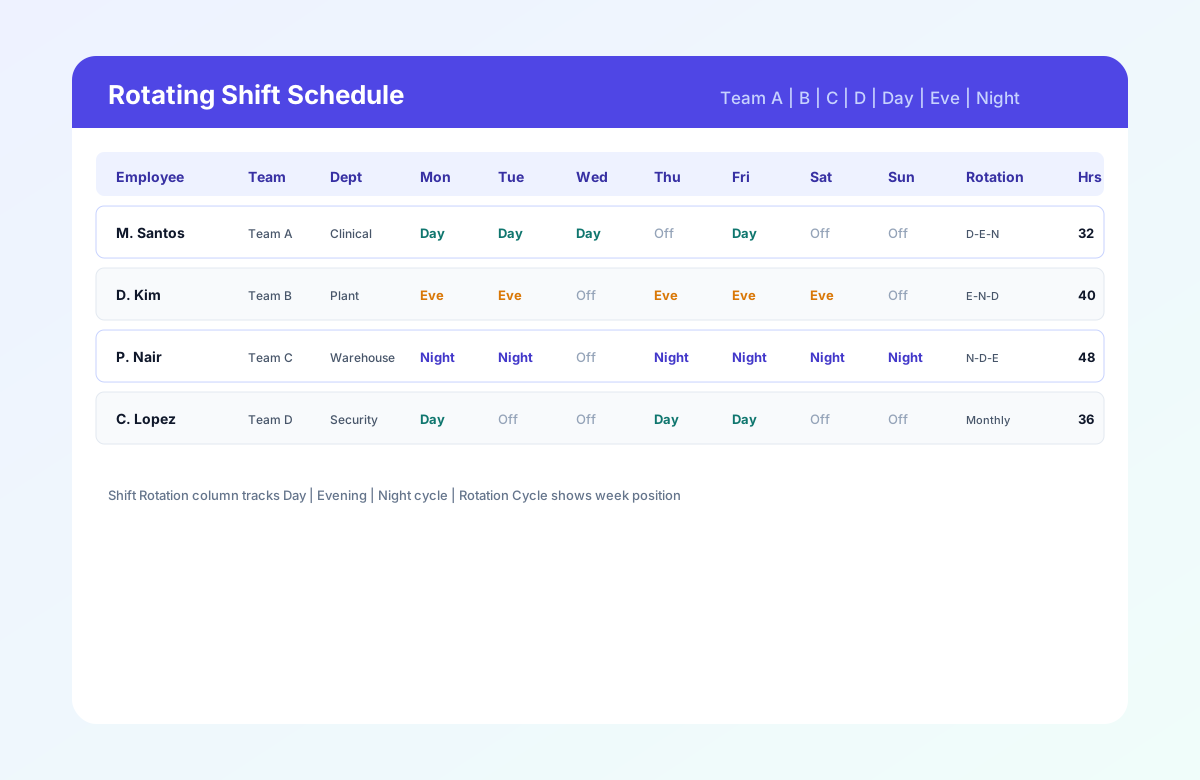
Table of contents
- Quick overview
- What is a rotating shift schedule?
- How often should employees rotate shifts?
- Types of rotating shift patterns
- Industries that use rotating shifts
- Who should use this template?
- What's included?
- Template preview
- Rotating shift schedule example
- Benefits of a rotating shift schedule
- Common rotating shift challenges
- Best practices
- Common mistakes
- How to build your first rotating shift week
- Rotating shift schedule template vs scheduling software
- Compare shift patterns
- Related templates
- Frequently asked questions
Quick overview
| Feature | Details |
|---|---|
| Best for | Healthcare, manufacturing, retail, warehousing, logistics, hospitality, security |
| Shift pattern | Rotating (day, evening, night, and cycle-based) |
| Coverage | 24/7 operations and multi-band sites |
| Formats | Excel, Google Sheets, PDF |
| Editable | Yes |
| Printable | Yes |
| Cost | Free |
Featured answer: A rotating shift schedule template gives managers a structured weekly grid for assigning employees to rotating day, evening, and night shifts while tracking rotation cycles, working hours, overtime, and notes.
This pillar guide is the parent page for shift pattern templates at Heyshift. Use it to compare rotation options, download a neutral starting grid, and jump to specialized templates for 8-hour, 10-hour, 12-hour, 2-2-3, and 4-on 4-off patterns.
What is a rotating shift schedule?
A rotating shift schedule moves employees through different work bands on a repeating cycle instead of keeping everyone on the same fixed hours every week.
Organizations rotate shifts so that:
- Night and weekend work is shared fairly across the roster
- 24/7 coverage stays continuous without over-relying on one crew
- Burnout from permanent night or weekend lines is reduced
- Employees can plan personal life around a known long-range pattern
Rotations can be slow (monthly band changes) or fast (weekly alternation between day and evening). The right speed depends on your industry, union contract, and how many teams you need to offset for coverage.
Unlike a single-pattern template such as the 8-hour shift schedule (three daily bands) or the 2-2-3 Panama schedule (fixed 2-2-3 blocks), this rotating shift schedule template is pattern-neutral: it documents whichever rotation label and cycle your operation uses today, then links you to specialized templates when you adopt a named pattern.
How often should employees rotate shifts?
There is not one universal rotation frequency.
Common approaches include:
- Weekly rotation
- Biweekly rotation
- Four-week rotation
- Monthly rotation
The appropriate cycle depends on staffing requirements, employee schedules, operating hours, and organizational policies. Choose a cycle your team can plan around, then document it in Rotation Period and Rotation Cycle so every published week stays consistent.
Types of rotating shift patterns
Rotating schedules can use different shift lengths and cycle structures. The right pattern depends on operating hours, staffing requirements, and the organization's rotation policy.
Use this table to choose a specialized template or stay on this generic rotating grid.
| Pattern | Typical shift length | Best for | Template |
|---|---|---|---|
| 8-hour (three bands) | 8 hours | Retail, manufacturing, call centers, 24/7 support | 8-hour shift schedule |
| 10-hour (4x10) | 10 hours | Compressed workweeks, public safety, plants | 10-hour shift schedule |
| 12-hour (two bands) | 12 hours | Hospitals, LTC, ED, ICU | 12-hour nurse schedule |
| 2-2-3 (Panama) | 12 hours | 24/7 clinical and plant coverage with alternating weeks | 2-2-3 shift schedule |
| 4-on 4-off | 12 hours | Security, utilities, remote sites, long off blocks | 4-On 4-Off shift schedule |
| DuPont | 12 hours | Continuous process manufacturing (coming soon) | DuPont template (planned) |
| Pitman | 12 hours | Fire, EMS, and public safety (coming soon) | Pitman template (planned) |
| Night shift (dedicated) | Varies | Permanent or semi-permanent night lines (coming soon) | Night shift template (planned) |
| Weekend shift (dedicated) | Varies | Weekend-heavy retail and hospitality (coming soon) | Weekend shift template (planned) |
| Generic rotating | Varies | Fairness across bands before you pick a named pattern | This page |
When to stay on this generic template: Use this page when you rotate between day, evening, and night on a custom cycle and have not yet standardized on Panama, 4-on 4-off, DuPont, or Pitman math.
When to switch to a named pattern template: Once your HR team and union agree on a fixed cycle, move to the matching specialized template so sample rows, column labels, and compare tables match how supervisors actually plan.
Industries that use rotating shifts
Healthcare
Hospitals, long-term care, clinics, and EMS rotate day and night lines so clinical staff share undesirable hours. Pair this template with the 12-hour nurse schedule template and hospital staff roster template.
Manufacturing
Plants running continuous lines use rotations to cover mornings, afternoons, and nights without permanent night teams. See manufacturing shift scheduling software.
Warehousing and logistics
Distribution and fulfillment centers staff receiving, pick-pack, and outbound lanes across three bands. See warehouse scheduling software.
Retail and supermarkets
Extended-hour stores rotate front-end, stock, and closing crews across opening, mid, and closing bands.
Hospitality
Hotels and resorts rotate front desk, housekeeping, and F&B across 24-hour operations. See hospitality scheduling software.
Security and public safety
Security firms and critical infrastructure sites use long-cycle rotations including 4-on 4-off and Panama variants.
Utilities and energy
Power, water, and oil and gas operations require uninterrupted coverage with documented rotation cycles for compliance.
Who should use this template?
This template fits operators who:
- Run two or more shift bands per day (day, evening, night, or custom labels)
- Need fair rotation across undesirable hours
- Operate 24/7 or extended hours at one or more sites
- Still plan in Excel or Google Sheets but want structured columns for rotation tracking
- Want a hub page to compare specialized patterns before adopting one
If you only run a single fixed day shift with no rotation, start with the employee schedule template instead.
What's included?
| Column | Purpose |
|---|---|
| Employee Name | Who is assigned |
| Team | Rotation group (Team A, B, C, D) |
| Department | Unit, zone, or function |
| Shift Rotation | Pattern label (Day -> Evening -> Night, 2-2-3, monthly, etc.) |
| Monday through Sunday Shift Start / End / Break | Daily times or Off |
| Weekly Hours | Planned hours for payroll review |
| Overtime Hours | OT flagged before publish |
| Day/Night Indicator | Current band for the week |
| Rotation Cycle | Position in the cycle (Week 2 of 4, etc.) |
| Supervisor | Who owns the row |
| Notes | Training, certification, or coverage comments |
| Leave Status | PTO or leave flags |
Header fields: Week Of, Facility / Site, Schedule Manager, Rotation Period.
Download formats:
| Format | File |
|---|---|
| Excel | .xlsx |
| CSV for Google Sheets | .csv (import with File > Import) |
| Printable roster |
Template preview
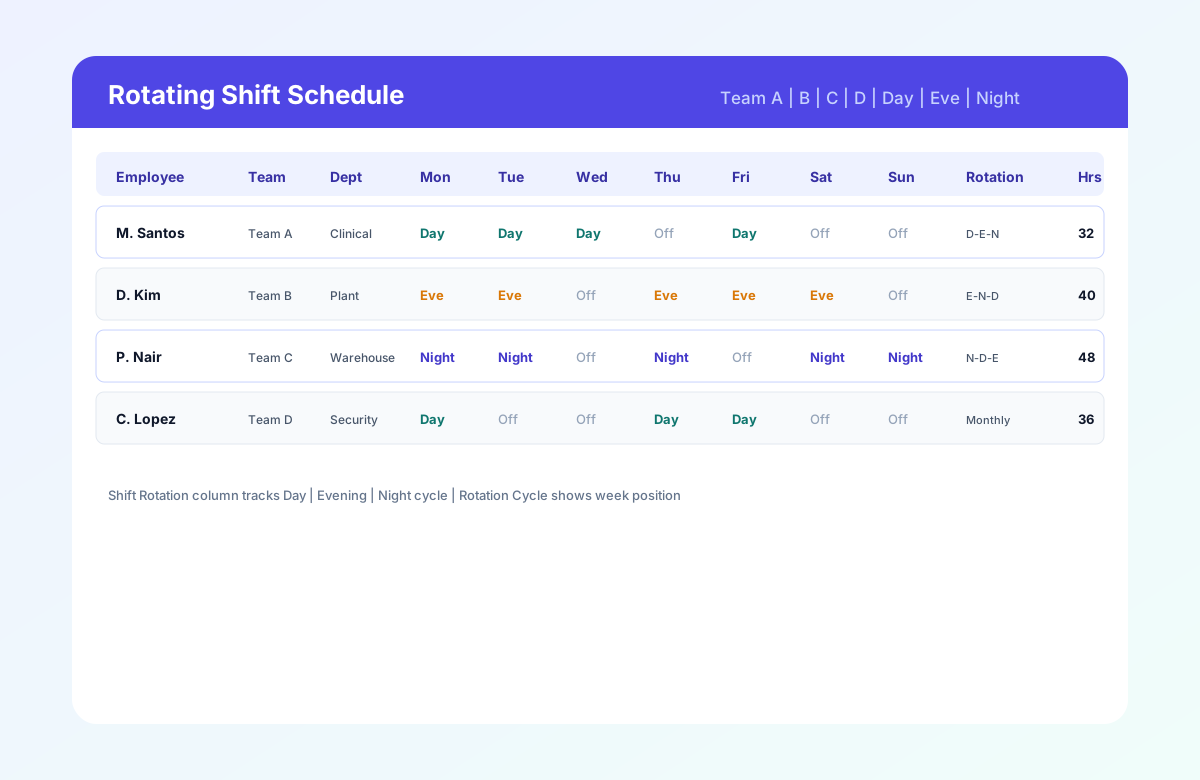
The preview shows four teams with different rotation labels, day/evening/night bands across the week, and rotation cycle position. Your downloaded file includes sample rows plus blank rows for your roster.
Rotating shift schedule example
| Team | Week 1 | Week 2 | Week 3 | Week 4 |
|---|---|---|---|---|
| Team A | Day | Evening | Night | Off |
| Team B | Evening | Night | Off | Day |
| Team C | Night | Off | Day | Evening |
| Team D | Off | Day | Evening | Night |
This is an example of a four-team rotation. Actual rotation patterns vary by organization, staffing requirements, operating hours, and applicable workplace policies.
How to build your first rotating shift week
Follow these five steps to publish a balanced week with fair rotation across day, evening, and night bands.
Set the week and rotation period
Fill Week Of, Facility / Site, Schedule Manager, and Rotation Period in the header. Match dates to your payroll week and document whether you are on week 1, 2, 3, or 4 of the cycle.
Assign teams and departments
Add Employee Name, Team, Department, and Shift Rotation label (for example Day -> Evening -> Night). Group rows by team so you can spot coverage gaps.
Staff managementEnter daily shift times
For each day, enter Shift Start, Shift End, and Break, or mark Off for rest days. Use Day/Night Indicator for the current band.
Review hours and overtime
Check Weekly Hours and Overtime Hours before publish. Confirm each band has minimum staffing every day you operate 24/7.
Overtime risk calculatorPublish and communicate
Export PDF for the floor, share a read-only Google Sheet, or email Excel to supervisors. Publish at least two weeks ahead when possible so staff can plan around the next rotation.
Mobile schedule access
Benefits of a rotating shift schedule
Fair shift distribution
Rotations spread night and weekend work across the team instead of leaving the same employees on permanent undesirable bands.
Reduced burnout
Predictable cycle blocks give staff recovery time and visibility into when their next night or weekend assignment arrives.
Predictable schedules
Employees memorize rotation cycles (2-week, 4-week, or monthly), which reduces daily schedule surprises compared with ad hoc weekly rebuilds.
Better 24/7 coverage
Offset teams cover day, evening, and night bands continuously without relying on one fixed crew per band.
Improved workforce planning
Rotation Cycle and Shift Rotation columns document where each employee sits in the pattern for HR and supervisor review.
Related resources
More templates, guides, and tools for building and running your schedule.
- Template8-hour shift schedule template
- Template10-hour shift schedule template
- Template12-hour nurse schedule template
- Template2-2-3 shift schedule template (Panama)
- Template4-On 4-Off shift schedule template
- TemplateEmployee schedule template
- TemplateHealthcare employee schedule template
- TemplateNursing home staff schedule template
- ResourceEmployee scheduling software
- ResourceHealthcare scheduling software
- ResourceWarehouse scheduling software
- ResourceManufacturing scheduling software
- FeatureShift scheduling
- ResourceOvertime risk calculator
- ResourceStart 30-Day Free Trial