Table of contents
Quick overview
|
|
| Best for |
Nursing homes and assisted living |
| Schedule type |
Weekly and monthly |
| Formats |
Excel, Google Sheets, PDF |
| Editable |
Yes |
| Printable |
Yes |
| Free download |
Yes |
| Shift types |
Day, evening, night, 12-hour |
| Multiple roles |
Clinical, care, and support |
Featured answer: A free nursing home staff schedule template gives directors of nursing and schedulers a ready-made weekly grid for RNs, LPNs, CNAs, caregivers, medication aides, dietary, housekeeping, and support staff with unit/wing assignments, shift times, breaks, hours, overtime, supervisor notes, and leave status in Excel, Google Sheets, or PDF.
This page targets nursing home staff schedule template, nursing home schedule template, skilled nursing facility schedule, assisted living staff schedule, long-term care schedule template, SNF staff schedule, and memory care staff schedule in one resource.
For nursing-unit depth, see the nurse schedule template. For acute-care campuses, see the hospital staff roster template. For software, explore nursing home scheduling software.
What is a nursing home staff schedule template?
Long-term care facilities operate around the clock. Residents depend on continuous nursing, caregiving, dining, housekeeping, and administrative support across multiple wings and care levels. A missed shift on the overnight band or an understaffed memory care wing creates immediate resident safety and regulatory risk.
A nursing home staff schedule template provides a structured format for assigning employees to shifts across care units while helping managers track coverage, working hours, and staffing requirements tied to resident census.
Unlike a basic employee schedule, a long-term care schedule template coordinates clinical staff, direct care workers, and support services within a single planning document. Schedulers can see whether North Wing has enough CNAs on Saturday evening, whether medication aides cover every pass, and whether dietary staff align with meal service times.
Use it to schedule registered nurses, licensed practical nurses, certified nursing assistants, medication aides, caregivers, activity coordinators, housekeeping, laundry, dietary staff, maintenance, reception, and administrators.
Who should use this template?
| Setting |
Why this template helps |
| Nursing homes |
Coordinate 24/7 clinical and support coverage by wing |
| Skilled nursing facilities (SNFs) |
Plan licensed and unlicensed ratios by census band |
| Assisted living communities |
Schedule caregivers, dining, and activities on residential wings |
| Memory care facilities |
Maintain consistent assignments for dementia care units |
| Long-term care facilities |
Replace ad hoc spreadsheets with one official grid |
| Senior care centers |
Align multi-service staff across day and evening bands |
| Rehabilitation centers |
Balance therapy support with nursing coverage |
| Continuing care retirement communities (CCRCs) |
Publish schedules across independent, assisted, and skilled levels |
| Residential care facilities |
Standardize weekly planning for smaller operator teams |
Directors of nursing, schedulers, HR, and operations managers at long-term care operators are the typical buyers who start with a schedule template before evaluating scheduling software.
Staff roles included
This nursing home shift schedule supports scheduling across clinical, care, and support teams.
Clinical staff
- Registered Nurses (RN)
- Licensed Practical Nurses (LPN/LVN)
- Certified Nursing Assistants (CNA)
- Medication Aides
Care staff
- Caregivers
- Resident Care Assistants
- Activity Coordinators
Support staff
- Housekeeping
- Laundry
- Dietary Staff
- Maintenance
- Reception
- Administrators
Rename roles and care units to match your facility's org chart. Many campuses add agency staff rows with a Notes flag for temporary coverage.
Download the nursing home staff schedule template
| Format |
Best for |
| Excel (.xlsx) |
Offline editing, formulas, and local save on scheduler PCs |
| Google Sheets (CSV import) |
Shared editing with DONs, charge nurses, and wing supervisors |
| PDF |
Printing for nurse stations, wing boards, and dietary prep areas |
Use the download buttons at the top of this page. No account required.
What's included?
Each row in the spreadsheet supports:
| Column |
Purpose |
| Employee Name |
Staff member on the schedule |
| Role |
RN, LPN, CNA, Medication Aide, Caregiver, Dietary, etc. |
| Care Unit |
Skilled Nursing, Assisted Living, Memory Care, Dining Services |
| Unit / Wing |
North Wing, East Wing, Garden Wing, Main Kitchen |
| Shift Type |
Day, Evening, Night, 12 Hour, 8 Hour |
| Monday through Sunday |
Shift start, end, and break for each day |
| Weekly Hours |
Total scheduled hours for the week |
| Overtime Hours |
Hours above your threshold before publish |
| Supervisor |
Charge nurse or manager responsible for the row |
| Notes |
Agency flag, cross-training, continuity assignment |
| Leave Status |
Active, PTO, FMLA, call-off, or pending |
Header fields include Week Of, Facility / Campus, DON / Scheduler, and Resident Census so schedulers tie staffing levels to occupancy.
Template preview
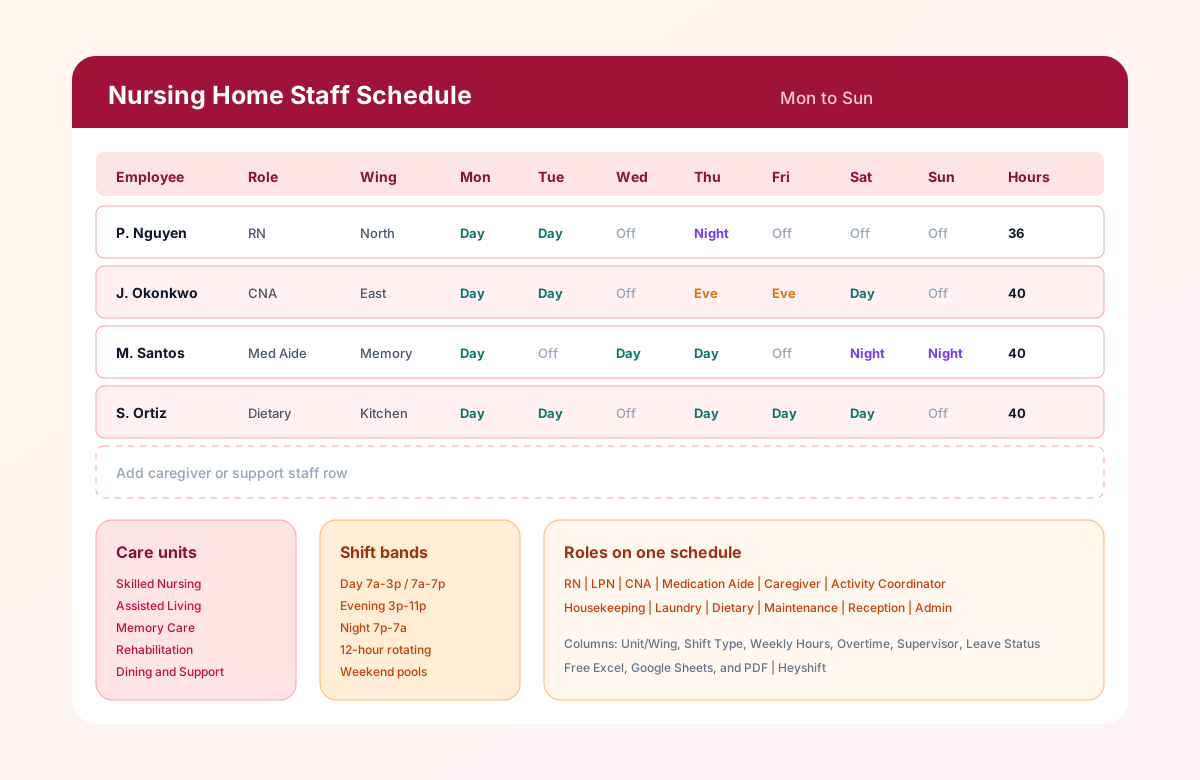
The preview image shows a weekly grid with employee names, roles, wings, day/evening/night assignments, and weekly hours. Sample rows include an RN on 12-hour rotation, a CNA on day and evening bands, a medication aide in memory care, and dietary staff aligned to meal service.
Key features
- Multi-wing layout: Group staff by skilled nursing, assisted living, memory care, and support services.
- Day, evening, and night bands: Plan 7 AM to 3 PM, 3 PM to 11 PM, and 11 PM to 7 AM coverage alongside 12-hour lines.
- Mixed role scheduling: Clinical, care, and support staff on one official grid.
- Overtime visibility: Weekly Hours and Overtime Hours columns before payroll submit.
- Leave tracking: Leave Status column for PTO, call-offs, and pending requests.
- Supervisor ownership: Charge nurse or manager named on each row for accountability.
- Print-ready PDF: Post schedules where mobile access is limited during shifts.
Common scheduling challenges
Long-term care scheduling is among the most demanding workforce planning tasks in healthcare. Schedulers juggle:
24/7 resident care
Residents need assistance, medication passes, meals, and supervision every hour. A gap on the overnight band affects falls risk, incontinence care, and emergency response time.
Staff shortages and call-offs
CNAs and LPNs are in high demand. Last-minute call-offs force supervisors to pull from weekend pools, offer overtime, or call agency staff. Without a visible grid, fill-ins create double-bookings.
Weekend and holiday coverage
Weekend shifts are often the least popular. Fair rotation across CNAs and nurses prevents burnout and reduces no-shows. Holiday pools need advance planning separate from weekday lines.
Overtime and consecutive shifts
Back-to-back 12-hour blocks or extra shifts after a full week push labor cost and fatigue risk. Review Weekly Hours and Overtime Hours before publish.
Agency staff
Temporary nurses and CNAs fill census spikes and leave gaps. Notes columns flag agency rows so charge nurses know who needs orientation to the wing.
Shift handovers
Day-to-evening and evening-to-night handovers depend on overlap and consistent assignments. Shift Type and break columns clarify who is on the floor during transition windows.
Regulatory staffing requirements
State minimums for licensed staff and CNA ratios vary by census and care level. Schedulers must align the grid with survey-ready documentation.
Resident continuity of care
Families and clinical teams prefer consistent caregiver assignments. Stable wing assignments reduce confusion for residents with dementia or complex care plans.
For operational depth, see how to create a nursing home staff schedule, assisted living staff scheduling best practices, and healthcare overtime management.
Best practices
- Publish schedules at least two weeks ahead. Staff plan childcare, second jobs, and transportation around confirmed shifts. Early publish reduces call-offs.
- Balance weekend rotations fairly. Track who worked last Saturday and Sunday. Spread unpopular shifts across the team.
- Monitor overtime and consecutive shifts. Flag staff approaching 40 hours or back-to-back 12-hour blocks before the week starts.
- Keep backup coverage available. Maintain a short list of per-diem, float, and agency staff for each wing and band.
- Maintain consistent caregiver assignments where possible. Stable wing pairings improve resident outcomes and family satisfaction in memory care.
- Cross-train staff for critical roles. CNAs who can cover medication aide gaps or dietary call-offs reduce crisis scheduling.
- Review staffing based on resident census. Update the header census field and rebalance CNAs when admissions or discharges change acuity mix.
Pair these habits with the overtime risk calculator before you lock the week.
How to build your first nursing home staff schedule