

Free Healthcare Staffing Matrix Template
Plan staffing requirements with a customizable healthcare staffing matrix. Estimate nurse coverage, patient ratios, shift requirements, and department staffing using Excel, Google Sheets, or Heyshift workforce planning tools.
Free download · No account required · CSV for Google Sheets
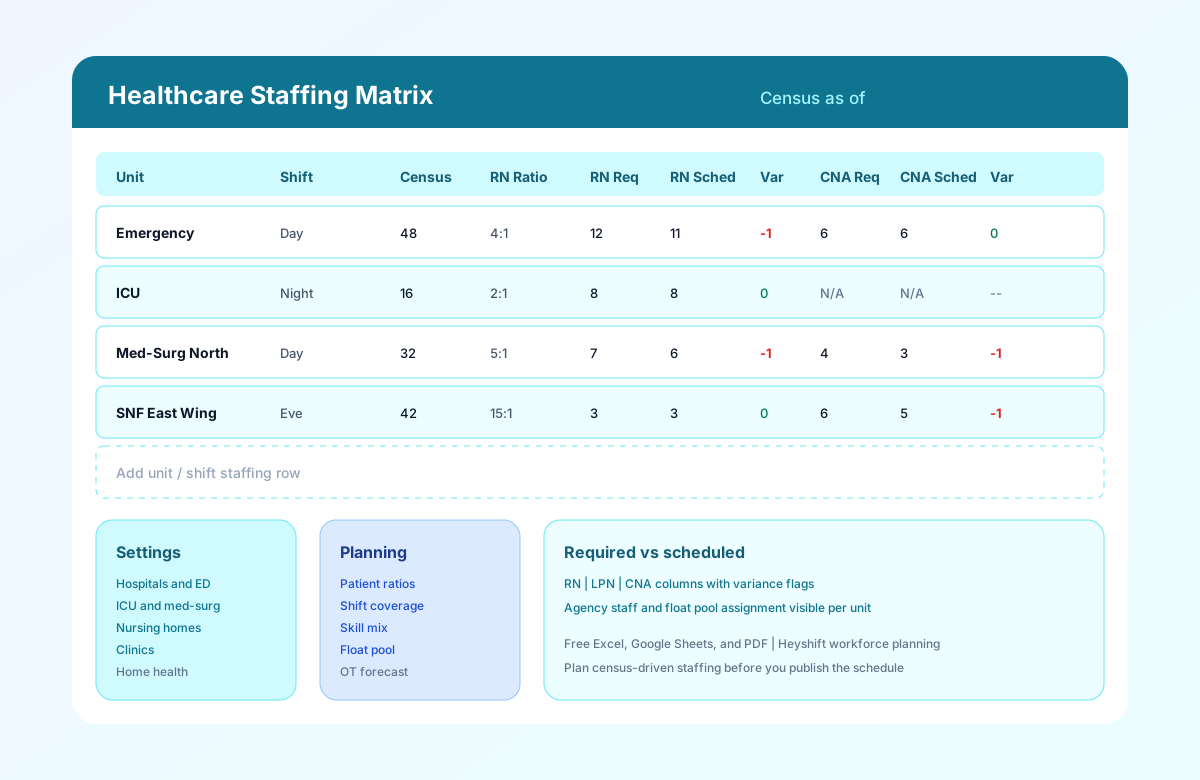
Table of contents
- Quick overview
- What is a healthcare staffing matrix?
- Why hospitals use staffing matrices
- Patient ratio planning
- Shift coverage planning
- Department coverage
- Nurse skill mix
- Float pool planning
- Overtime forecasting
- Download the template
- Template preview
- Best practices
- How to build your healthcare staffing matrix
- Benefits of a structured staffing matrix
- Spreadsheet vs Heyshift
- Why upgrade to Heyshift?
- Related templates
- Frequently asked questions
Quick overview
| Best for | Hospitals, clinics, LTC, home health |
| Template type | Staffing matrix / grid |
| Formats | Excel, Google Sheets, PDF |
| Editable | Yes |
| Printable | Yes |
| Free download | Yes |
| Tracks | Ratios, variance, float, OT |
Featured answer: A free healthcare staffing matrix template gives nurse managers and staffing coordinators a planning grid to compare required versus scheduled RNs, LPNs, and CNAs by unit and shift, using patient census, acuity, target ratios, float pool assignments, and overtime forecasts in Excel, Google Sheets, or PDF.
This page targets healthcare staffing matrix template, hospital staffing matrix, nurse staffing matrix, patient to nurse ratio template, and CNA staffing matrix in one resource.
Pair with the hospital staff roster template for publish and what is workforce planning for strategy depth.
What is a healthcare staffing matrix?
A healthcare staffing matrix is a planning document that translates patient demand into required staff levels by unit, shift, and role. It answers: given our census and acuity today, how many nurses and CNAs do we need on each band, and do we have them scheduled?
Unlike a schedule that names individual employees, a staffing matrix works at the unit level first. Staffing coordinators calculate required headcount from patient-to-staff ratios, compare against the draft roster, and flag variance before the week is published.
Hospitals use matrices for ED surge planning, ICU critical care mix, and med-surg census swings. Nursing homes use them for wing census and CNA minimums. Clinics adapt the grid for visit volume and room coverage. Home health maps caseload to RN visit capacity.
Use this template before you build the weekly roster, not after.
Why hospitals use staffing matrices
Acute-care staffing is volatile. Admissions spike on Monday evenings. ICU census drops after discharges. ED volume surges after holidays. Copying last week's schedule without recalculating requirements creates predictable gaps.
Regulatory and survey readiness
State staffing rules and internal policies often define minimum licensed staff by unit type. A matrix documents how requirements were calculated against census, supporting survey conversations and internal audits.
Safer patient coverage
Understaffed shifts increase fall risk, medication delays, and nurse burnout. Required versus scheduled variance visible on one grid lets managers fill gaps before the shift starts, not after a sentinel event review.
Labor cost control
Overstaffing wastes margin; understaffing drives overtime and agency spend. Matrices balance clinical need with scheduled hours and forecast overtime when float and agency fill variance.
Connection to scheduling workflow
The matrix is the planning layer. The nurse schedule template and hospital staff roster template are the publish layer. The healthcare attendance sheet template is the reconciliation layer.
For operational playbooks, read hospital staff scheduling best practices and healthcare overtime management.
Patient ratio planning
Patient-to-staff ratios are the core input for most healthcare staffing matrices.
How ratios work
If med-surg census is 30 patients and your target patient-to-RN ratio is 5:1, you need 6 RNs on that shift band. If CNA ratio is 10:1, you need 3 CNAs. Enter census and target ratio in the matrix; calculate required counts and round up per policy.
Acuity adjustments
Raw census understates ICU and ED need. Use the Acuity Level column (Low, Medium, High, Critical, Dementia) to document when ratios tighten beyond standard med-surg rules.
LTC and SNF differences
Skilled nursing often emphasizes CNA hours per resident day alongside RN supervisory coverage. Memory care may add medication aide requirements on the Skill Mix Notes column.
Clinic and ambulatory adaptation
Replace bed census with visit volume or rooms open. RN triage and MA room assignments still benefit from required versus scheduled comparison, even when ratios are N/A.
| Setting | Typical ratio inputs |
|---|---|
| ED | Patients per RN by acuity band |
| ICU | Patients per RN (often 1:1 or 2:1) |
| Med-surg | Patients per RN and per CNA |
| SNF / LTC | Residents per RN and per CNA |
| Clinic | Visits or rooms per RN / MA |
Shift coverage planning
Each unit row should specify the Shift Band (day, evening, night, or 12-hour blocks). Coverage requirements change by band:
- Day shifts often carry highest census after admissions and procedures.
- Evening shifts bridge dinner, meds, and handover in LTC.
- Night shifts run leaner but need minimum licensed staff for emergencies.
Build separate matrix rows for each band instead of averaging across 24 hours. Compare to the 12-hour nurse schedule template when units run 7 AM to 7 PM lines.
Weekend and holiday bands may use different ratio policies. Duplicate rows or add Notes when weekend minimums differ from weekday rules.
Department coverage
Use the Department / Unit column for each care area that schedules independently:
Acute care
- Emergency Department
- ICU and step-down
- Medical-surgical wings
- Labor and delivery
- Perioperative services
Long-term care
- Skilled nursing wings
- Memory care floors
- Assisted living neighborhoods
- Rehabilitation units
Ambulatory and community
- Outpatient clinics
- Urgent care
- Home health regions
- Hospice teams
Group rows by campus or hospital if you manage multiple sites on one matrix. The nursing home staff schedule template complements LTC wing rows after requirements are set.
Nurse skill mix
Total headcount hides skill mix problems. A shift with enough bodies but no charge nurse or no IV-certified RN fails clinically.
The matrix separates:
| Role column | Purpose |
|---|---|
| RNs Required / Scheduled / Variance | Licensed nursing coverage |
| LPNs Required / Scheduled / Variance | Practical nursing support |
| CNAs Required / Scheduled / Variance | Direct care aide coverage |
Use Skill Mix Notes for charge nurse, trauma certification, CRRT, medication pass, or bilingual needs that ratios alone do not capture.
Review mix with the employee availability form template so schedulers assign qualified staff who are actually available.
Float pool planning
Float staff cover variance when core unit rosters fall short. The Float Pool Assigned column documents how many float RNs or CNAs back each unit and shift.
Best practices for float on the matrix:
- Assign float against negative variance rows first.
- Name float home unit in Notes for accountability.
- Track float hours toward overtime forecast when they extend beyond base shift.
- Do not treat float as permanent fix for chronic understaffing on one unit.
When float is exhausted, escalate to agency staff or shift rebalance before publish.
Overtime forecasting
The Overtime Forecast (Hours) column estimates extra labor when:
- Scheduled staff are below required levels and incumbents stay late
- Float coverage requires extended shifts
- Agency staff are unavailable and internal staff absorb hours
Review forecast totals with the overtime risk calculator before locking the schedule. Chronic positive forecast on the same unit signals hiring or scheduling pattern change, not repeated overtime.
Download the healthcare staffing matrix template
| Format | Best for |
|---|---|
| Excel (.xlsx) | Formulas, variance calculations, offline coordinator work |
| Google Sheets (CSV import) | Shared planning with nurse managers and DONs |
| Leadership review, staffing committee packets, audit files |
Use the download buttons at the top of this page. No account required.
What's included
| Column | Purpose |
|---|---|
| Department / Unit | Care area being planned |
| Care Level | Acute, LTC, ambulatory, community |
| Shift Band | Day, evening, night, or 12-hour block |
| Patient Census | Beds, residents, visits, or caseload |
| Acuity Level | Clinical intensity modifier |
| Target Patient-to-RN Ratio | Policy or state minimum |
| RNs Required / Scheduled / Variance | Licensed nurse planning |
| Target Patient-to-CNA Ratio | Aide ratio where applicable |
| CNAs Required / Scheduled / Variance | Direct care aide planning |
| LPNs Required / Scheduled / Variance | Practical nurse planning |
| Float Pool Assigned | Backup staff allocated |
| Agency Staff | Temporary fill count |
| Overtime Forecast (Hours) | Expected extra hours |
| Skill Mix Notes | Charge, certification, special needs |
| Supervisor | Accountable manager |
Each Variance column calculates in Excel as Scheduled minus Required, so a negative number is a gap to fill. Required counts stay manual so you can round up from census and ratio per your policy.
Header fields include Date / Week Of, Facility / Campus, Staffing Coordinator, and Census As Of so leadership knows which census the plan is built on.
Template preview
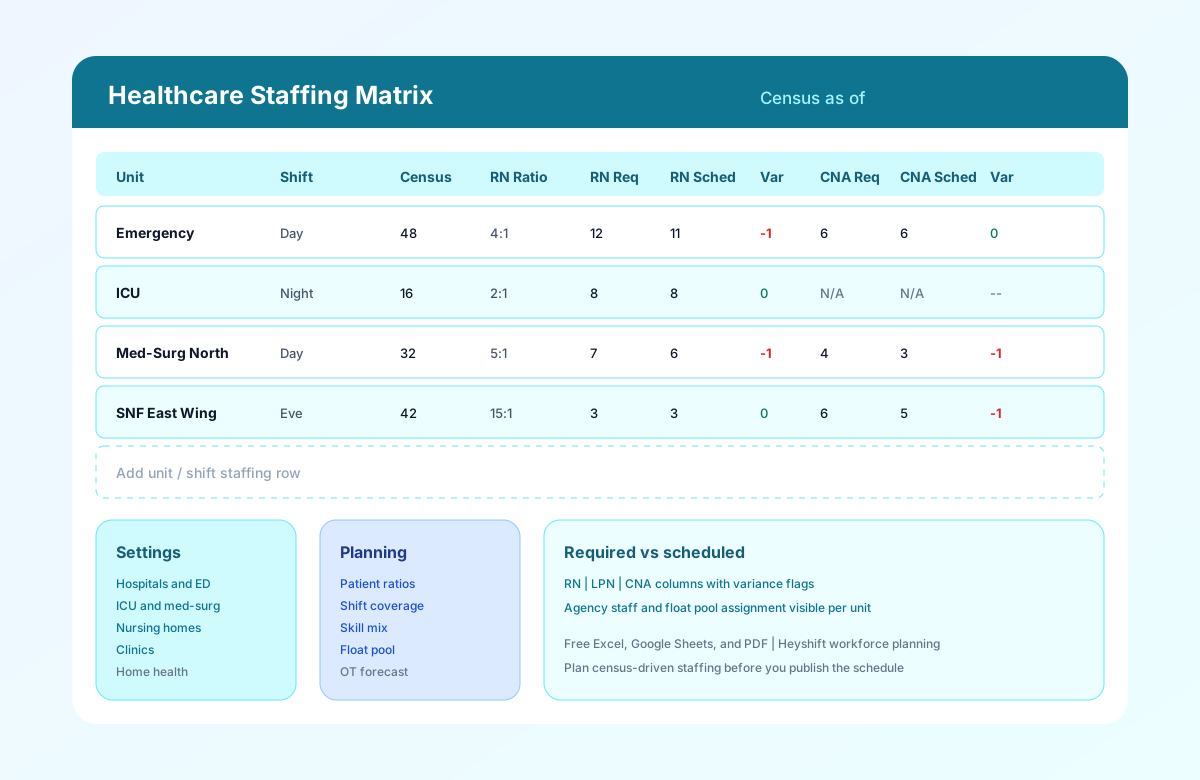
The preview image shows a staffing matrix with unit names, shift bands, census, target ratios, required versus scheduled RNs and CNAs, variance flags, and sample rows for ED, ICU, med-surg, and skilled nursing.
Best practices
- Rebuild the matrix when census changes. Daily census huddles should update required counts before schedulers finalize shifts.
- Use one official matrix per publish cycle. Parallel spreadsheets create conflicting requirements and overtime surprises.
- Calculate variance before publish. Negative variance rows need float, agency, or schedule change, not post-hoc justification.
- Document ratio source. Note whether ratios come from state minimums, union contract, or internal policy in Skill Mix Notes.
- Align with availability and leave. Cross-check the employee availability form template and approved PTO before assuming scheduled counts are achievable.
- Review skill mix, not just totals. Charge and certification requirements belong on the matrix, not in hallway conversations.
- Archive matrices with census snapshot. Store PDF copies with the published roster for survey and labor audits.
- Plan software transition when matrices multiply. Multi-site operators outgrow spreadsheets when each campus maintains its own grid. See healthcare staff scheduling software.
How to build your healthcare staffing matrix
How to build your healthcare staffing matrix
Follow these five steps to translate census and ratios into a staffing plan your schedulers can act on before publish.
Set the date and census snapshot
Fill Date / Week Of, Facility / Campus, Staffing Coordinator, and Census As Of in the header. Use the same census snapshot schedulers will build against.
Add units and shift bands
Create one row per department and shift (ED day, ICU night, SNF evening). Include Care Level and Acuity Level for ratio context.
Calculate required staff from ratios
Enter Patient Census and target patient-to-RN and patient-to-CNA ratios. Calculate RNs Required and CNAs Required based on your policy or state minimums.
Workforce planningCompare scheduled staff and variance
Enter RNs Scheduled, CNAs Scheduled, and LPNs Scheduled from the draft roster. Variance columns show gaps before publish.
Nurse schedule templatePlan float, agency, and overtime
Document Float Pool Assigned, Agency Staff, and Overtime Forecast when variance is negative. Review with supervisors before final publish.
Overtime risk calculator
Benefits of a structured staffing matrix
Census-driven planning
Tie required staff to patient census and acuity instead of copying last week's schedule without checking occupancy.
Gap visibility before publish
Required versus scheduled columns with variance flags surface understaffing while there is still time to adjust.
Skill mix clarity
Separate RN, LPN, and CNA columns document licensed mix per unit and shift, not just total headcount.
Float and agency tracking
Backup coverage visible on the same grid as core staff reduces surprise agency spend and last-minute overtime.
Buyer-ready planning format
Standardize how staffing coordinators plan before evaluating workforce planning software.
Related resources
More templates, guides, and tools for building and running your schedule.
- ResourceHealthcare staff scheduling software
- ResourceNurse scheduling software
- ResourceNursing home scheduling software
- AnswerWhat is workforce planning?
- FeatureWorkforce visibility
- FeatureShift scheduling
- TemplateHospital staff roster template
- TemplateNurse schedule template
- TemplateNursing home staff schedule template
- TemplateHealthcare attendance sheet template
- TemplateEmployee availability form template
- ArticleHospital scheduling best practices
- ArticleHealthcare overtime management
- ResourceOvertime risk calculator
- ResourceStart 30-Day Free Trial