

Free Fast Food Employee Schedule Template
Keep your fast food location fully staffed with a free, editable schedule template. Organize daily, weekly, and monthly schedules for crew members, cashiers, cooks, drive-thru staff, and shift managers. Available in Excel, Google Sheets, and PDF for fast food restaurants, QSRs, drive-thrus, and franchise locations.
Free download · No account required · CSV for Google Sheets
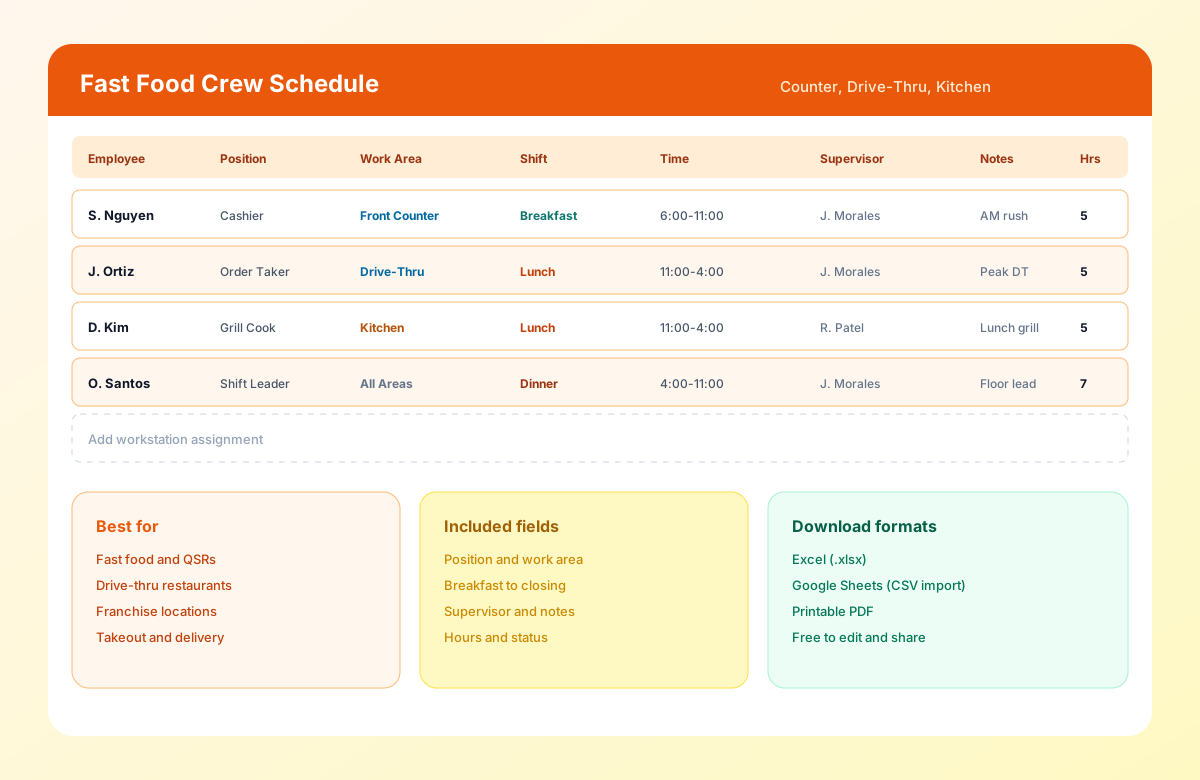
Table of contents
- Quick overview
- What is a fast food employee schedule template?
- Why fast food scheduling matters
- Who should use this template?
- Positions you can schedule
- Download the template
- What's included?
- Template preview
- How to use the template
- Daily, weekly, and monthly examples
- Common fast food scheduling challenges
- Best practices
- Benefits
- Why many QSRs still use spreadsheet schedules
- Spreadsheet vs Heyshift
- Real-world example
- Why choose Heyshift?
- Related templates
- Frequently asked questions
Quick overview
| Template type | Fast food employee schedule |
| Best for | Fast food, QSRs, drive-thrus, and franchise locations |
| Schedule options | Daily, weekly, and monthly |
| Formats | Excel, Google Sheets, PDF |
| Shift types | Breakfast, lunch, dinner, closing, and overnight |
| Editable | Yes |
| Printable | Yes |
| Free download | Yes |
Featured answer: A free fast food employee schedule template helps managers organize crew coverage for cashiers, cooks, drive-thru staff, and shift supervisors by work area, shift, and supervisor in Excel, Google Sheets, or PDF.
This page focuses on fast food and QSR scheduling inside the restaurant cluster. Start with the pillar restaurant employee schedule template. Pair with the restaurant staff schedule template, restaurant shift schedule template, kitchen staff schedule template, server schedule template, bar staff schedule template, and cafe staff schedule template.
For software and ops depth, see restaurant scheduling software and the restaurant staff scheduling guide.
What is a fast food employee schedule template?
A Fast Food Employee Schedule Template is a workforce planning tool designed specifically for organizing quick service restaurant operations. It helps managers assign crew members, cashiers, cooks, drive-thru staff, and shift supervisors to shifts based on expected customer demand, employee availability, and operating hours.
Unlike a general restaurant schedule, a fast food schedule focuses on high-volume counter and drive-thru service, rapid meal period transitions, and specialized roles within each work area.
Managers can plan staffing for breakfast, lunch, dinner, closing, and overnight operations while balancing labor costs and employee workloads.
Whether you manage a single drive-thru location or a multi-unit franchise, a structured scheduling process improves communication, reduces scheduling conflicts, and keeps QSR operations running efficiently.
Why fast food scheduling matters
Fast food restaurants experience dramatic changes in customer traffic throughout the day and week.
Breakfast rush, lunch peaks, dinner volume, weekends, holidays, and promotional events often require significantly more staff than slower afternoon periods.
Without proper scheduling, businesses may experience:
- Long drive-thru wait times
- Slow counter service
- Kitchen bottlenecks
- Employee burnout
- Increased overtime
- Lost sales
- Poor customer experience
An organized schedule helps fast food managers:
- Match staffing to transaction volume
- Improve service speed
- Reduce labor costs
- Balance workloads fairly
- Improve communication
- Reduce scheduling conflicts
- Improve employee satisfaction
- Increase operational efficiency
A consistent scheduling process helps both staff and customers enjoy a better experience.
Who should use this template?
This template is designed for businesses that schedule fast food and QSR teams.
| Setting | Why this template helps |
|---|---|
| Fast food restaurants | Coordinate crew members, cashiers, and cooks across breakfast, lunch, dinner, and closing |
| Quick service restaurants (QSRs) | Manage counter and kitchen coverage during rapid meal period transitions |
| Drive-thru locations | Schedule order takers, window staff, and kitchen support for peak drive-thru volume |
| Franchise operators | Standardize scheduling across multiple locations with consistent work area assignments |
| Counter-service chains | Organize front counter, kitchen, and dining room staffing for high-volume service |
| Late-night locations | Plan overnight shifts with adequate kitchen and counter coverage |
Positions you can schedule
| Category | Roles |
|---|---|
| Front of house | Cashiers, counter crew, dining room attendants, customer service staff |
| Drive-thru | Order takers, window staff, headset operators, drive-thru runners |
| Kitchen | Cooks, grill operators, fry cooks, prep cooks, food assembly staff |
| Management | Shift supervisor, assistant manager, general manager, crew trainer |
Download the fast food employee schedule template
| Format | Best for |
|---|---|
| Excel (.xlsx) | Advanced editing, formulas, and offline scheduling |
| Google Sheets (CSV import) | Team collaboration and cloud-based access |
| Printing schedules for employees and managers |
Use the download buttons at the top of this page. No account required.
What's included?
The Fast Food Employee Schedule Template includes the information managers need to organize shifts efficiently.
| Field | Description |
|---|---|
| Employee Name | Staff member assigned to the shift |
| Position | Cashier, Cook, Drive-Thru, Crew Member, etc. |
| Work Area | Front Counter, Drive-Thru, Kitchen, Dining Room |
| Date | Scheduled workday |
| Shift | Breakfast, Lunch, Dinner, Closing, Overnight |
| Start Time | Shift start |
| End Time | Shift finish |
| Break | Meal or rest break |
| Total Hours | Scheduled hours |
| Supervisor | Shift manager |
| Notes | Promotions, training, or special instructions |
| Status | Confirmed, Pending, or Needs coverage |
Header fields include Date / Week Of, Restaurant / Location, Shift Manager, and Service Focus so each posting has one owner.
Template preview
The downloadable Fast Food Employee Schedule Template includes a main Schedule sheet plus a How to use tab. Duplicate tabs or filter rows for daily planners, weekly views, labor hour summaries, or work area coverage checks.
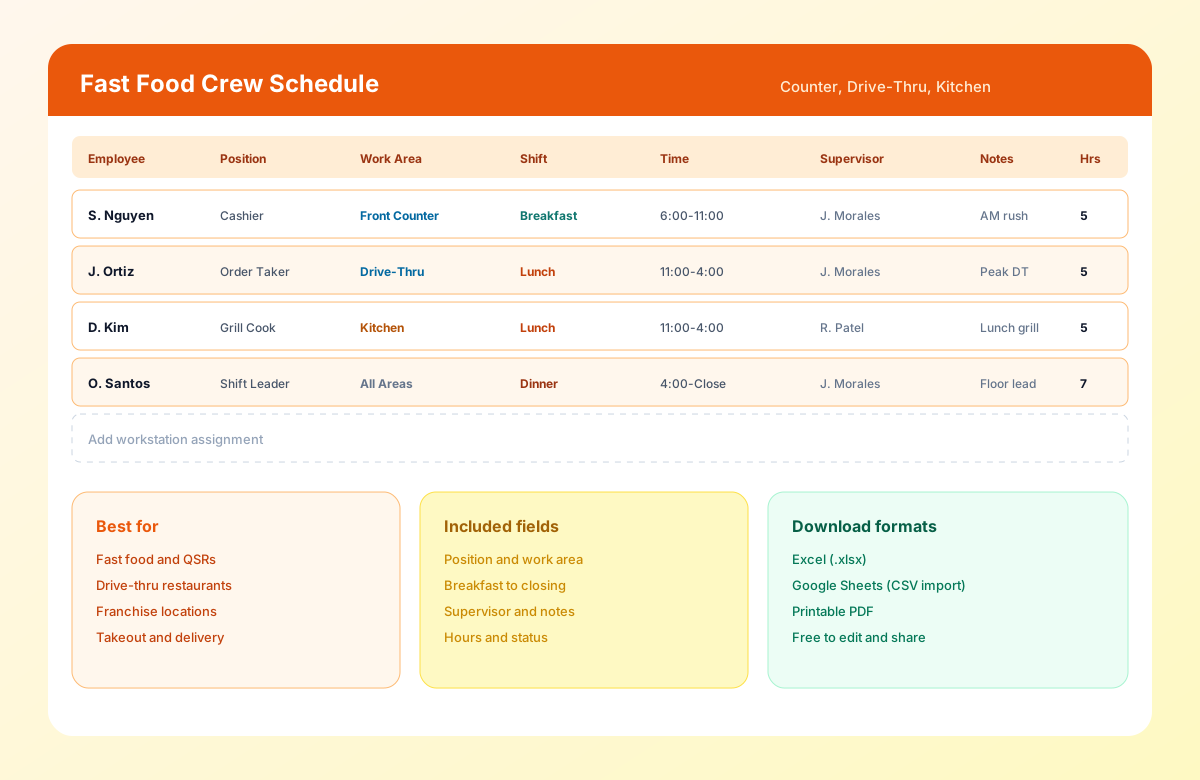
The preview shows front counter, drive-thru, kitchen, and dining room coverage with breakfast, lunch, and dinner shifts, supervisors, and hours.
How to use the fast food employee schedule template
How to use the fast food employee schedule template
An organized fast food schedule ensures every shift has the right mix of counter, drive-thru, kitchen, and dining room coverage. Follow these seven steps to plan staffing for breakfast, lunch, dinner, and closing service.
Create your fast food team roster
Add every employee with name, position, employment type, skill level, certifications, preferred hours, and maximum weekly hours.
Staff managementOrganize staff by work area
Group crew members by front counter, drive-thru, kitchen, and dining room so every workstation has balanced coverage before you publish.
Define shift types
Set breakfast, lunch, dinner, closing, and overnight windows based on your location's operating hours and meal period demand.
What is a split shift?Schedule based on customer demand
Plan for breakfast rush, lunch peaks, dinner volume, weekends, holidays, and promotions. Add cashiers, cooks, and drive-thru staff during high-demand periods.
Demand-based schedulingReview employee availability
Verify approved leave, requested days off, weekend availability, preferred shifts, max weekly hours, and school or part-time schedules.
Employee availability formReview labor hours
Review total scheduled hours, monitor overtime, balance workloads, and compare staffing with expected transaction volume.
Overtime risk calculatorPublish the schedule
Share with employees, confirm work area assignments, notify staff of schedule changes, and communicate promotions at least one week in advance.
Mobile schedule access
Benefits of using a fast food employee schedule template
Improve workstation coverage
Ensure enough crew members are scheduled at the counter, drive-thru, and kitchen during peak meal periods.
Reduce scheduling errors
Avoid overlapping shifts, understaffed workstations, and missed assignments during busy service.
Control labor costs
Schedule employees according to expected transaction volume rather than fixed staffing levels.
Improve communication
Employees know exactly when they work, which work area they are assigned to, and who they are working with.
Balance workloads
Distribute shifts fairly across crew members, cashiers, and cooks throughout the week.
Prepare for peak periods
Plan staffing for breakfast rush, lunch peaks, dinner volume, and holiday promotions in advance.
Related resources
More templates, guides, and tools for building and running your schedule.
- TemplateRestaurant employee schedule template
- TemplateRestaurant staff schedule template
- TemplateRestaurant shift schedule template
- TemplateKitchen staff schedule template
- TemplateServer schedule template
- TemplateBar staff schedule template
- TemplateCafe staff schedule template
- TemplateEmployee schedule template
- TemplateEmployee availability form template
- TemplateRotating shift schedule template
- Template8-hour shift schedule template
- Template10-hour shift schedule template
- Template2-2-3 shift schedule template
- Template4-On 4-Off shift schedule template
- ResourceRestaurant scheduling software
- FeatureShift scheduling
- FeatureEmployee availability
- FeatureAttendance tracking
- FeatureLeave management
- FeatureMobile scheduling
- FeatureLabor cost monitoring
- AnswerWhat is employee scheduling software?
- AnswerWhat is employee availability management?
- AnswerWhat is shift coverage?
- AnswerWhat is workforce planning?
- AnswerWhat is overtime management?
- AnswerWhat is multi-location scheduling?
- AnswerWhat is workforce analytics?
- AnswerWhat is a split shift?
- AnswerWhat is shift swapping?
- AnswerWhat is demand-based scheduling?
- ArticleRestaurant staff scheduling guide
- ArticleBest scheduling software for restaurants
- ResourceOvertime risk calculator
- ResourceStart 30-Day Free Trial